
You open GA4 and see that a landing page loses half its visitors before the form. The number is clear. The reason is not. That gap between what happens and why it happens is exactly where the Microsoft Clarity vs Google Analytics question comes from.
This guide is written for founders and marketing managers at growing businesses who run their own analytics without a data team. After reading it, you will know what each tool actually measures, what changed around privacy and consent in 2025, and how to combine the two so your website decisions stop being guesswork.
The short answer up front: this is not a versus battle. Clarity and GA4 answer different questions, they are both free, and they run side by side without interfering with each other. The real skill is knowing which tool to open for which question.
What Microsoft Clarity is
Microsoft Clarity is a free behavioural analytics tool that shows you how people use your website, through session recordings, heatmaps and frustration signals. Where most analytics platforms give you numbers, Clarity gives you footage.
Its main features:
- Session recordings: replays of individual visits, so you can watch someone scroll past your pricing, hesitate at a form field and leave.
- Heatmaps: visual layers that show where visitors click, how far they scroll and which areas they ignore.
- Frustration signals: automatic detection of rage clicks (repeated clicking on one element), dead clicks (clicks on things that do nothing) and quick backs (visitors who bounce straight back to the previous page).
- Clarity Copilot: a built-in AI assistant that summarises recordings and heatmaps and answers questions about your project data, so you do not have to watch every session yourself.
Clarity is free with no traffic limits, no sampling and no paid tier. Setup is a single script, via Google Tag Manager or directly, and takes minutes. There is also an official integration route for AI tools: Microsoft publishes a Clarity MCP server that lets assistants like Claude query your Clarity data.
What GA4 does best
Google Analytics 4 is an event-based analytics platform that measures what happens on your site and where those visitors came from. It tracks sessions, users, key events (conversions), revenue and full acquisition paths across web and app.
This is the tool that answers business questions. Which channel drives leads? What does a paying customer’s journey look like? Is organic traffic growing? GA4 also connects natively to Google Ads, so your campaigns can optimise on the conversions it measures, and it exports raw data to BigQuery if you ever need deeper analysis.
For attribution, GA4 offers data-driven attribution and last click. Older models such as first click or position-based no longer exist. And one setting catches many teams out: on a standard property, event-level data is kept for 2 or 14 months, and the default is the short one. Google documents this in its data retention help page. Check it before you lose a year of comparison data.
GA4’s weakness is the flip side of its strength. It counts everything and shows nothing. There are no recordings, no heatmaps and no visual context. When a number drops, GA4 raises the question but cannot answer it.
Microsoft Clarity vs Google Analytics: the real differences
The comparison in one table:
| Feature | Microsoft Clarity | Google Analytics 4 |
|---|---|---|
| Focus | Qualitative: shows how users behave | Quantitative: measures what users do |
| Data type | Visual (recordings, heatmaps, frustration signals) | Numerical (events, key events, revenue) |
| Primary use case | UX, usability and conversion friction | Marketing performance and attribution |
| Setup | One script, minutes, no sampling | Needs configuration of events and key events |
| Cost | Free, no traffic limits or paid tier | Free; GA4 360 for enterprise needs |
| Data retention | Recordings 30 days, heatmaps 9 months | Event data 2 or 14 months (standard property) |
| Consent | Consent signal required in EEA, UK and Switzerland | Consent Mode required for EEA advertisers |
In one line: Clarity shows behaviour, GA4 measures results.
Privacy and consent: what changed in 2025
Older comparisons, including an earlier version of this article, described Clarity as a tool that stores no personal data and needs little privacy attention. That framing is outdated, so let’s correct it.
Since 31 October 2025, Clarity requires a valid consent signal for visitors from the EEA, the UK and Switzerland. Without consent, Clarity places no cookies and falls back to limited, cookieless data collection, which means no session recordings for those visitors. Microsoft documents this in its consent management guide. Most consent platforms can pass the signal automatically, and there is a Consent API for custom banners.
Clarity does mask sensitive content by default. The standard Balanced mode hides numbers, email addresses and everything typed into input fields. That is sensible, but it does not replace consent, and on pages with sensitive content you should check the masking settings yourself.
Retention is also stricter than people assume: recordings are kept for 30 days, heatmap and click data for 9 months, per Microsoft’s data retention documentation. Treat Clarity as a rolling window on recent behaviour, not an archive.
One practical consequence: if your consent setup is broken, both tools quietly under-report EEA traffic. We cover that problem in depth in our guide to Google Ads tracking problems.
Why most sites should run both
A classic example. GA4 shows that many users add a product to the basket and never reach checkout. That is the what. The why could be surprise shipping costs, a broken discount field on mobile, or an out-of-stock message that appears too late.
GA4 cannot tell you which one it is. Clarity can: filter recordings on basket pages, watch ten sessions, and the pattern is usually obvious. The reverse also holds. Clarity might show hesitation on a page, but only GA4 tells you whether that page matters for revenue in the first place.
Because both tools are free and independent, there is no budget trade-off. The only cost is attention, and that is exactly why you need a routine instead of random browsing.
Coby’s What-Why Loop
At Coby we use a fixed four-step routine to combine the two tools. We call it the What-Why Loop:
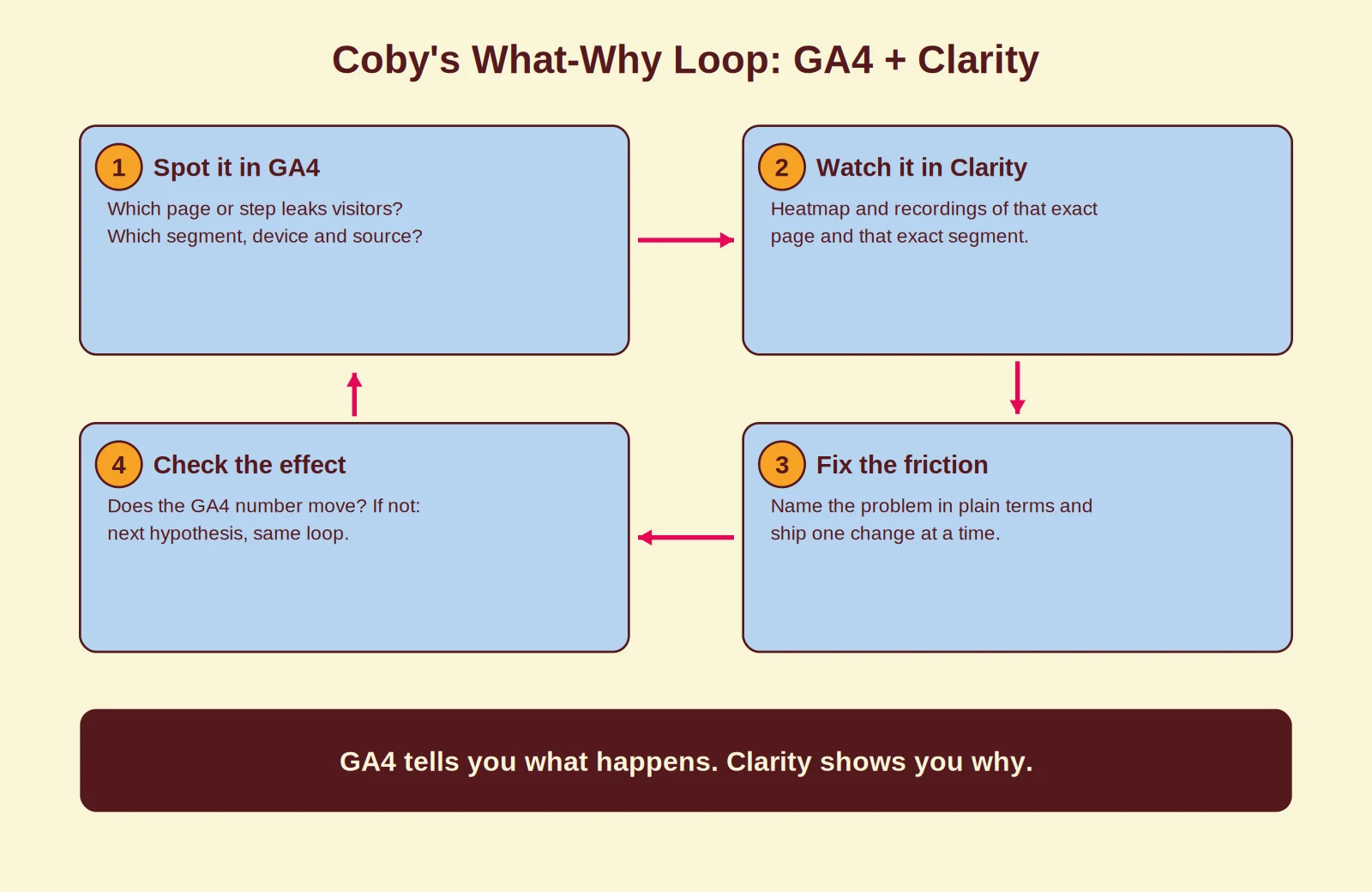
- Spot it in GA4. Find the page or funnel step that leaks visitors, and narrow it down by segment: device, source, new versus returning.
- Watch it in Clarity. Open the heatmap and filter recordings on that exact page and segment. Frustration signals like rage clicks tell you where to look first.
- Fix the friction. Name the problem in plain terms and ship one change at a time, so you know what caused any improvement.
- Check the effect. Back to GA4: does the number move? If not, next hypothesis, same loop.
Run this loop weekly and Clarity’s 30-day recording window stops being a limitation, because you are always looking at fresh behaviour. It is also the engine behind our approach to conversion rate optimisation: measurement first, then changes.
Common mistakes we see
Treating Clarity as a GA4 replacement. Clarity has no acquisition reporting, no conversion attribution and no revenue view. Drop GA4 and you lose the ability to judge your marketing spend.
Watching random recordings. Recordings without a question are entertainment, not analysis. Start from a GA4 number, then watch sessions that match that exact situation.
Trusting the what while it is broken. If GA4 events fire twice or consent breaks your data, every Clarity investigation starts from a false premise. Fix measurement first; our tracking-first approach explains the order we use.
Letting bots and consent tools pollute the data. Cookie scanners and consent crawlers show up as visitors in both tools. Here is how to exclude Cookiebot traffic in GA4.
How Coby approaches this
Clean measurement is the foundation of everything we do, which is why analytics setups like this sit at the start of every engagement, not at the end. We configure GA4 properly, add Clarity next to it, and route conversions through server-side tagging where signal loss justifies it, with consent handled correctly across the stack. That measurement layer also feeds your first-party data strategy.
The order matters. For one B2B client, fixing the measurement and then running exactly this what-why routine helped take lead volume from 2 to 3 leads per month to 4 to 5 per week. Not because of a clever campaign trick, but because every change was based on what visitors actually did.
Want to know what your current setup misses? Our data and analytics service covers exactly this, or get in touch for a quick look at your GA4 and Clarity setup.
Conclusion
Microsoft Clarity and GA4 are not competitors. GA4 measures what happens and what your marketing delivers. Clarity shows why visitors behave the way they do. Both are free, so run both, keep consent in order, and work in loops: number, footage, fix, number.
Frequently asked questions
Can I run Microsoft Clarity and GA4 at the same time?
Yes, and that is the recommended setup. GA4 measures what happens, Clarity shows why. They run independently and do not interfere with each other.
Is Microsoft Clarity really free?
Yes. Clarity is free with no traffic limits, no sampling and no paid tier. Microsoft uses aggregated data to improve its products and services.
Do I need cookie consent to use Microsoft Clarity?
In the EEA, the UK and Switzerland, yes. Since 31 October 2025 Clarity requires a valid consent signal for those visitors; without it, no cookies are set and session recordings are not available for them.
Does Microsoft Clarity slow down my website?
The script loads asynchronously and typically adds a few milliseconds. In our client setups we have not measured a meaningful Core Web Vitals impact.
Does GA4 show heatmaps like Clarity?
No. GA4 reports metrics and events, not visual behaviour. For heatmaps, scroll maps and session recordings you need Clarity or a paid tool such as Hotjar.
Can Microsoft Clarity replace Google Analytics?
No. Clarity has no acquisition, conversion or revenue reporting and keeps recordings for only 30 days. Use Clarity for the why and GA4 for the what.
Written by Marloes Slotboom, founder of Coby Agency. Last updated: September 2026.