
You pay for clicks, you see conversions in Google Ads, and yet nothing matches what your backend says. If you run an SME, or you are the marketing manager doing everything yourself, you do not have time to referee an argument between three dashboards. Somewhere your data is leaking, and everyone keeps telling you server-side tagging is the fix.
They are partly right. Server-side tagging (often called server-side tracking) moves your measurement logic out of your visitor’s browser and onto a server you control. That solves some real problems. It also very much does not solve others, which vendors rarely mention.
In this guide you will learn what server-side tagging is, what it concretely does to your data, and when it is worth the investment. If you want a tool comparison, read our overview of server-side tracking tools. If you want to build it today, follow our GTM and TAGGRS setup guide. This post covers the what, the why and the when, so you can decide whether to act now or park it for later.
What is server-side tagging?
Server-side tagging is a measurement method where your website events go to a server you control first, and that server forwards them to platforms like Google Ads, GA4 and Meta. Your visitor’s browser no longer talks to ten ad platforms directly; it only talks to your own subdomain.
Think of it as sending post. With client-side tracking, every visitor has to post ten separate cards to ten different companies, and some never arrive. With server-side tagging, the visitor hands one envelope to your front desk, and you handle the delivery.
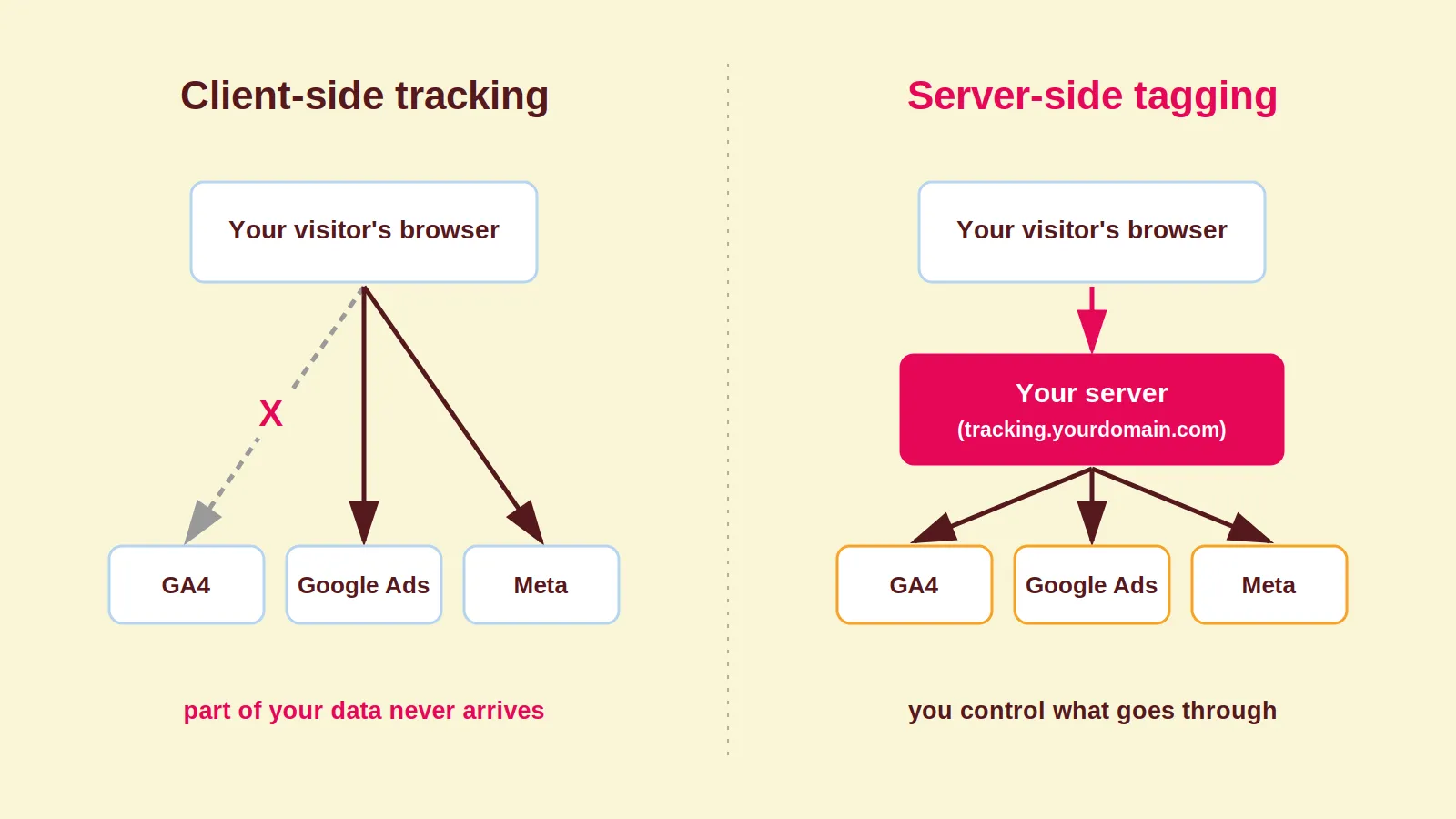
In practice this usually means a server-side Google Tag Manager container, hosted on a subdomain of your own site (such as tracking.yourdomain.com) on Google Cloud or through a managed provider. The technical detail lives in Google’s server-side tagging documentation.
Why client-side tracking leaks data
Client-side tracking leaks data because browsers, ad blockers and consent choices increasingly restrict measurement scripts. Each of the three punches its own holes in your conversion data.
Safari is the biggest culprit. Apple launched Intelligent Tracking Prevention (ITP) in 2017 and has blocked third-party cookies entirely since 2020. On top of that, Safari caps cookies set through JavaScript at a maximum of 7 days. If a customer comes back to buy after two weeks, the link to their original ad click is gone.
Ad blockers add to this by blocking the well-known measurement domains of Google and Meta. And tags simply fail to fire on slow pages or when someone leaves mid-load. The result: you steer campaigns on incomplete numbers, with no error message anywhere.
Sound familiar? We covered the symptoms in detail in our post on Google Ads tracking problems.
The missing data is not random
The real problem is not that you are missing conversions, it is which conversions you are missing. The lost data is not a random sample, so your algorithms end up optimising on a distorted picture of your customer.
People who run ad blockers tend to be technically minded. Safari and iOS users form their own segment with their own buying behaviour. Those are exactly the groups that vanish from your data most often.
Smart Bidding and Meta’s algorithms then learn from a skewed sample. They bid more on the audiences you measure well and less on the ones you miss. Your campaigns never throw an error. They just quietly perform below their potential.
What server-side tagging actually does to your data
Server-side tagging recovers part of your lost conversions, extends the lifespan of your cookies and gives you control over what each platform receives. None of these three benefits is absolute, so let’s go through them honestly.
1. Longer-lived cookies, with a footnote. Safari caps JavaScript-set cookies at 7 days. Cookies set through an HTTP response from your own server can last longer. But be precise here: if your subdomain points to a third party through a CNAME, or the response comes from a third-party IP address, Safari applies the same 7-day cap. How you set up your subdomain decides whether you actually get this benefit.
2. Harder to block, not unblockable. Browser extensions cannot see server-to-server traffic, so they cannot stop it. DNS-level blockers like Pi-hole or AdGuard DNS can still block your tracking subdomain once it lands on a filter list. Anyone claiming server-side tagging is unblockable is selling you a fairy tale.
3. Control over your data flows. You decide which fields go to which platform. You can hash or strip personal data before it reaches a third party, enrich events with CRM data and deduplicate double-counted conversions. For Meta, you send events through the Conversions API alongside the Pixel, with deduplication switched on.
4. A faster site. Fewer third-party scripts in the browser means less work on your visitor’s device. A nice bonus, not the main reason to do this.
What server-side tagging does not fix
Server-side tagging is not a way around consent, and it does not repair a broken measurement setup. If someone clicks “reject all” on your cookie banner, you are not allowed to track them server-side either. GDPR cares about what you collect, not where you process it.
Second hard truth: a broken data layer simply moves house with you. If your events are misconfigured client-side, you will now forward the same mistakes through your server. On Shopify, for example, get your data layer right with the GTM custom pixel before you touch the architecture.
The order is always: audit the measurement first, rebuild the plumbing second.
Coby’s Server-Side Decision Framework
Answer these five questions to work out whether server-side tagging is worth it for your business right now. This is the framework we use in our own audits.
- Measure your data gap. Compare 30 days of conversions in Google Ads and Meta against your backend (Shopify, your CRM or your accounts). If the gap sits consistently above 15 to 20 percent, that is a clear signal.
- Check your traffic mix. Lots of Safari and iOS traffic, and customers who return several times before converting? Then Safari’s 7-day cookie cap is already hurting your attribution.
- Check your volume. Under 10,000 sessions per month? Hold off. Clean up your client-side setup first: proper event names, a solid data layer, a tidy GA4 configuration and filtered test traffic, such as Cookiebot traffic in GA4.
- Run the numbers. Budget roughly 30 to 80 euros per month for hosting, plus a few days of implementation work. If you spend more than about 10,000 euros per month on ads, better data almost always pays for itself. Below 5,000 euros per month, the maths is far less obvious.
- Plan a parallel run. Keep the old and new setups running side by side for two to four weeks and compare conversion counts per channel. Only switch off the old tags once the numbers match.
If you get through all five, pick your tool with our tools comparison and then follow the setup guide linked above.
Common server-side tagging mistakes
Most failed migrations do not fail on technology; they fail on testing and expectation management. These are the mistakes we see most often.
- Running the container on a default Google URL instead of your own subdomain. You lose the first-party benefit, which was the entire point.
- Enabling the Conversions API without deduplication. The same purchase counts twice, your ROAS suddenly looks wonderful, and the algorithm starts overbidding on thin air.
- Switching off client-side tags too early, before the parallel run has proven the new data is correct.
- Not preparing stakeholders for the jump in numbers. After the switch, reported conversions go up because you measure more, not because your campaigns suddenly perform better. Annotate your dashboards, set new baselines and do not compare the first months against old periods at face value.
- Treating server-side as a privacy free pass. Consent is still consent, and your consent management platform stays exactly where it is.
How Coby approaches this
At Coby, every engagement starts with the measurement, not the campaigns. We compare your frontend data against your backend numbers, name exactly where the leak is, and only then decide whether server-side tagging is the right fix. Sometimes the honest answer is: not yet.
That order is deliberate. Marloes worked at Google as an Agency Account Strategist for the Benelux and Nordics and saw too many accounts optimising on half their data. That is why tracking is the foundation of every account we run, never an afterthought.
Does it work? For De Eenhoorn (OneMeeting Group) we rebuilt the measurement first and the campaigns second. The result: a 1,500 percent ROAS and lead volume growing from 2 or 3 per month to 4 or 5 per week. Not because server-side tagging is magic, but because decisions made on complete data simply turn out better. You will find more of our thinking on the Coby blog.
Conclusion
Server-side tagging makes your data more complete, your cookies longer-lived and your data flows controllable, but it is neither a miracle cure nor a consent workaround. Run through the decision framework above to see whether your business is ready. Unsure about your own setup? Book a free 30-minute call and we will look at your data together.
Would you like this set up for you? Our server-side tracking service page explains how we work and what it costs.
FAQ: server-side tagging
What is server-side tracking?
Server-side tracking (or server-side tagging) is a measurement method where website events go to a server you control first, which then forwards them to platforms like Google Ads and Meta. It reduces your dependence on the visitor’s browser and gives you control over what each platform receives.
What is the difference between server-side tagging and the Meta Conversions API?
The Conversions API is one specific server connection to Meta. Server-side Google Tag Manager is the broader infrastructure that routes events to multiple platforms at once, including through that same Conversions API. One is the plumbing, the other is one of the destinations.
Does server-side tagging bypass GDPR or my cookie banner?
No. Server-side tagging changes where data is processed, not what you are allowed to collect. If a visitor refuses consent, you cannot track them server-side either.
How much does server-side tagging cost?
Expect roughly 30 to 80 euros per month in hosting for a site with average traffic, plus a few days of one-off implementation and testing work. Managed providers bundle hosting and tooling, which helps if you have no cloud experience in-house.
Can ad blockers block server-side tagging?
Browser extensions cannot, because they never see the server-to-server traffic. DNS-level blockers like Pi-hole can block your tracking subdomain once it appears on a filter list. So server-side tagging is much harder to block, but not unblockable.
When do I not need server-side tagging yet?
If you are under 10,000 sessions per month with a simple funnel and modest ad spend, the complexity usually outweighs the gain. Clean up your client-side measurement first and revisit this later.
Written by Marloes Slotboom, founder of Coby Agency. Last updated: August 2026