
 Coby Agency
If you run Google Ads or Meta Ads and you are not sure the numbers on your dashboard are real, this article is for you. Tracking-first performance marketing means one simple thing: get the measurement right before you touch a single campaign setting. Because if your conversion data is wrong, every decision built on top of it is wrong too.
I once audited a Google Ads account that had been running for three years at around 15,000 euros a month. On the surface it looked healthy. Good click-through rates, sensible cost-per-conversion. But the tracking told a different story. The same conversion was being counted more than once, firing on page load, on button click, and again through an old Universal Analytics tag nobody had removed. The account was bidding on numbers that did not reflect a single real sale.
That is not a rare edge case. It is the most common thing I find when I open a new account.
Here is what you will be able to decide after reading this:
- Whether your current tracking is reliable enough to trust for bidding
- Which tracking gaps waste the most budget in Google and Meta campaigns
- How server-side tagging differs from browser-side tracking, and when it matters
- What to check first if you suspect your conversion data is off
- When to fix tracking yourself and when to bring in a specialist
What bad tracking actually costs you
Broken tracking does not just make reports look untidy. It quietly drains budget, because automated bidding learns from whatever you feed it.
When Google Smart Bidding or Meta Advantage+ reads your conversion data, it uses that signal to decide who to show ads to and how much to bid. Clean data makes it sharper over time. Duplicate, missing, or misattributed conversions teach it to chase the wrong people at the wrong price.
Both failure directions cost money. When a duplicate tag inflates the conversion count, Target CPA bidding thinks it is winning at half the real cost, so it keeps spending while your true cost-per-acquisition sits far higher than the interface shows. When consent blocks or a flaky confirmation page hide real conversions, Smart Bidding sees weak signals, pulls spend back from audiences that were actually converting, and you lose volume you should have had.
The campaigns are rarely the problem. The measurement is. Optimising a campaign on noisy data is just moving budget around inside a broken system.
Where tracking breaks and why it is easy to miss
Most tracking problems are invisible at a glance. Analytics shows sessions. Google Ads shows conversions. Everything looks populated, so people assume it works. Populated and accurate are two different things.
These are the issues I see most often:
- Duplicate conversion tags firing on the same event, usually on a thank-you page that also loads on refresh or bookmark
- Conversion events that fire on page load instead of a real action, so a bounced visitor counts as a lead
- GA4 events that exist but are not mapped to any real business outcome, giving you data you cannot act on
- Cross-domain gaps, where a visitor moving from your main site to a checkout subdomain gets counted as a new person, breaking the attribution chain
- Cookie consent setups that block tracking for a large share of users with no server-side fallback, leaving conversions unattributed
That last one has grown into a much bigger issue since stricter consent rules came into force across Europe. If you run campaigns in any EU market on purely client-side tags, you are almost certainly working with incomplete data right now.
Server-side tagging: when it is worth the setup
Browser-side tagging sends data straight from the visitor’s browser to your analytics and ad platforms. It is simple and widely used, but it depends on the browser cooperating. Ad blockers block it. Cookie consent can block it. Safari’s Intelligent Tracking Prevention limits how long cookies survive, which distorts return-visitor attribution.
Server-side tagging routes that data through a server you control first, usually a Google Tag Manager server container. The browser sends one event to your server, and your server forwards clean data to Google, Meta, or GA4. Because that hand-off is server to server, ad blockers and browser cookie limits do not interfere with it the same way. In practice this recovers a meaningful share of conversions that client-side setups lose, which improves the signal your bidding runs on.
The exact recovery depends heavily on your audience, device mix, and geography, so there is no single figure worth quoting as a rule of thumb. What I can say is that I recommend a server-side check in three situations: you run significant Meta spend and see low Event Match Quality in Events Manager, your audience skews privacy-conscious (tech, finance, healthcare), or iOS makes up a large share of your traffic.
The setup is not trivial. It needs a server environment such as Google Cloud Run, proper routing, and someone who understands both the tagging layer and the data model. For a smaller budget with mostly Android and desktop traffic, a clean client-side setup with Consent Mode v2 is often enough to start. This is the work we describe on our tracking and data analytics service, and there is a fuller walk-through in our guide to server-side tagging.
The Consent Mode v2 gap most accounts ignore
Google made Consent Mode v2 mandatory for advertisers targeting the European Economic Area in March 2024. Plenty of accounts added the technical implementation without checking whether the modelled conversions it produces actually improve measurement.
Consent Mode v2 uses modelling to fill the gaps when users decline cookies. The quality of that modelling depends on how much consented data you have as a baseline. With low consent rates the models have very little to work from and produce noisy estimates. A cookie banner that quietly nudges people toward “reject all” starves the model, and a clearer banner that lifts consent rates directly improves the quality of the modelled data feeding Smart Bidding.
It is worth checking in GA4 under Reports, Advertising, Consent. If your consented sessions are low, that is a better place to start than campaign structure or bidding.
The attribution question underneath all of this
Even with clean conversion tracking, your attribution model changes what the data tells you. Google Ads defaults to data-driven attribution, which spreads credit across the touchpoints Google can see. That is better than last-click for most accounts, but it still only covers Google Ads clicks and organic sessions recorded in GA4, if you have linked them properly.
Say someone sees a Meta ad, searches your brand on Google three days later, and converts. Google’s model gives most of the credit to the branded search click. Your Meta campaigns look inefficient, so you cut Meta spend, brand search volume drops, and then you wonder why Google performance softened too.
The first thing I want to know in any new account is where revenue leaks across channels, because otherwise you are optimising on a partial picture. That means reading GA4 multi-channel path reports, comparing Meta’s reported conversions against GA4 assisted conversions, and checking for overlap in conversion windows. It is not a one-time job. Channel mix shifts as you scale, so a quarterly check keeps you from making budget calls on data that was never built to answer them.
Coby’s five-check tracking audit
When I take on a new account, I run five checks before I look at campaign structure. None of it takes more than a few hours on a standard account, but it changes every decision that follows.
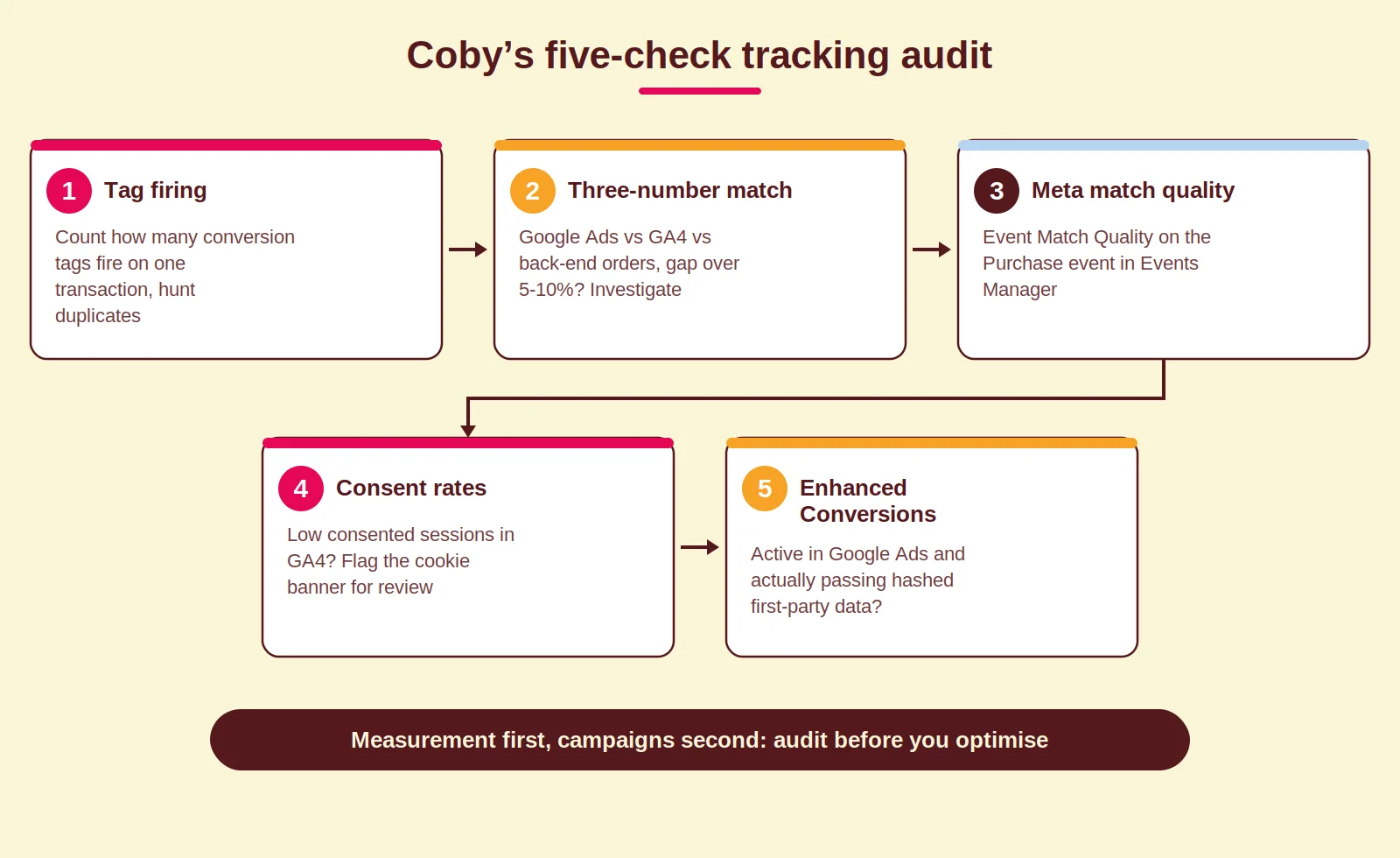
- Tag firing. Load the confirmation page with Google Tag Assistant or a server-side debugger and count how many conversion tags fire on one transaction. Look for duplicates left over from old implementations.
- Three-number match. Compare the conversion count in Google Ads, the transaction count in GA4, and the order count in the back-end system. If they diverge by more than five to ten per cent, find out why.
- Meta match quality. Check Event Match Quality for the Purchase event in Meta Events Manager. A low score usually means the pixel is missing customer fields (hashed email, phone, name) that Meta needs to match events.
- Consent rates. Read consent rates in GA4. If they are low, flag the cookie banner for a design review.
- Enhanced Conversions. Confirm Enhanced Conversions is active in Google Ads and actually passing hashed first-party data. The common failure is a tag that is present but pulling an empty email variable. Google’s Enhanced Conversions documentation lists the setup steps.
How Coby approaches this
Clean tracking is the foundation of everything we do, and it is the reason we look at measurement before campaigns, every single time. It is also what makes the rest of the stack work. The same event data that trains your bidding also powers your marketing automation: the abandoned-cart follow-ups, the segment-based email flows, the lead scoring that tells sales when a prospect is ready. If site events misfire or cross-domain tracking breaks, your automation triggers on the wrong people at the wrong time.
Performance marketing without clean tracking is guesswork, and guesswork is an expensive way to run Google Ads. Get the data layer right first, and paid media, automation, and reporting all build on something solid.
If you want to know where your tracking is losing data right now, we run tracking audits that catch the gaps most agencies never check for. Get in touch and we will tell you exactly what we find.
Frequently asked questions
What is server-side tracking and do I need it?
Server-side tracking routes your analytics and ad tags through a server you control rather than the visitor’s browser, so ad blockers and browser privacy limits interfere less. You probably need it if you run significant Meta spend, have a privacy-conscious or heavily iOS audience, or see low Event Match Quality in Meta Events Manager. For smaller budgets or desktop-heavy audiences, a well-configured browser-side setup with Consent Mode v2 is often enough.
Why does my Google Ads conversion count not match GA4?
Usually it comes down to different attribution windows, cross-device gaps, duplicate conversion actions firing more than once per transaction, or GA4 and Google Ads not being properly linked. A gap over ten per cent is worth investigating, because Smart Bidding uses the Google Ads conversion count. If that number is inflated or deflated, your bids will be off.
What is Consent Mode v2 and why does it affect ad performance?
Consent Mode v2 is Google’s framework for telling its tags whether a user has consented to tracking. When consent is declined, Google models the likely conversions. The quality of that modelling depends on how much consented data you provide as a baseline, so low consent rates feed noisier data into Smart Bidding. Clearer cookie banner design that lifts consent rates improves measurement quality directly.
How do I know if my Meta pixel is set up correctly?
Open Meta Events Manager and check the Event Match Quality score for your Purchase event. A score of seven or above is solid. Below six suggests the pixel is missing customer data such as hashed email or phone that Meta needs for matching. Also confirm you are running the browser pixel and the Conversions API together, since the pixel alone misses a share of iOS conversions.
Should I fix tracking before launching a new campaign?
Yes. Automated bidding in Google and Meta learns from your conversion data from day one. Launch with broken or duplicate tracking and the algorithm learns the wrong patterns, which take weeks to correct after you fix the data. Setting up clean tracking before launch is always faster than repairing a campaign that has been optimising on bad signals for months.
How long does a tracking audit take?
A thorough audit across GA4, Google Ads, and Meta for a typical e-commerce or lead-generation site takes a couple of days of focused work. That covers tag verification, Consent Mode, cross-domain tracking, and attribution review, with a written list of prioritised fixes. Setups with multiple domains, several ad accounts, or a CRM integration take longer.
Last updated: August 2026
Written by Marloes Slotboom, founder of Coby Agency