
If your cookie banner went live in 2023 or early 2024, there is a real chance your site still runs the first version of Google’s consent mode. That version no longer does the job. Since March 2024, Google requires consent mode v2 from every advertiser who wants remarketing, audience building and personalised ads to keep working for visitors in the European Economic Area.
The good news: with Google Tag Manager and a certified consent management platform, the upgrade is a matter of hours, not weeks. This guide walks you through the full setup, with Cookiebot as the example CMP. You will also learn the difference between the basic and advanced implementation, and the mistakes we correct most often in tracking audits.
It is written for founders and marketing managers who look after their own tracking. You do not need a developer to follow along.
What consent mode v2 is
Consent mode v2 is Google’s framework for passing a visitor’s consent choice to Google tags. Instead of firing tags blindly, your website first records what the visitor agreed to, and Google Analytics and Google Ads adjust their behaviour to match that choice.
The framework works with four consent signals:
| Parameter | What it controls | Introduced in |
|---|---|---|
ad_storage |
Whether advertising cookies may be stored | v1 |
analytics_storage |
Whether analytics cookies (GA4) may be stored | v1 |
ad_user_data |
Whether user data may be sent to Google for advertising | v2 |
ad_personalization |
Whether data may be used for remarketing and personalised ads | v2 |
The first two existed in version one. The last two are what make it v2. They were introduced ahead of the March 2024 deadline for EEA traffic, and Google documents them in its consent mode update for the EEA. If your setup only sends ad_storage and analytics_storage, you are effectively still on v1, and Google treats the two missing signals as not granted.
One thing consent mode is not: a replacement for a consent banner. Your legal duty to ask permission under the GDPR and the ePrivacy rules stands either way. Consent mode is the plumbing that carries the answer to Google.
What you lose without it
Without consent mode v2, Google Ads stops adding EEA visitors to your remarketing lists, and your audiences shrink until they are too small to serve. That is the direct, visible cost.
The quieter cost sits in measurement. Google’s ads features for European traffic depend on the v2 signals, as described in the official consent mode documentation. Miss them and you lose modelled conversions on top of the signal you already lose to browser tracking prevention and consent choices. If your campaigns have felt underreported since 2024, this is one of the first places we look, alongside the issues covered in our guide to Google Ads tracking problems.
Smart Bidding makes the stakes higher than they look. Automated bidding learns from the conversions it can see. Feed it a thinner, patchier signal than your competitors do, and it simply bids worse with the same budget.
Basic vs advanced consent mode
Consent mode v2 comes in two flavours, and the difference shows up the moment a visitor clicks “decline”.
Basic consent mode keeps Google tags blocked until consent is granted. If the visitor declines, nothing fires and nothing is sent. It is the simplest setup to build and the easiest to explain to a privacy officer, but declined visitors leave no trace at all, and conversion modelling only works in a limited, general form.
Advanced consent mode loads the Google tags before the consent dialog appears. When a visitor declines, the tags send cookieless pings: no cookies stored, no identifiers, just minimal signals. Google uses those pings for conversion modelling, and in GA4 also for behavioural modelling, so part of the declined traffic comes back as modelled data. Google explains the two implementations side by side in its consent mode behaviour documentation.
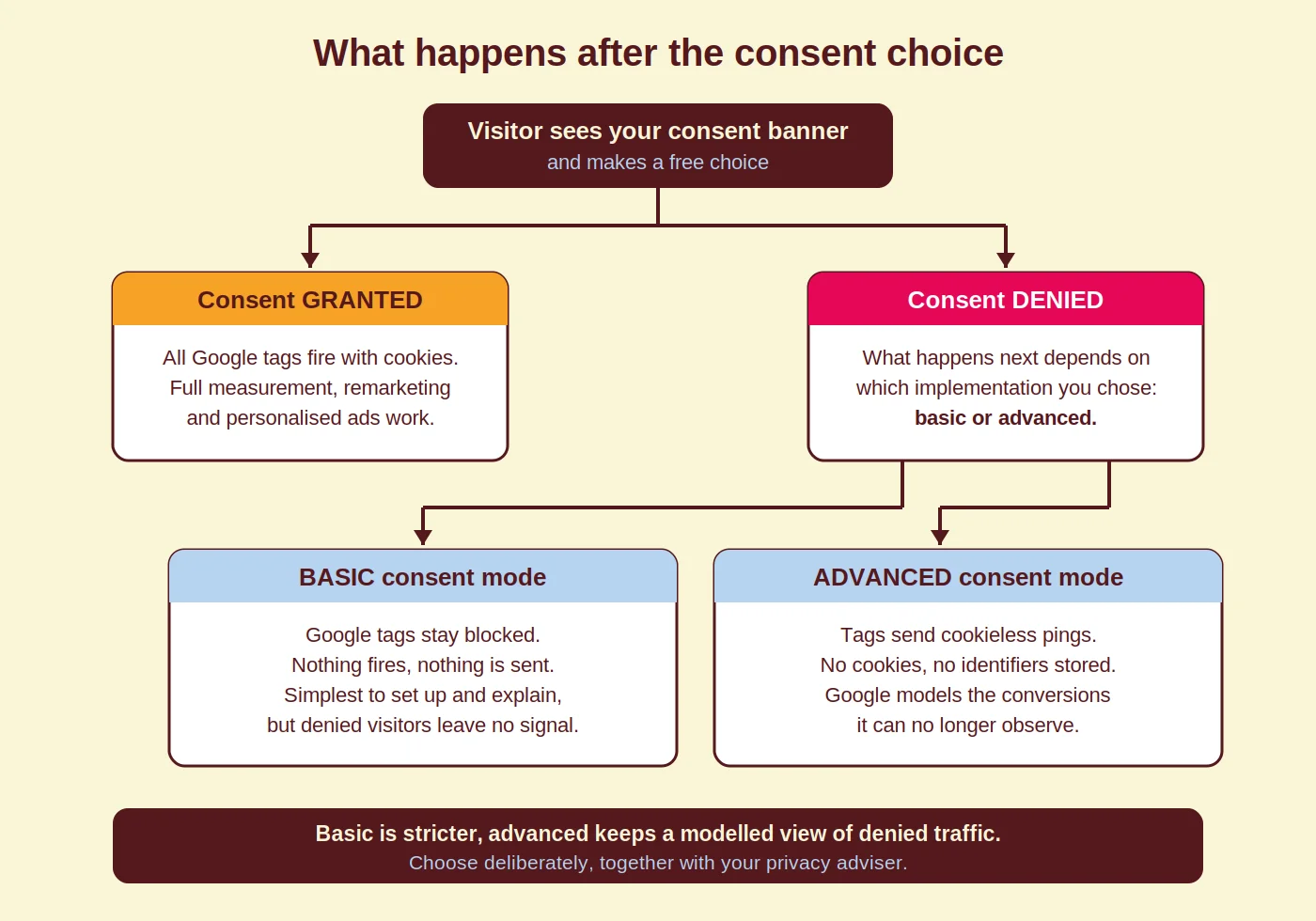
Which one should you pick? Basic is the stricter reading and a perfectly sound choice. Advanced recovers modelled conversions but loads tags before consent, which not every privacy adviser is comfortable with. Treat it as a deliberate decision made together with whoever owns privacy in your organisation, not as a default you inherit from a template.
Set up consent mode v2 in Google Tag Manager
With a certified CMP, the whole setup takes five steps. Plan an hour, including testing.
Step 1: pick a certified CMP and configure your banner
Google requires a Google-certified CMP for serving ads to EEA audiences, so start there. We use Cookiebot (by Usercentrics) in this guide because it is certified, affordable for SMEs and has a ready-made Tag Manager template. You can create an account via the Cookiebot sign-up page.
- Add your domain and let Cookiebot scan it. The scan sorts your cookies into the four consent categories: necessary, preferences, statistics and marketing.
- Style the banner under Settings and add every language your website serves, so visitors read the banner in their own language.
- Give “accept” and “decline” equal weight. A banner that only offers a highlighted accept button invites complaints and does not produce valid consent.
Step 2: add the Cookiebot CMP template in GTM
- Log in to Google Tag Manager and go to Tags > New.
- Choose Community Template Gallery and search for Cookiebot CMP.
- Add the template to your workspace and paste in your Cookiebot ID from step 1.
- Tick Enable Google Consent Mode in the tag settings.
- Set the trigger to Consent Initialization – All Pages and name the tag, for example “Cookiebot CMP”.

The Consent Initialization trigger exists for exactly this purpose: it fires before every other trigger, so the consent defaults are in place before any tag can run.
Step 3: check your default consent state
The template sets all four consent signals to “denied” by default, and updates them the moment the visitor makes a choice. Review those defaults rather than assuming them. You can also set region-specific defaults, for example denied for the EEA and the UK and granted elsewhere, if that matches your legal advice.
Step 4: turn on Consent Overview and review every tag
In GTM, go to Admin > Container Settings and tick Enable consent overview. A shield icon appears in your tag list, showing which consent each tag requires and which tags have no consent configured at all. Walk through that list once: it is the fastest way to spot a stray pixel that ignores consent entirely.
Then open Preview mode. Tag Assistant shows the consent state on every event, including the “default” state and the “update” that follows the banner choice. Accept, decline and re-open the banner, and watch the four signals change.
Step 5: publish and test on the live site
Publish the container and test both paths in a clean browser session: accept everything, then in a fresh session decline everything. Check that GA4 and Google Ads tags behave as intended in each case, and give Google Ads a few days before you judge the conversion numbers, since modelling needs time to settle.
One follow-up worth doing straight away: Cookiebot’s monthly scans show up in your analytics if you let them. Our short guide on excluding Cookiebot traffic in GA4 fixes that in a few minutes.
Common mistakes we see
1. Pre-ticked categories on the banner
An earlier version of this guide suggested pre-selecting all categories to lift opt-in rates. We no longer recommend that, and neither do regulators: consent under the GDPR must be a free, active choice, and pre-ticked boxes do not qualify. Better levers for opt-in rates are banner copy, design and timing.
2. Sending v1 signals and calling it done
A setup that only passes ad_storage and analytics_storage looks alive in every test, while remarketing quietly falls apart. Check in Tag Assistant that all four signals appear, including ad_user_data and ad_personalization.
3. Stacking consent mode on top of hard blocking
Some CMP configurations block the Google scripts entirely until consent, while the container is set up for advanced consent mode. Result: the cookieless pings you chose advanced mode for never leave the browser. Pick one model and configure the CMP to match it.
4. Forgetting the tools outside Google
Consent does not stop at Google tags. Microsoft Clarity, for example, requires a consent signal for visitors in the EEA, the UK and Switzerland since 31 October 2025; without it, Clarity sets no cookies and records no sessions. We cover how that works in our comparison of Microsoft Clarity and GA4. Walk through your full tag list, not just the Google half.
5. Never testing again after launch
Theme updates, new plugins and CMP changes all break consent setups silently. Re-test after every meaningful site change, and put a quarterly check in the calendar. Five minutes in Tag Assistant beats three months of quietly missing data.
How Coby approaches this
Consent is one of the checks in Coby’s Tracking Audit, the fixed routine we run before touching any campaign. We verify that the consent defaults load first, that all four v2 signals update correctly, and that the consent rate itself is healthy, because a poorly designed banner costs you more data than any technical bug.
That order matters. Fixing the measurement first is the whole idea behind our tracking-first way of working: campaigns optimised on a broken signal just get better at being wrong. For one B2B client, repairing the measurement setup end to end, consent flow included, took them from 2 to 3 leads per month to 4 to 5 per week with the same budget.
Consent mode also pairs naturally with server-side tagging. One caveat we always give: server-side setups still respect the visitor’s consent choice. Anyone selling it as a way around the banner is selling you a compliance problem.
Want a second pair of eyes on your setup? That is exactly what our Google Tag Manager consultancy and data and analytics service are for.
Conclusion
Consent mode v2 is not optional for EEA advertisers, and the setup is genuinely doable in an afternoon: certified CMP, Cookiebot template in GTM, Consent Initialization trigger, then test both consent paths. The decision that deserves real thought is basic versus advanced, and that one belongs with your privacy adviser as much as with your marketer.
Not sure whether your current setup sends the right signals? Get in touch and we will check it as part of a tracking audit.
Frequently asked questions
Is consent mode v2 mandatory?
For advertisers targeting the European Economic Area, yes in practice: since March 2024, Google requires the v2 consent signals for remarketing, audience building and personalised ads on EEA traffic. Without them, those features stop working for European visitors.
What is the difference between consent mode v1 and v2?
Version 2 adds two consent signals, ad_user_data and ad_personalization, on top of ad_storage and analytics_storage. They tell Google whether user data may be sent for advertising and whether it may be used for personalisation.
What is the difference between basic and advanced consent mode?
In basic consent mode, Google tags stay blocked until consent is granted, so declined visitors send nothing. In advanced consent mode, tags send cookieless pings after a decline, which Google uses to model conversions you can no longer observe directly.
Do I need a certified CMP for consent mode v2?
Google requires a Google-certified CMP for serving ads to EEA audiences. Certified platforms such as Cookiebot support consent mode v2 out of the box, which also makes the technical setup far simpler.
Does consent mode v2 recover all the data I lose to declines?
No. Advanced consent mode recovers part of it through modelled conversions, and basic consent mode recovers less. Consent mode narrows the gap; it does not remove it.
Does consent mode also cover tools like Microsoft Clarity?
No, Google’s consent mode only steers Google tags. Clarity has its own consent requirement for the EEA, the UK and Switzerland since 31 October 2025, so you need to pass a consent signal to it separately, usually via your CMP.
Written by Marloes Slotboom, founder of Coby Agency. Last updated: September 2026.