
You spend money on Google Ads, and Google decides where that money goes based on one signal: your conversion data. If that data is wrong, incomplete or duplicated, Smart Bidding optimises confidently in the wrong direction. No error message, no warning, just budget quietly flowing to the wrong clicks.
This guide is for SME founders and marketing managers who run their own campaigns and want to set up Google Ads conversion tracking properly before scaling spend. We say it a lot at Coby: running Google Ads without tracking is like sailing without a compass. You are moving, but you have no idea whether it is in the right direction.
The good news: conversion tracking is not dark magic. It comes down to three decisions. What counts as a conversion, how the measurement is implemented, and how you verify that the numbers are true.
Is your tracking already live and behaving strangely? Start with our guide to Google Ads tracking problems, which walks through diagnosing broken setups. This post covers the other side: building a setup that does not break in the first place.
Here is what we cover:
- What Google Ads conversion tracking actually measures, and what it should measure
- Coby’s 3-Step Conversion Tracking Framework for a clean setup
- Attribution in Google Ads today: data-driven or last click
- Consent mode, Enhanced Conversions and server-side tracking
- The mistakes we see most often, and how to avoid them
What does Google Ads conversion tracking actually measure?
Google Ads conversion tracking records what people do after clicking your ad: a purchase, a form submission, a phone call. The platform will happily track anything you point it at. It does not know which action represents money changing hands. That judgement is yours.
Accounts tend to get this wrong in two directions.
Too much: twelve conversion actions, including newsletter signups, PDF downloads and scroll depth, all set as primary. Smart Bidding weighs them equally, so campaigns optimise for whatever is cheapest and most frequent. That is rarely your actual sale.
Too little: one conversion action on a thank-you page, with no order value, no transaction ID and no currency. The algorithm gets a binary yes or no, with no sense of whether that conversion was worth €15 or €1,500.
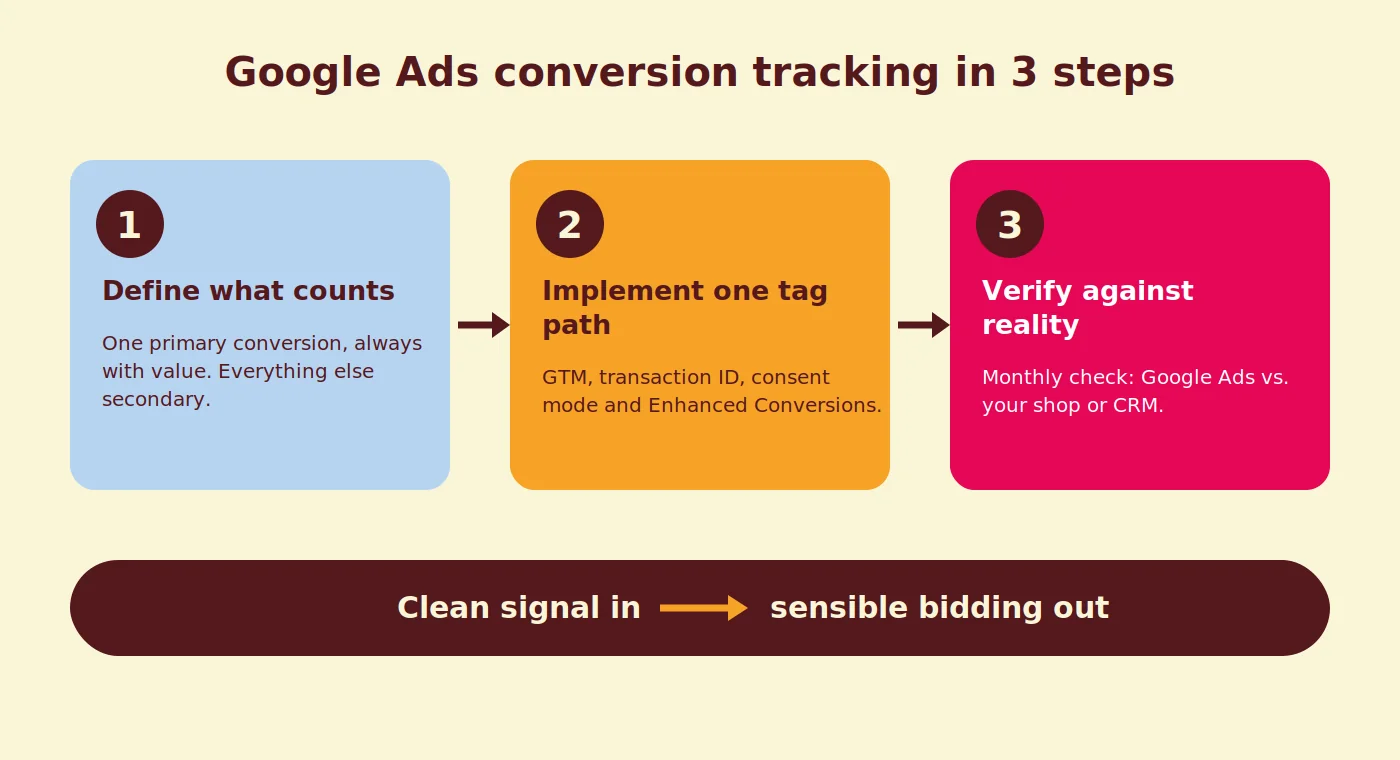
The goal is a setup where your revenue-generating action is the sole primary conversion, with values passed on every conversion, and everything else demoted to secondary. Clean signal in, sensible bidding out.
Coby’s 3-Step Conversion Tracking Framework
A reliable setup follows three steps: define, implement, verify. Skip any of the three and you end up optimising on hope. Here is how we run it for every new account.
Step 1: Define what counts
- List every action on your site that has business value: purchases, quote requests, demo bookings, calls.
- Pick the one action per campaign goal that represents real revenue. For ecommerce that is the purchase. For lead generation it is the submitted form or booked call, never the view of the form page.
- Set that action as your only primary conversion. Everything else becomes secondary: still visible in reports, ignored by bidding.
- Add values. Ecommerce passes dynamic order values. Lead generation can use fixed values per lead type, for example €50 for a brochure request and €500 for a demo booking, based on what each lead is roughly worth to you.
- Check the counting setting. Purchases count “every”, leads count “one” per click, so a nervous double submit does not become two conversions.
Step 2: Implement one clean tag path
- Choose one route for measurement and stick to it. We prefer Google Tag Manager because it keeps everything in one container you control.
- Fire the conversion tag on the real completion event, the order confirmation or the form success event, and pass a transaction ID so Google can deduplicate.
- On Shopify, use a custom pixel setup so checkout events reach GTM reliably.
- Implement consent mode alongside your cookie banner, so Google knows the consent state of every hit. Google’s consent mode developer guide covers the technical side. For the GTM setup itself, see our Consent Mode installation guide for Google Tag Manager.
- Switch on Enhanced Conversions, which sends hashed first-party data such as an email address with your conversion tag, so Google can match conversions it would otherwise miss. It is opt-in at account level and requires accepting Google’s customer data terms.
Step 3: Verify against reality
- Test with Google Tag Assistant: does the tag fire exactly once on a test conversion?
- Check the Diagnostics tab under the conversion action in Google Ads for warnings.
- Compare a full month of Google Ads conversions against your backend: Shopify, WooCommerce or your CRM. A worked example: if Google Ads reports 200 purchases and Shopify shows 160, you have a gap to explain before you let Smart Bidding learn from it. Attribution windows explain part of most gaps; duplicates and consent issues explain the rest.
- Repeat the comparison monthly, and after every site change, checkout update or GTM container publish. It takes ten minutes and catches drift early.
Attribution in Google Ads: data-driven or last click
Google Ads offers two attribution models today: data-driven attribution, which is the default, and last click. Google removed first click, linear, time decay and position-based in 2023, so any advice recommending those as a fallback is out of date.
Data-driven attribution distributes conversion credit across the ad interactions that contributed, based on your account’s own data, and it works for accounts of any size. Last click gives everything to the final click. Stay on data-driven unless you have a specific reporting reason not to.
What deserves more of your attention is the conversion window. The default click-through window is 30 days. If your customers take 90 days to decide, part of your conversions lands outside the window and never reaches the algorithm. Match the window to your sales cycle.
One caution: Google Ads and GA4 attribute differently. GA4 looks across all channels, Google Ads looks at its own ads. The numbers will not match, and that is not a bug. Comparing paid channels fairly is its own topic, which we covered in Google Ads vs Meta Ads.
Consent mode, Enhanced Conversions and server-side tracking
In European markets, a meaningful share of visitors declines cookies, and every declined visitor is a conversion your tags may never see. Exact rates depend on your market and your banner design, but under the GDPR this is daily reality, not an edge case.
Three layers reduce the damage. Do them in this order.
Consent mode tells Google the consent state of each visitor. With consent mode implemented, Google can model conversions for the visitors you cannot observe directly, so Smart Bidding is not flying blind on the declined share.
Enhanced Conversions for web sends hashed first-party data, such as the email address someone enters at checkout, alongside the conversion tag. Google matches it against signed-in users and recovers conversions that cookies alone would miss. Details in Google’s Enhanced Conversions for web documentation.
Server-side tagging moves measurement from the visitor’s browser to a server you control, which makes it far more resistant to ad blockers and browser restrictions. It is the biggest step of the three and not every account needs it on day one. We covered when it pays off in our server-side tracking tools guide and how to build it in server-side tracking with GTM and TAGGRS.
Common Google Ads conversion tracking mistakes
Most broken setups fail in one of four predictable ways. Check these before you trust a single number.
Duplicate tags. A developer hardcodes the conversion tag, a marketer later adds the same tag via GTM, and every sale counts twice. Reported ROAS roughly doubles while nothing actually improved. One tag path, one tag per action.
Tracking form views instead of submissions. If your conversion fires when the form page loads, or the thank-you page can be reached directly, you are counting window shoppers. Fire on the success event, not the page view.
Everything set as primary. Twelve primary conversions means Smart Bidding treats a newsletter signup like a €1,500 order. Primary is for revenue actions only.
Ignoring consent mode. Without it, declined visitors simply vanish, and Google cannot model what it does not know exists. If your consent banner went live without a tracking review, assume there is a problem.
Suspect one of these is live in your account right now? Our Google Ads tracking problems guide shows how to diagnose and fix each one step by step.
How Coby approaches this
At Coby, tracking is where every engagement starts, before we touch campaigns, keywords or budgets. Optimising on noisy data just gets you to the wrong place faster.
We call this the Data Foundations phase: conversion actions defined together with the client, one clean tag path in GTM, consent mode verified, values passed, and a backend comparison to prove the numbers match reality. Only then do we scale spend.
It is not a glamorous first week, but it is why results hold up. For OneMeeting (De Eenhoorn), that foundation combined with restructured campaigns supported a 1,500% ROAS. Another lead generation client went from 2 to 3 leads per month to 4 to 5 per week after we rebuilt measurement and bidding on top of it.
Marloes, Coby’s founder, previously worked at Google as an Agency Account Strategist for Benelux and the Nordics, so our setups follow how Google’s systems actually consume your data rather than folklore. You can see how we structure this work on our data and analytics service page.
Set the foundation before you scale
Define what counts, implement one clean tag path, verify against your backend. That is the whole game. Do it before you scale budget, and every optimisation afterwards stands on solid ground.
Want it done properly without spending your evenings in Tag Manager? Book a free 30-minute call and ask about our Data Foundations setup. We will tell you honestly what is worth fixing and what is fine as it is.
FAQ
Does Google Ads track conversions automatically? No. Auto-tagging adds a GCLID to your URLs so clicks can be attributed, but you still need to create a conversion action and install the tag, or import conversions from GA4. Without that, nothing is measured.
What is the difference between primary and secondary conversions in Google Ads? Primary conversions feed Smart Bidding, so the algorithm optimises towards them. Secondary conversions appear in reports but do not influence bidding. Set revenue actions as primary and soft signals like newsletter signups as secondary.
Which attribution model should I use in Google Ads? Google Ads currently offers two models: data-driven attribution, which is the default, and last click. Data-driven works for accounts of any size and is the right choice for almost everyone.
Do I need Enhanced Conversions? If a noticeable share of your visitors declines cookies or uses ad blockers, yes. Enhanced Conversions uses hashed first-party data to recover conversions that standard tags miss, which gives Smart Bidding a more complete picture.
Should I import conversions from GA4 or use the Google Ads tag? For bidding, the Google Ads tag is preferred: it reports faster and attributes more completely for ads. GA4 imports work, but conversions can arrive with delay, which affects Smart Bidding. Many accounts use the Google Ads tag for bidding and GA4 for cross-channel reporting.
How often should I check my conversion tracking? Monthly, plus after every site migration, checkout change or GTM container publish. A ten-minute comparison between Google Ads conversions and your backend orders catches most issues before they get expensive.
Written by Marloes Slotboom, founder of Coby Agency. Last updated: August 2026