
A client came to us a few months ago convinced their Google Ads campaigns had stopped working. Conversions were down 40% over three months, CPAs looked terrible, and they were ready to cut the budget. When I pulled their tracking setup, I found the real problem within about 20 minutes: iOS updates and aggressive ad blockers had quietly wiped out a huge chunk of their client-side pixel data. Their campaigns were still performing fine. The measurement was broken. Every optimisation decision they had made in those three months was based on data that was missing nearly half the picture.
That is the conversation that leads most people to server-side tracking. Here is what it actually means, which tools are worth your time, and how to know if it is the right move for your setup right now.
After reading this, you will be able to:
- Understand the practical difference between client-side and server-side tracking, without needing a developer background
- Identify which server-side tracking tools are worth considering and for what use cases
- Spot the warning signs that your current tracking is quietly losing data
- Know what a proper implementation actually involves before you commit to one
- Decide whether to tackle this now or sort other measurement gaps first
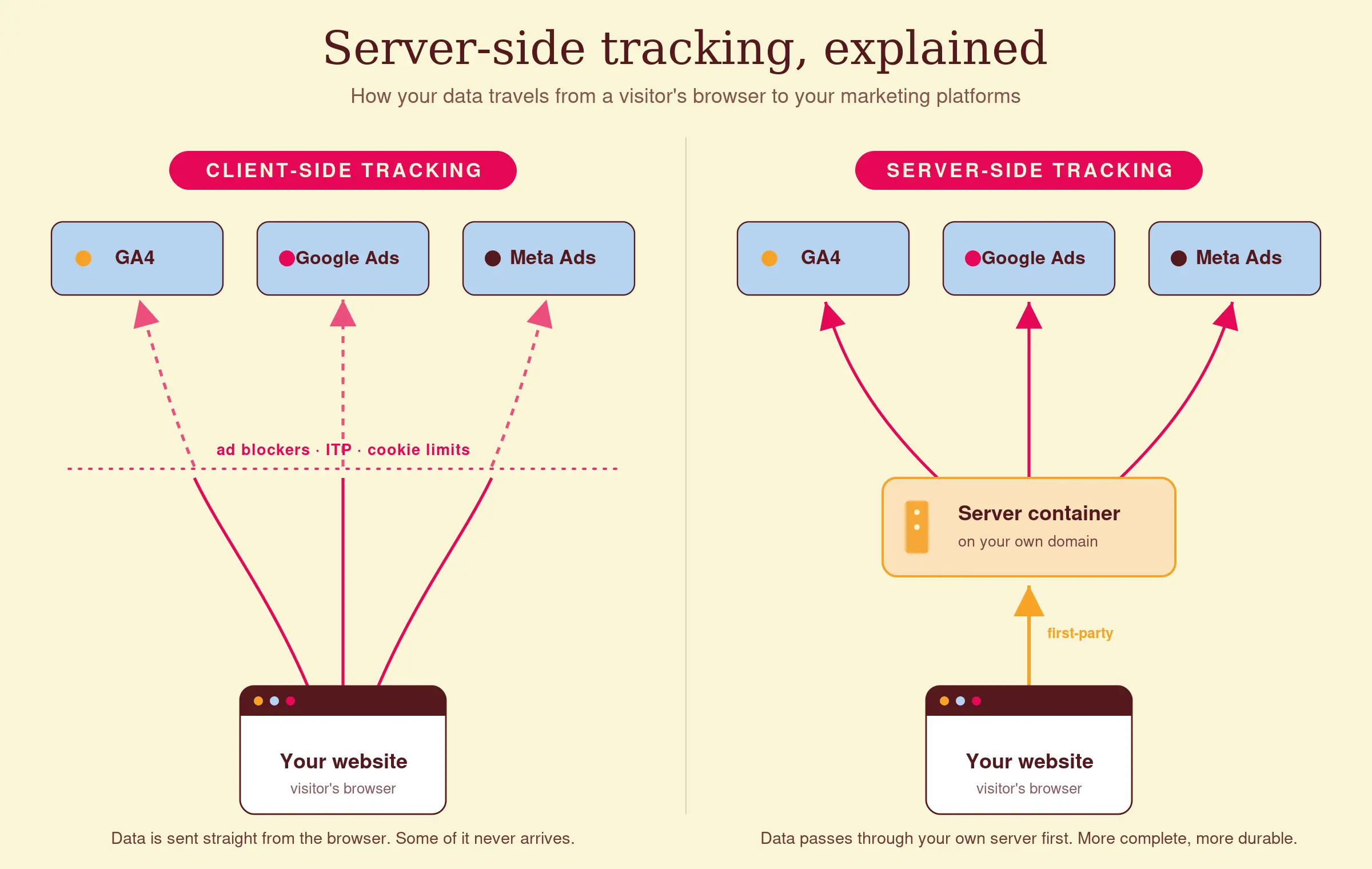
Client-side tracking and where it breaks down
Traditional tracking works like this: a visitor lands on your website, their browser loads a JavaScript tag (a pixel, a snippet, a script), and that script fires a signal back to Google Analytics, Meta, or wherever you are sending data. The whole thing happens inside the visitor’s browser.
The problem is that browsers have become increasingly hostile to this process, for reasons that are mostly legitimate. Safari’s Intelligent Tracking Prevention (ITP) limits how long cookies can persist, often to just 24 hours. Ad blockers, which Statista estimates are used by around 42% of internet users globally, block tracking scripts outright. iOS 14.5’s App Tracking Transparency changed how Meta can match app events to users. Browser privacy settings are getting stricter with every update.
The result: a meaningful slice of your conversions simply never gets recorded. Exactly how much depends on your audience, your industry, and how tech-savvy your customers are. For some B2C brands I have looked at, the gap is 15%. For others serving a more privacy-conscious or tech-adjacent audience, it is closer to 35 to 40%.
When your paid channels are optimising toward incomplete conversion data, they are learning from the wrong signal. Smart bidding on Google Ads, Meta’s Advantage+ audience targeting, all of it relies on accurate conversion events. Noisy or sparse data means the algorithms are making worse decisions, and you have no way to see that is happening.
What server-side tracking actually does differently
Server-side tracking moves the data collection off the visitor’s browser and onto your own server (or a cloud container). Instead of the browser firing directly to Google or Meta, the browser fires to your server first, and your server then sends the data on to the destination platforms.
Because the data travels server to server, ad blockers cannot intercept it. ITP’s cookie restrictions matter less because you control the cookies server-side, extending their lifespan to the limit the platform allows (up to 7 days for first-party cookies in some configurations, more in others depending on implementation). The tracking is also faster, since you are not loading multiple third-party scripts in the browser.
What it does not do is make you immune to privacy regulations. GDPR and consent requirements still apply. Server-side tracking does not mean you can track users who have not consented. It means that for users who have consented, you get a much more complete picture of their behaviour. That distinction matters, and any agency or vendor telling you otherwise is selling something.
The tools that are actually worth looking at
The most widely used implementation right now is server-side Google Tag Manager (sGTM). Google Tag Manager already manages tags for most marketing teams. The server-side version lets you run a tagging server, typically hosted on Google Cloud, and route events through it before they go to GA4, Google Ads, or Meta via the Conversions API. It is not a plug-and-play setup, but it is well-documented, and it is free beyond the hosting costs (which run roughly $50 to $150 per month on Google Cloud, depending on traffic volume).
Meta’s Conversions API (CAPI) is worth a separate mention because it is now essentially required for anyone spending seriously on Meta. CAPI sends web events directly from your server to Meta, bypassing the browser entirely. Combined with the Meta pixel (running both in parallel is the recommended approach, with deduplication configured), it fills the gap that iOS 14.5 created. Meta’s own data suggests CAPI integration can recover a significant share of events that the pixel alone misses, though the exact figure depends heavily on your implementation quality.
Stape and TAGGRS are third-party hosting and management platforms built around server-side GTM. If you want the benefits of sGTM but do not want to manage Google Cloud infrastructure yourself, these platforms handle the hosting for a monthly fee and add a layer of templates and tooling on top. It is a practical middle ground for teams without dedicated DevOps resource.
Segment (now part of Twilio) is a customer data platform with server-side capabilities built in. It sits at a different level of complexity and cost, and it is generally a better fit once you are routing data to multiple destinations and want a unified customer profile rather than just better tracking for paid channels.
For most e-commerce brands and lead-gen businesses in the mid-market, sGTM plus CAPI is the combination I would start with. It covers the two highest-impact gaps (Google and Meta) without requiring a full CDP investment.
You can read more about how we approach tracking and data analytics at Coby Agency, including the specific setup decisions that change depending on your tech stack.
| Tool | What it is | Rough cost | Best for |
|---|---|---|---|
| Server-side GTM (sGTM) | Routes your existing tags through your own server before they reach GA4, Google Ads and Meta | ~€50–150/mo cloud hosting | The default starting point for most Google + Meta setups |
| Meta Conversions API (CAPI) | Sends web events server-to-server to Meta, run in parallel with the pixel and deduplicated | Free, plus dev time | Anyone spending seriously on Meta after iOS 14.5 |
| Stape / TAGGRS | Managed hosting and tooling built around sGTM, so you skip the Google Cloud setup | ~€20–50/mo | Teams without DevOps who still want sGTM |
| Segment (Twilio) | A customer data platform with identity resolution and routing to many destinations | Higher / enterprise | Routing data across many tools with a unified customer profile |
Signs your current tracking setup is already losing data
You do not always need a full audit to spot the warning signs. A few things to check:
- Your GA4 session counts and your Meta Ads Manager reported conversions diverge significantly. Some discrepancy is normal; a consistent 30%+ gap is not.
- Your Meta pixel event match quality score is below 6.0 in Events Manager. This score reflects how well Meta can match your events to user profiles, and a low score means your campaigns are flying half-blind.
- Your Google Ads conversion data shows a high proportion of modelled conversions. Google flags these in the UI. Modelled means estimated, which means real data is missing.
- You see a significant drop in reported conversions after iOS updates or after major browser privacy changes rolled out.
If several of these apply, you are likely making budget and bidding decisions based on a materially incomplete dataset. That is worth fixing before running more spend through the same setup.
What a proper implementation involves
I want to be upfront about something here: server-side tracking is not a one-afternoon job. A proper sGTM setup involves provisioning a server, configuring the tagging container, mapping your existing tags to server-side equivalents, setting up first-party cookies with the correct domain attribution, and running deduplication logic so you are not double-counting events that fire from both client and server. CAPI integration requires access to your website’s backend or a middleware layer, plus hashed customer data (email, phone number) to improve match rates.
Done correctly, it is a meaningful improvement to your measurement. Done incorrectly, you end up with duplicated data, broken attribution, or consent violations. I have seen all three in accounts we have taken over from other agencies.
The first question I would answer before committing to an implementation is where your biggest measurement gaps actually are right now. Sometimes the issue is server-side tracking. Sometimes it is a broken GA4 configuration, or purchase events firing twice, or consent mode not set up properly. Fixing the wrong thing first is expensive and slow.
If you are running paid search campaigns and want to understand the tracking side of that, our Google Ads service always starts with a tracking review before we touch campaign structure. Same for Meta Ads. The campaigns follow the data, not the other way around.
New to the topic? Start with server-side tagging explained, or follow the hands-on setup guide with GTM and TAGGRS.
For broader context on how server-side tagging is evolving, Google’s official server-side GTM documentation is the most reliable reference, and the IAB’s privacy and data guidance is worth reading alongside it if consent compliance is a concern.
At Coby, we run tracking audits that identify exactly where data is leaking before any implementation work starts. If you want to know what your current setup is actually missing, get in touch and we will take a look.
Frequently asked questions
Is server-side tracking legal under GDPR?
Yes, but it does not change your consent obligations. You still need a valid legal basis to process user data, and for tracking purposes that typically means consent. Server-side tracking improves data completeness for consenting users; it does not allow you to track users who have opted out. Make sure your consent management platform (CMP) is properly integrated with your server-side setup.
How much does server-side GTM cost to set up and run?
Hosting on Google Cloud runs roughly $50 to $150 per month for most mid-traffic sites, though high-traffic e-commerce stores can go higher. Implementation costs depend on your current stack and how complex your tagging is. A clean, well-scoped implementation typically takes 20 to 40 hours of technical work. Platforms like Stape offer managed hosting from around $20 to $50 per month and reduce the infrastructure management overhead.
Do I need server-side tracking if I am already using the Meta pixel?
The pixel alone is no longer enough for reliable Meta measurement, particularly after iOS 14.5. Meta recommends running both the pixel and CAPI in parallel, with deduplication configured so events are not counted twice. Without CAPI, you are likely missing a material share of your conversion events, which directly affects how Meta’s algorithm optimises your campaigns.
What is the difference between server-side GTM and a customer data platform like Segment?
Server-side GTM is primarily a tag management solution: it routes your existing marketing tags through a server instead of the browser. Segment is a customer data platform that unifies event data across your entire stack and routes it to multiple destinations, with more sophistication around identity resolution and customer profiles. For most businesses focused on improving paid channel measurement, sGTM is the right starting point. Segment makes more sense once you are managing data flows across many tools and need a unified customer record.
Will server-side tracking fix my attribution problems?
It will improve data completeness, which is a prerequisite for better attribution. But server-side tracking alone does not solve multi-touch attribution or last-click vs. data-driven model questions. Those are separate decisions about how you credit channels, not just whether the data arrives in the first place. Get the data collection right first, then work on the attribution model.
How do I know if my current tracking is missing conversions?
Check your Meta Events Manager for pixel event match quality scores below 6.0. In Google Ads, look for a high proportion of modelled conversions in your conversion columns. Compare reported conversions across platforms against your actual backend order data or CRM records. A consistent and large gap between what your ad platforms report and what your own systems show is a reliable sign that tracking is leaking.