
You open Google Tag Manager and something is off. The Overview looks cleaner, half the left menu has vanished behind a "Show more" toggle, and there is a friendly new card offering to build your Google Ads purchase conversion for you, just by clicking around your website. If you manage tracking for a living, or you rely on that tracking to spend money well, this update is worth understanding properly.
Google rolled these interface changes out in 2026, and they are the visible tip of a much bigger change coming: a major integration between Google tag and Google Tag Manager. Google set out the changes in its own Tag Manager announcement, and the direction is clear. The simplification is welcome, but one new feature deserves real caution before you trust it with your conversion data.
Here is what actually changed, what is coming, and how to keep your tracking solid through it.
Key takeaways
- The June 2026 update is mostly a UI refresh: a cleaner Overview and a collapsible navigation that hides "advanced" features by default.
- It is a precursor to a bigger Google tag and GTM integration, where many standalone Google tags are set to become full GTM containers.
- The new visual event builder can create a Google Ads purchase conversion by selecting page elements with CSS selectors. Convenient, but fragile.
- For anything business-critical, build conversions on the Data Layer, not on CSS selectors that break when your site changes.
- If you spend on ads, get your tracking clean now, before the integration and before the shortcut tempts you into a brittle setup.
What actually changed in the June 2026 update
On the surface the changes are cosmetic, but they signal where GTM is heading.
The Overview dashboard has been tidied up. The old wall of visual clutter is gone, condensed into a single card. At the top you get a quick count of modified, added and deleted items in your workspace, with an overflow menu to manage workspaces and jump to the activity history. Below that sits a new visualisation of your Google tags and their destinations, the same Container to Google tags to Destinations flow you now see in the interface. There is still a Container Diagnostics panel, the "container quality" score with its list of issues to review, and then the familiar, now sortable, list of changes.
The navigation has been reorganised too. Triggers, Variables, Templates and Folders now sit in a collapsible Advanced tab, and there is a new Settings tab that centralises container-wide options like consent mode, data redaction and cross-domain settings, so you configure them once instead of tag by tag. Nothing you already use has been removed; it has just been tidied away.
None of this changes how your tags fire. But the direction is clear: GTM is being simplified for a wave of newcomers.
The bigger change this is preparing for
The UI refresh is the visible part of something bigger. In its official announcement, Google confirmed that standalone Google tags will be upgraded to fully capable Google Tag Manager containers. Sites that only run a Google tag today will gain GTM's interface-driven tagging, debugging and version control, and each Google destination keeps its own tag. Google is clear that this does not change how your tags behave in the page, and that the upgrade is optional: nothing changes automatically, and you choose whether to run the optimisation flow.
If you have ever been unsure whether Google tag and GTM overlap, this integration is Google answering the question for you: they are converging. Which makes now a good moment to get your setup clean, because a messy tag setup does not get tidier when it is migrated automatically.
The classic mess I still find in audits is a gtag.js snippet hardcoded on the site and a Google Ads conversion tag in GTM, firing the same conversion twice. Google Ads then reports double conversions, Smart Bidding optimises toward a fiction, and the account looks like it is winning while real return quietly drops. An integration that converts your Google tags into containers is a reason to fix that now, not later.
The new visual event builder, and why to be careful with it
The feature that will get the most attention is the new visual event builder. Google's entry point for it is the "Start guided setup" button in the Welcome card, under "Measure purchases in Google Ads". It lets you create a Google Ads purchase conversion without writing anything.
Here is how it works. You start the guided setup, answer a few questions about the conversion, and a tab opens to your own website with an editor overlay. You complete a test purchase to land on the receipt page, then you literally click the transaction ID, the conversion value, the currency code and, optionally, the customer's email address on the page. GTM turns those clicks into triggers and variables using CSS selectors, and you publish. Right now it only works for Google Ads purchase conversions, and you need Edit access to the GTM container running on that page.
For a beginner, that is slick. And that is also the problem.
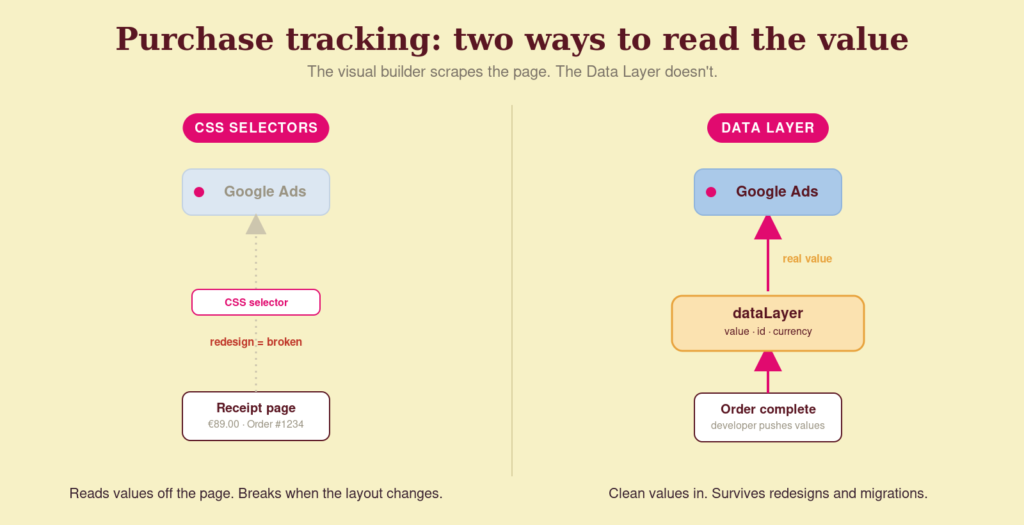
Google frames it as selecting elements on the page while the system handles the selectors and triggers in the background. In practice, that means it scrapes values off the page using CSS selectors, and receipt pages change. A theme update, a checkout redesign, an A/B test, a dynamically rendered total, any of these can shift the underlying HTML and silently break the selector. The conversion stops firing, or fires with the wrong value, and nobody notices until the numbers look strange weeks later. For a newsletter signup, that risk is fine. For the purchase value that trains your Smart Bidding, that is business-critical data resting on something brittle.
The robust way to track a purchase is the Data Layer: your developer pushes the transaction ID, value and currency into a structured object at the moment the order completes, and GTM reads clean, stable values from there. It survives redesigns because it does not depend on where things sit on the page. That trade-off, convenient now and expensive later, is exactly what we flag in a tracking audit.
Use the event builder if you want, especially to get a newcomer off the ground. But for anything that feeds your bidding, get the Data Layer right first.
What this means if you spend on ads
Two practical things.
First, when the Google tag and GTM integration arrives, your Google tags are likely to become GTM containers whether you planned for it or not. A clean, Data-Layer-based setup migrates cleanly. A pile of hardcoded snippets and duplicate conversions migrates into a bigger mess. Sorting it now is cheaper than untangling it later.
Second, the shortcut culture the new UI encourages, guided setup, hidden "advanced" features, click-to-track, is fine for getting started, but it is not the same as a setup you can trust with spend. The businesses that get burned are the ones that mistake "easy to set up" for "reliable".
For Google Ads and Meta accounts where the conversion signal actually drives the bidding, the reliability of that signal is the whole game.
How Coby approaches this
We treat tracking as the foundation, so a UI refresh does not change the work, it just moves the buttons. When we set up conversions, we build them on the Data Layer, verify them in GA4 DebugView and Tag Assistant, and version everything in GTM so a bad change can be rolled back in seconds.
If you want your tracking checked before the Google tag integration lands, and set up so it holds through redesigns and migrations, that is exactly the tracking and data analytics work we do. We find what is firing, fix what isn't, and make sure the data feeding your campaigns is real.
Frequently asked questions
Why does my Google Tag Manager look different?
Google rolled out a UI update in 2026: a cleaner Overview dashboard and a reorganised navigation that moves Triggers, Variables, Templates and Folders into a collapsible Advanced tab, plus a new Settings tab for container-wide options. It is a cosmetic change for now, but it is preparing GTM for a larger integration with Google tag.
Where did Triggers and Variables go in GTM?
They are still there, moved into a collapsible Advanced tab (along with Templates and Folders) to keep the default view lighter. The container also gains a new Settings tab for options like consent mode and cross-domain settings. Nothing you use has been removed.
What is the new visual event builder in GTM?
It is a guided, click-based tool, started via "Start guided setup" under "Measure purchases in Google Ads", that lets you create a Google Ads purchase conversion by selecting elements on your receipt page. GTM turns those clicks into triggers and variables using CSS selectors. Right now it only supports Google Ads purchase conversions and needs Edit access to the container.
Should I use the visual event builder for my purchase conversions?
For getting started quickly, it works. But because it reads values off the page with CSS selectors, it breaks when your receipt page or theme changes, which can silently stop your conversions or send the wrong value. For business-critical purchase tracking that feeds Smart Bidding, build the conversion on the Data Layer instead.
Is Google Tag merging with Google Tag Manager?
Yes. Google has confirmed that standalone Google tags will be upgraded to fully capable Google Tag Manager containers, and the 2026 UI changes are the first visible step. Your Google tag settings move into a new Settings tab. The upgrade is optional, so nothing changes automatically and you choose whether to run it.
Do I need to change anything in my setup right now?
Not because of the UI itself. But it is a good prompt to audit your container: remove duplicate conversion tags, move business-critical conversions onto the Data Layer, and clean up anything hardcoded. A tidy setup migrates cleanly when the Google tag integration arrives; a messy one does not.
Written by Marloes Slotboom, founder of Coby Agency. Last updated: July 2026.