
Microsoft Clarity shows you how visitors actually behave on your site: heatmaps, session recordings, rage clicks, scroll depth. Claude is very good at turning data into plain-language conclusions. Connecting the two sounds like an obvious win, and since Microsoft ships an official MCP server for exactly this, you can.
But most articles about Microsoft Clarity with Claude oversell what the connection does. They suggest Claude will watch thousands of recordings and hand you a redesigned checkout. The reality is more modest, and still useful, if you know what you are working with.
This guide is for founders and marketing managers who already run (or should run) Clarity and want AI to shorten the path from behaviour data to decisions. We use this setup ourselves, so we will tell you honestly what it can do, what it cannot, and the workflow that makes it worth the ten minutes of setup.
After reading, you will be able to:
- Explain what the official Clarity MCP server actually gives Claude access to
- Set up the connection in Claude Desktop yourself
- Work within the real API limits instead of being surprised by them
- Run a weekly loop that turns Clarity data into shipped improvements
What connecting Microsoft Clarity to Claude means
The Model Context Protocol (MCP) is an open standard that lets AI assistants like Claude talk to external tools. Microsoft publishes an official MCP server for Clarity, the npm package @microsoft/clarity-mcp-server, which connects Claude to your Clarity project through the Clarity Data Export API.
Once connected, you can ask Claude questions in plain language: how did mobile traffic behave in the last three days, which browsers show unusually low engagement time, how much of yesterday’s traffic was bot traffic? Claude fetches the numbers, compares them and answers in sentences instead of tables.
Both halves of the stack are free at their base. Clarity itself costs nothing, with no traffic caps, and the MCP server is open source. You only need a Claude account for the AI side.
What the integration can and cannot do
This is the section most write-ups skip, so let’s be precise.
What you get through the MCP server
The server talks to Clarity’s Data Export API, which returns aggregated project data: traffic and session counts, distinct users, pages per session, engagement time, active time, scroll depth and bot sessions. You can break results down by dimensions such as device, browser, operating system and country, with up to three dimensions per request.
The API has two hard limits you should plan around. It covers a short window of recent data per request, up to the last three days, and each Clarity project gets 10 API requests per day. That is not a bug in the MCP server; it is how the underlying API works. Recent versions of the server can also list session recordings with filters, so Claude can point you to which recordings are worth opening.
What Clarity’s built-in Copilot covers
Some of what people expect from “Clarity + AI” already lives inside Clarity itself. Clarity Copilot, built into the product, can chat about your project data, summarise individual session recordings so you do not have to watch them, generate takeaways across groups of recordings, and summarise heatmap behaviour per page. If your goal is “summarise what happened in these sessions”, Copilot inside Clarity is the tool for that job.
What neither does
Claude does not watch your recordings, and the Data Export API is not a data warehouse: you cannot pull six months of history through it. The integration is also not a replacement for GA4. Clarity tells you how people behave on the page; GA4 tells you where they came from and what they converted into. We compared the two in detail in our Microsoft Clarity vs GA4 guide, and the short version stands: you want both, wired into a measurement setup you trust. That is the tracking-first argument in one sentence.
How to set up the Clarity MCP server
Setup takes about ten minutes if Clarity is already collecting data.
- Get Clarity running first. Add the tracking snippet to your site (directly or via Google Tag Manager) and let it collect for at least a week or two, so there is behaviour worth analysing. Our GTM consultancy guide covers clean tag implementation.
- Generate an API token. In your Clarity project, go to Settings, then Data Export, and select Generate new API token. Name it something recognisable and store it securely.
- Add the server to Claude Desktop. In Claude Desktop’s MCP configuration, add the server so it launches with npx and passes your token, following the official setup instructions. You need Node.js installed; restart Claude Desktop afterwards.
- Test with a small question. Ask something like “compare mobile and desktop engagement over the last three days”. If Claude answers with your real numbers, the bridge works.
One practical note: the token grants access to your behaviour data, so treat it like any other credential. Rotate it periodically and do not paste it into shared documents.
Coby’s Weekly Clarity Loop
Ten requests a day and three days of history sound restrictive until you stop treating the integration as a dashboard and start treating it as a weekly discipline. This is the loop we run, and it maps directly onto our conversion rate optimisation approach.
- Pull the week’s picture in one or two requests. Ask Claude for the recent numbers split by device or browser. Two well-chosen requests use a fraction of the daily limit and give you the deltas that matter.
- Let Claude flag what looks off. Falling engagement time on mobile, a browser with unusual bot share, a country segment that scrolls half as deep. Claude is good at spotting the odd one out and phrasing it as a hypothesis.
- Verify inside Clarity. Open the heatmaps and recordings for the flagged segment, and use Clarity Copilot to summarise sessions instead of watching them all. This is where the “why” lives; the API only gave you the “what”.
- Ship one fix and re-check next week. Change the form, the layout, the button, whatever the evidence points at. Next week’s pull tells you whether the number moved.
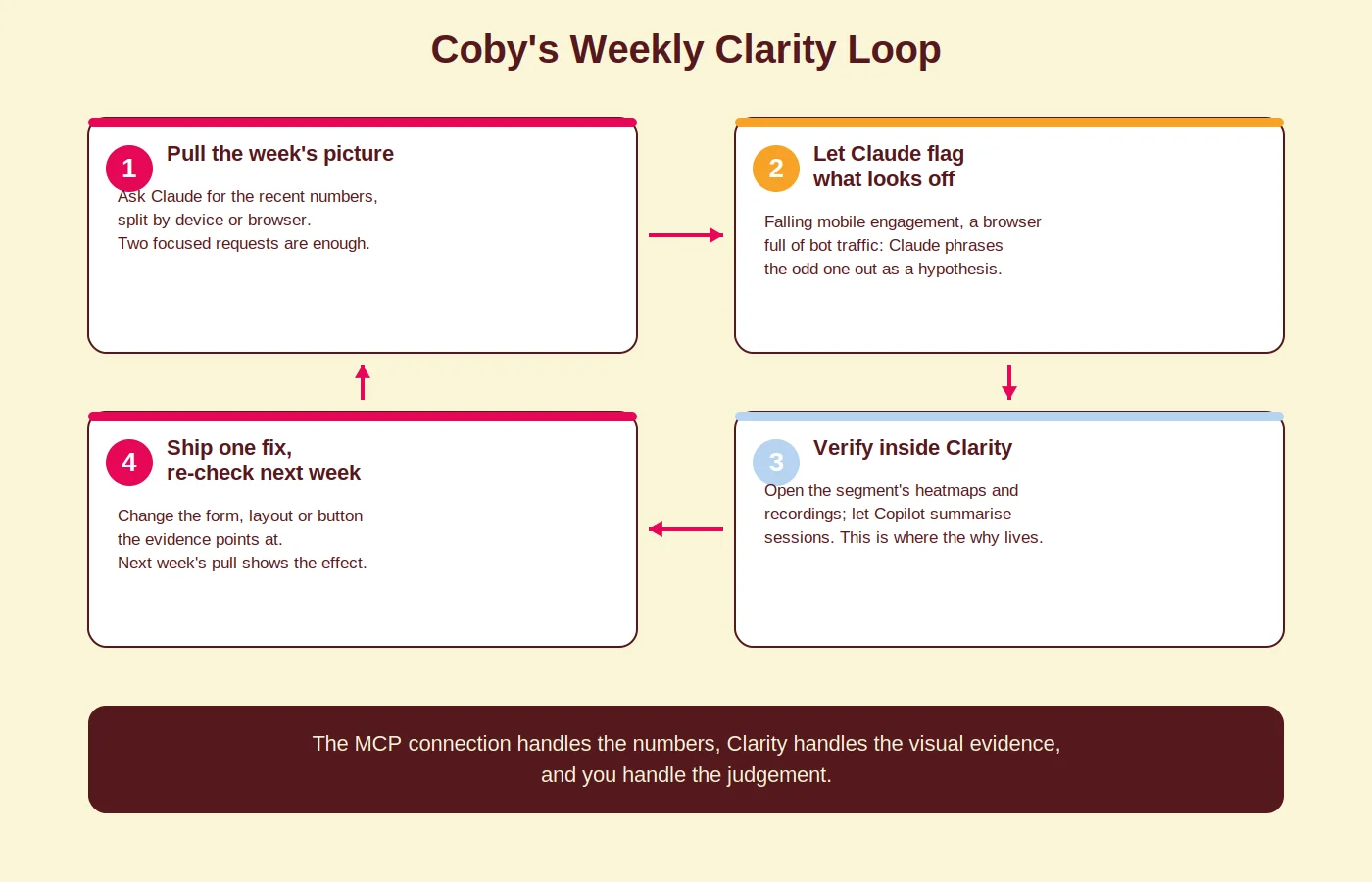
The loop works because each tool does what it is best at: the MCP connection handles the numbers and the comparison, Clarity handles the visual evidence, and you handle the judgement. If you want the pulling and flagging to happen automatically on a schedule, that is a natural marketing automation job.
Common mistakes with Clarity + Claude
Expecting deep history. The Data Export API covers the last few days, not the last quarter. Fix: use the loop weekly so the short window becomes a feature (fresh data, recent changes) instead of a limitation.
Burning the request budget on vague questions. “How is my website doing?” wastes a request on a generic answer. Fix: ask segment-level questions with a comparison built in, like mobile versus desktop scroll depth on the same days.
Treating correlation as causation. Claude can tell you a page’s engagement dropped; it cannot know you launched a cookie banner that covers the CTA. Fix: keep a simple change log and verify every flag against the recordings before acting.
Skipping the baseline. If you change your checkout without recording the before-numbers, next week’s data proves nothing. Fix: note the metric you expect to move before you ship the fix.
Analysing broken data beautifully. If your tagging is a mess, AI summaries of that mess are still a mess. Fix: get the measurement layer right first; it is the same order we apply in every audit.
How Coby approaches this
We are a tracking-first agency, so we like Clarity for the same reason we like server-side tagging: it adds signal you can act on without adding cost. The MCP connection earns its place in our stack as a time-saver, not a magician. It answers in thirty seconds the segment questions that used to mean clicking through filters, and it writes up anomalies our team then verifies in the recordings.
For clients, this usually lands as part of a broader setup: clean tracking, Clarity beside GA4, and a weekly behaviour review feeding a CRO backlog. The AI shortens the distance between data and decision; the discipline of the loop is what actually moves conversion rates.
Curious what your visitor behaviour data would tell you if someone actually looked at it every week? Get in touch and we will show you what the loop looks like on your own site.
Frequently asked questions
What does the Microsoft Clarity and Claude integration cost?
Microsoft Clarity is completely free, and the official MCP server is open source. You only need a Claude account; a paid Claude plan helps if you run analyses frequently, but the connection itself adds no cost.
Can Claude watch my session recordings?
No. Through the MCP server, Claude works with aggregated metrics from the Data Export API and can list recordings worth reviewing. For AI summaries of the recordings themselves, use Clarity Copilot inside the Clarity interface.
How much historical data can Claude access?
The Clarity Data Export API returns up to the last three days of data, with 10 API requests per project per day and up to three dimensions per request. For longer trends, use the Clarity dashboard itself or your analytics platform.
Does Clarity with Claude replace Google Analytics 4?
No. Clarity shows how people behave on your pages; GA4 covers acquisition, conversions and longer-term trends. They answer different questions and work best together, which is exactly why we run both for clients.
Is Microsoft Clarity safe to use under privacy rules?
Clarity masks sensitive input content by default, but you remain responsible for your configuration: check what your recordings capture, update your privacy policy and make sure your consent setup covers behavioural analytics. When in doubt, have your setup reviewed.
Last updated: September 2026
Written by Marloes Slotboom, founder of Coby Agency