 Coby Agency
I recently reviewed an account where the welcome email sequence had been running for over a year. It looked healthy on the surface: clean design, personalised first name, green metrics across the dashboard. The problem was the trigger. It fired on every form submission across the site, including the contact form, the trade enquiry form and the newsletter signup. Completely different people, same sequence. Nobody had noticed, because nobody was measuring what happened after the send.
That is the pattern behind most underperforming marketing automation. The setup gets done, the tool sends the emails, and everyone assumes it works. The logic is rarely questioned, because questioning it means connecting automation data to revenue data, and most businesses have not set that part up.
This guide is for founders and marketing managers who run automation themselves, or are about to choose a platform. After reading, you will be able to:
- Check whether your tracking can feed a platform reliable data before you commit to one
- Build workflow triggers that match real customer behaviour instead of guessed behaviour
- Evaluate tools by business size, sales cycle and integrations rather than feature tables
- Audit a live workflow without rebuilding it from scratch
What marketing automation covers in 2026
Marketing automation is software that sends messages or takes actions automatically, triggered by what a contact does or who they are. An abandoned cart email that goes out a few hours after someone leaves your webshop is the classic example. Nobody presses send.
The scope has grown well beyond email. Modern platforms like HubSpot, ActiveCampaign and Klaviyo also handle SMS, lead scoring, CRM updates and audience syncs to ad platforms. That last part matters more than most feature lists suggest: pushing converted customers back to Google Ads and Meta as exclusion or seed audiences is where automation starts paying for your paid media too.
One distinction worth knowing. A drip campaign sends the same timed sequence to everyone who enters it. An automation workflow reacts to behaviour: someone who clicks branches into a different path than someone who does not. Workflows take more setup but stay relevant, because the content responds to what people actually do.
The trigger is the whole thing
Most implementation guides spend two sentences on triggers before moving to the fun part, the email templates. That is backwards. Get the trigger wrong and every subsequent step runs on bad data.
The question to ask before building any workflow: what specific action did this person just take, and what does it tell me about where they are in their decision? Someone who downloaded a pricing guide is in a different place than someone who signed up for a newsletter from a blog post. Putting them in the same nurture sequence because both land in your CRM as a contact is one of the most common reasons workflows convert poorly despite healthy engagement metrics.
Trigger hygiene is also technical. Every form on your site needs a clearly named source field that maps to your CRM. Without it, your platform sees a contact, not a context. I have seen accounts where three different forms wrote to the same CRM property, so a warm demo request and a cold checklist download entered identical sequences. The demo requests converted worse than they should have, and nobody could see why, because the data was mixed at the source.
Choose the tool after the data audit, not before
Almost every comparison article about marketing automation tools starts with feature tables: sends per month, number of workflows, price per contact. Those matter, but they come second. The first question is whether your tracking is clean enough to feed the tool anything useful.
Platforms depend on behavioural signals for the interesting work: lead scoring, triggered sequences, predictive send times. Those signals come from page views, form fills and purchase events. If your GA4 is misconfigured, your pixel fires on some pages but not others, or events quietly broke during a site rebuild, every automation on top makes decisions with bad inputs. This is why we always run a tracking audit before recommending any platform, and why server-side tagging is often part of the fix.
Then match the platform to your journey and your team, not to what a competitor mentioned on a podcast:
- Small teams and e-commerce (roughly under 10,000 contacts): Klaviyo for webshops, ActiveCampaign for service businesses. Klaviyo has a free tier up to 250 profiles and paid email plans from around $20 per month, and its Shopify and WooCommerce integrations are deep. Note that since early 2025 Klaviyo bills on all subscribed profiles, not just the ones you email, so list hygiene directly affects cost.
- Mid-market with a marketing ops person and a CRM in place: HubSpot Marketing Hub removes a whole category of sync problems because the CRM is native. Budget realistically: the Professional tier runs around $800 per month on an annual plan ($890 on monthly billing), plus a mandatory onboarding fee in year one. Worth it if you run multi-step nurtures and lead scoring, and have someone to maintain them.
- Enterprise with a dedicated ops team: Salesforce Marketing Cloud or Marketo. These are not self-serve. Paid implementation is part of the true cost, not a footnote.
Before signing an annual contract, ask vendors three questions. How does your tool push conversion data back to ad platforms? What is the sync frequency? What breaks if the connection drops? A 24-hour sync lag on a purchase event means you keep paying to acquire someone who bought yesterday. Then run a 30-day pilot with real contact data and one live automation. You will find out quickly whether the tool does what you need or whether the demo showed a curated version of reality.
The metrics that tell you it is working
Open rate is not the signal you think it is. Since Apple’s Mail Privacy Protection rolled out, mail content is pre-loaded for a large share of recipients, which registers as an open even when nobody looked. If a meaningful part of your list uses Apple Mail, your open rate is inflated and unreliable as a performance signal.
The signals that hold up: click-to-open rate, reply rate on plain-text sequences, conversion events within a defined window after a send, and revenue from contacts who went through a sequence compared with those who did not. That last one requires your platform to talk to your analytics and CRM data, which is exactly why the attribution layer comes before workflow launch, not after. If your workflows are not connected to a revenue outcome, you are optimising on noise. The same discipline applies to your ads, which is why we treat tracking problems in Google Ads the same way.
Common mistakes and how to fix them
Three failures come up more often than anything else, and none of them are the platform’s fault.
Automation built before the data is clean. Welcome emails going to long-standing customers, re-engagement campaigns firing at people who never disengaged, lead scores calculated on page views that were never tracked. Audit the events first.
Workflows built on an assumed journey. Teams build a seven-email nurture on the assumption that prospects decide in four weeks, while the CRM shows most decide much faster or much slower. Map sequence length and gaps to the real evaluation window, which you find in your purchase data and by talking to customers.
Nobody owns it after launch. Products change, creative changes, behaviour changes. A workflow that was right at launch can send the wrong message a year later. Put a quarterly review in someone’s calendar, and give every workflow a clear exit condition so contacts do not stay trapped in sequences after they become customers.
How Coby approaches marketing automation
We start with tracking, every time. Before any workflow is built or any platform contract is signed, we verify that the events feeding the system match what the backend reports. Clean data first is the foundation of everything we do, from B2B lead generation to e-commerce flows.
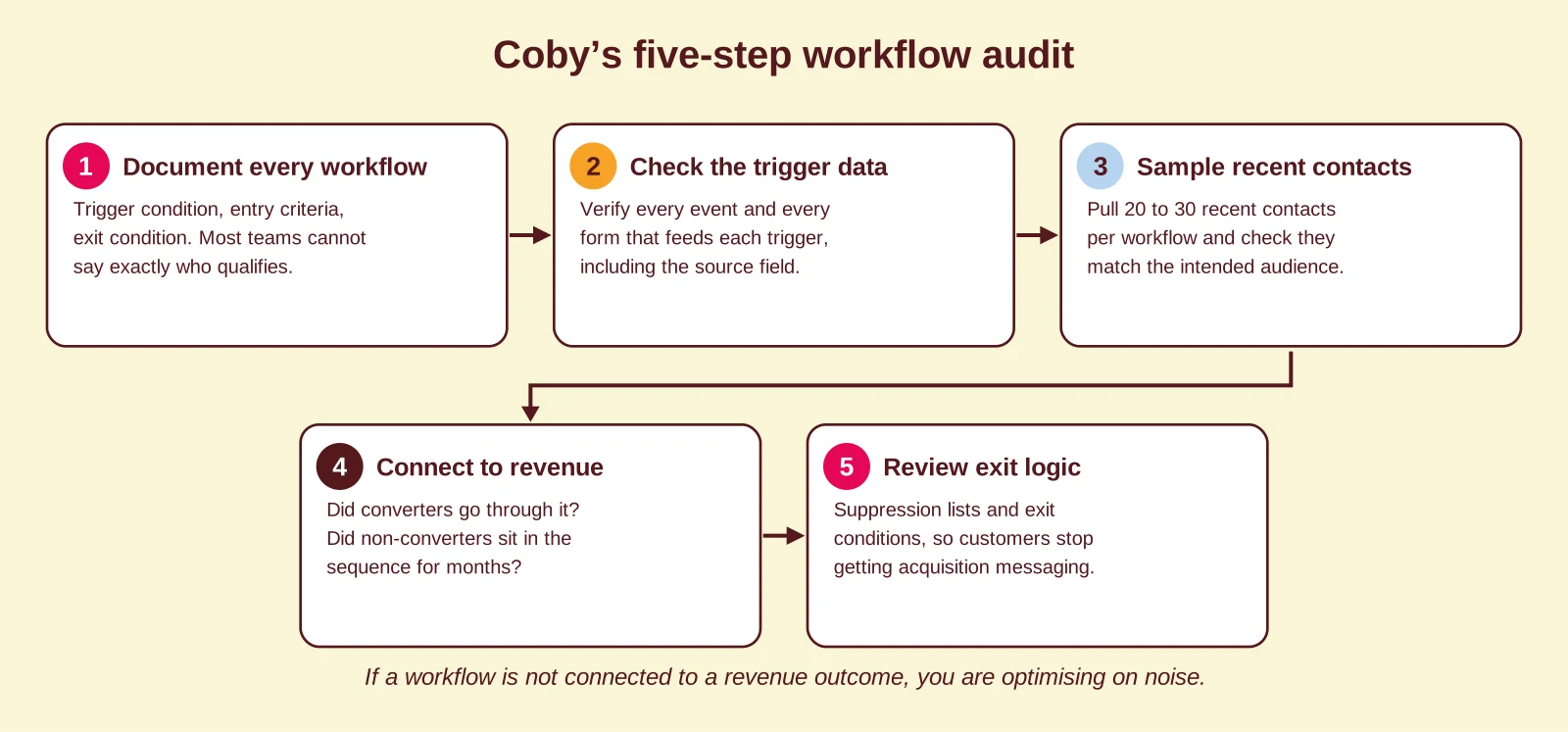
For live setups we use Coby’s five-step workflow audit:
- Document every active workflow: trigger condition, entry criteria, exit condition. Most teams can name the workflow but cannot say exactly who qualifies or when someone leaves.
- Check the data each trigger depends on, including every form that feeds it.
- Pull a sample of 20 to 30 recent contacts per workflow and check they match the intended audience.
- Connect workflow membership to revenue: did converters go through it, and did non-converters sit in it for months?
- Review suppression lists and exit logic, so customers stop receiving acquisition messaging.
Because we are a small team, the person doing this audit is the person you talk to. If you want an outside pair of eyes on your setup, our marketing automation service starts with exactly this audit. Get in touch and we will tell you what is contributing and what is just running quietly in the background.
FAQ
What is the best marketing automation tool for small businesses?
ActiveCampaign and Klaviyo (for e-commerce) are the most practical choices for small teams. Both are approachable, well documented and cover email automation, segmentation and basic CRM needs without a dedicated ops person. The right choice depends on whether you sell products, services or software.
How do I know if my business is ready for marketing automation?
If leads or customers come in consistently and you are manually sending the same follow-ups repeatedly, you are ready. The one prerequisite is tracking that is reliable enough to segment accurately: you need to know who purchased, who enquired and who is browsing.
What is the difference between a drip campaign and an automation workflow?
A drip campaign sends the same timed sequence to everyone. A workflow branches on behaviour, so someone who clicks gets a different path than someone who does not. Workflows need more setup but stay more relevant to each recipient.
Why is my marketing automation not working?
The most common cause is incomplete or inaccurate data feeding the automation: tracking scripts missing from parts of the site, contacts without activity history, or triggers firing for the wrong forms. Audit the tracking first, then the workflow logic.
How much does marketing automation cost?
Klaviyo starts free up to 250 profiles and from roughly $20 per month after that. HubSpot Marketing Hub Professional runs around $800 per month on an annual plan plus an onboarding fee in year one. Enterprise platforms cost thousands per month plus implementation. The full cost also includes the hours someone spends maintaining workflows.
Should I fix tracking before building automation?
Yes, always. Automation built on bad data sends the wrong message to the wrong people, which damages relationships instead of building them. A tracking audit is a smaller piece of work than an automation build, and it changes what you build.
Last updated: November 2026
Written by Marloes Slotboom, founder of Coby Agency