
Most ecommerce teams set up Google Merchant Center once, see their Shopping ads running, and never look at it again. Then months later the ROAS is flat, the bestsellers keep getting disapproved, and nobody knows why budget flows to the products that matter least.
If you run a webshop or manage its marketing, this guide is for you. The core idea is simple: in Shopping and Performance Max, the feed is the campaign. Google decides which searches your products appear for based on the data you feed it. Messy data in, messy results out, no matter how clever the bidding.
You will learn what Google Merchant Center does, which feed attributes actually move performance, how to fix disapprovals systematically, what changed in 2026, and how to connect the feed to bidding on real margin instead of vanity ROAS.
Key takeaways
- Merchant Center is the product database behind Shopping, Performance Max and free listings. Approval decides whether you compete at all.
- Titles are keyword signals, not creative headlines. Put the attributes people search for at the front.
- Disapprovals silently remove products from the auction. Check the account weekly, fixes are usually simple.
- New for 2026: conversational attributes give AI shopping surfaces like AI Mode extra context per product. Optional, but an early advantage for feeds that fill them.
- The biggest wins sit outside the feed: passing margin as conversion value so bidding optimises for profit.
What Google Merchant Center does (and where it fits)
Google Merchant Center is the product database that sits between your webshop and Google’s shopping surfaces. You supply product data, Google reads it, and that data powers Shopping ads, Performance Max, and free product listings in the Shopping tab and on Search.
It is separate from Google Ads. Ads handles budgets and bidding; Merchant Center handles what is true about your products. They connect through a linked account, but no Smart Bidding setting can repair wrong product data. The algorithm only knows what the feed tells it.
A bit of housekeeping for 2026: the redesigned interface that Google rolled out as “Merchant Center Next” finished replacing the classic version in 2024, and in July 2026 Google dropped the “Next” label again. It is simply Google Merchant Center now. Two renames worth knowing: feeds live under “Data sources”, and the old Diagnostics tab is now “Needs attention”.
The feed attributes that actually move performance
Your product data is a structured file or connection, one row per product variant, with attributes defined in Google’s product data specification. Four attributes deserve most of your attention, plus a fifth group of fields that arrived in 2026 and belongs on your radar.
Title. The title is the strongest matching signal you control. Google reads it to decide which searches your product can appear for, and truncates what shoppers see at roughly 70 characters, so the order matters. “Women’s black ankle boots, leather, size 10” works. A CMS export like “WMN-BLK-SZ10-ANKLE” is invisible. Structure titles as brand plus product type plus the attributes people search for, most important first. The full logic is in our post on Google Shopping feed optimisation.
GTIN. Google uses barcodes to match your product to its product knowledge graph. A correct GTIN means your listing inherits everything Google already knows about that product. A missing or wrong one means your listing competes with less data than your competitor selling the identical item.
google_product_category. A numeric taxonomy, not a free text field. Pick the deepest category that fits. “Sporting Goods” tells Google almost nothing; the specific bicycle category tells it exactly which auctions you belong in.
custom_label_0 to 4. Invisible to shoppers, priceless to you. You get five free-form fields for any value that helps you steer. Common setups: custom_label_0 for margin tier (high / mid / low), custom_label_1 for season (summer / winter / holidays), custom_label_2 for price band or bestseller status, custom_label_3 for sale or clearance, custom_label_4 for stock level. Then split campaigns and targets along those lines: a high-margin bestseller deserves a different budget and a sharper target than a thin-margin clearance item. This is the attribute that makes profit-based bidding possible later.
Conversational attributes. New for 2026: six optional fields that give AI shopping surfaces, such as AI Mode in Google Search and Gemini, context that never fits in a title. They are question_and_answer (frequently asked questions plus answers per product), document_link (links to public PDFs such as manuals and sizing charts), related_product (relationships such as accessory or part of a set), item_group_title (a readable name for a family of variants), variant_option (exactly how one variant differs from its siblings) and popularity_rank (how well a product sells relative to the rest of your catalogue). They are not required and change nothing about your approval status or ad rank, but filling them hands AI assistants exactly the answers they need to recommend your product instead of a competitor’s. The full list is in Google’s documentation on conversational attributes. Start with the products customers ask the most questions about; a supplemental feed is the safest route. We unpack all six fields, including format rules and priorities, in our guide to conversational attributes.
Disapprovals: find them before they cost you
Merchant Center flags issues at three levels: errors that disapprove products, warnings that limit them, and notifications. Errors are the silent killers, because a disapproved product is simply absent from the auction while your dashboards keep looking normal.
The usual suspects, in the order we encounter them in audits:
- Price or availability mismatch. The feed says one price, the landing page another, often because a sale ended in the CMS but not in the feed. Shorten the refresh interval, use sale_price with effective dates, and let automatic item updates catch the stragglers.
- Missing or invalid GTINs. Fill them from your product database, and mark products correctly when no GTIN exists, for instance for handmade goods.
- Image policy issues. Watermarks, promo text on images, or lifestyle-only shots where Google expects the product on a clean background.
- Landing page problems. Slow pages, redirects, or a page that shows a different product than the listing.
Work through “Needs attention” weekly, sorted by impact, suppressions before warnings. One feed-level error can take hundreds of products offline at once, and a suppressed bestseller costs more than fifty suppressed slow movers.
Feed rules and supplemental feeds
You rarely need a developer to fix feed data. Feed rules transform attributes on the way in: map hex codes to plain colour names, prepend the brand to titles, or fill a missing field with a default.
Supplemental feeds add or overwrite attributes for existing products, matched on ID. The classic use is a Google Sheet that assigns custom labels by margin tier without touching the primary feed. One warning from experience: document which feed owns which attribute. Stacked supplemental feeds writing to the same field produce conflicts nobody can untangle later.
Connect the feed to money: margin, GA4 and tracking
Here is where most guides stop and where the real gains start. Merchant Center tells Google what you sell. Your conversion tracking tells Google what it is worth. If that second signal is wrong, the feed work above optimises towards the wrong goal.
The common trap: a shop sells own-label products at healthy margins and branded products at thin ones. The campaign hits its ROAS target by pushing cheap-to-sell branded items, and the profit contribution is terrible. The fix is passing gross margin as the conversion value instead of revenue, so bidding optimises for profit. Combine that with margin-based custom labels and you can set different targets per margin tier. Another route is a tool such as ProfitMetrics or Stape: these go a step beyond filling in margins and also account for other costs such as purchasing, shipping and payment fees, staff and marketing, so your campaigns steer on the profit that actually remains. How we structure that is covered in our Performance Max strategies.
The value signal also needs to arrive. Client-side tracking loses a share of conversions to ad blockers, browser restrictions and refused consent, and Smart Bidding learns from what remains. Server-side tagging closes most of that gap. For Shopping accounts this is not a nice-to-have: the bidding model is only as good as the conversion data it learns from.
Also link GA4 under Linked accounts, so product performance lands in your analytics and audiences can flow back into campaigns.
How Coby approaches Merchant Center
At Coby we treat Merchant Center as part of the tracking foundation, not as a set-and-forget upload. Every ecommerce audit we run starts with the same three checks: what share of the catalogue is actually approved, whether titles match how people search, and whether conversion values reflect margin or just revenue.
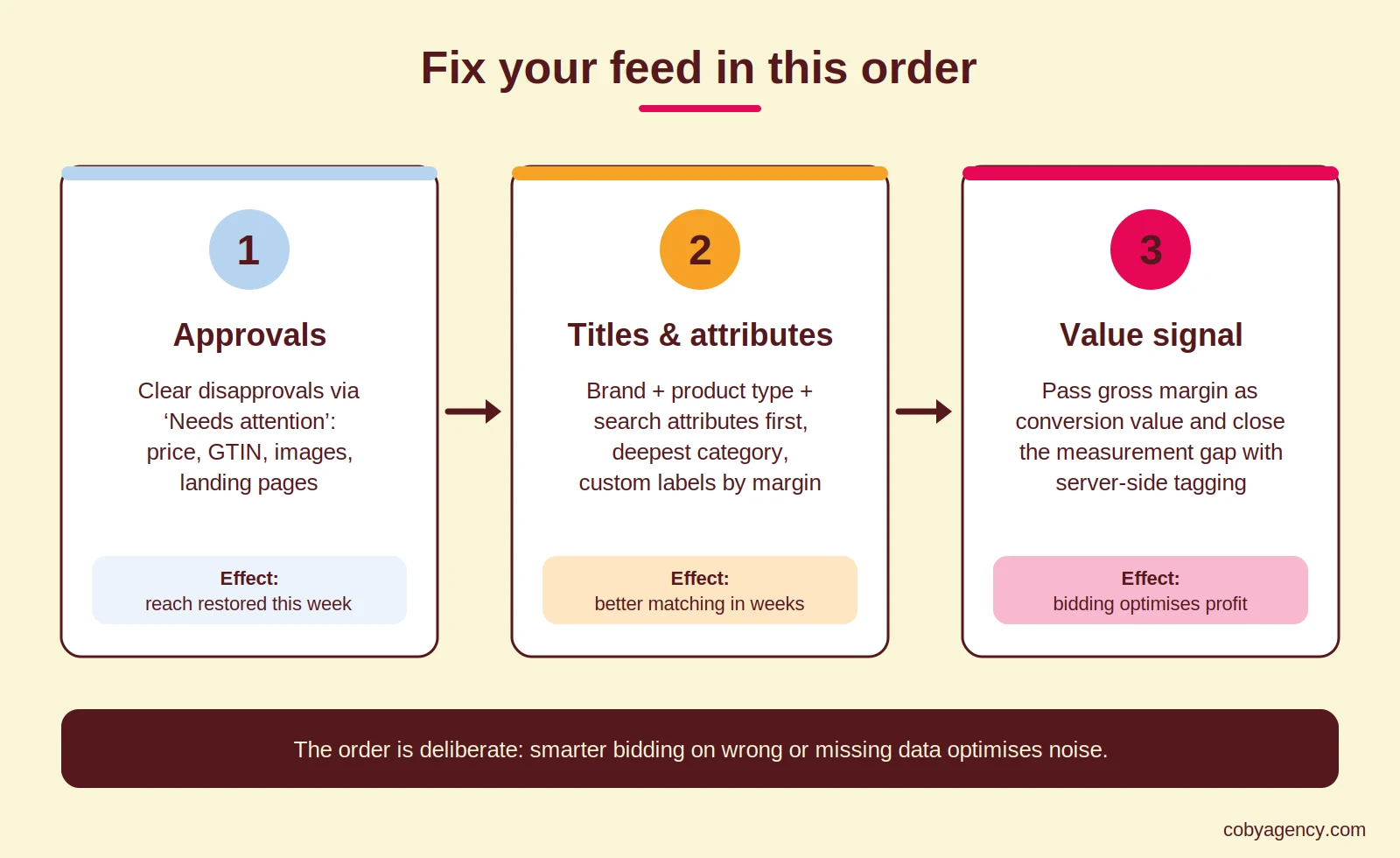
That order is deliberate. Fixing approval issues restores reach this week. Fixing titles improves matching within weeks. Fixing the value signal changes what the whole account optimises for. Doing them in reverse wastes the effort, because better bidding on missing or mispriced data optimises noise.
It is honest work rather than magic: a weekly Needs attention check, a documented feed setup, and a value signal you can trust. If you want a second pair of eyes on your setup, our SEA team runs full feed and tracking audits, and our data and analytics service builds the measurement side.
Conclusion
Google Merchant Center decides whether your products compete, and your feed quality decides on which terms. Get approvals clean, titles searchable, labels meaningful and the value signal honest, and every euro of Shopping budget works harder.
Want to know what your feed is silently costing you? Get in touch and we will walk through your Needs attention tab together.
FAQ
What is Google Merchant Center? Google Merchant Center is the free tool where you manage the product data that powers Shopping ads, Performance Max and free listings on Google. It connects your webshop’s catalogue to Google’s advertising systems.
Is Google Merchant Center free? Yes. The account and free product listings cost nothing. You only pay when you run paid campaigns through a linked Google Ads account.
Why are my products disapproved in Merchant Center? The most frequent causes are price or availability mismatches between feed and landing page, missing GTINs, image policy violations and landing page issues. Check the Needs attention section, fix the data, then request a re-review rather than waiting for the next crawl.
What are conversational attributes in Merchant Center? Six optional fields, new for 2026, that give AI shopping surfaces such as AI Mode and Gemini extra context about your products: question_and_answer, document_link, related_product, item_group_title, variant_option and popularity_rank. They are not required and do not affect your approval status or ad rank, but they help AI assistants recommend your product.
What do I use custom labels for? custom_label_0 to 4 are five free-form fields shoppers never see. Use them to tag products by margin tier, season, price band or stock level, for example, then split campaigns and targets along those lines. That way a high-margin bestseller gets steered differently than a clearance item.
How often should my feed update? Match the update frequency to how often prices and stock change. A daily fetch suits stable catalogues; shops with frequent price changes should fetch several times a day or use the Merchant API to push updates in near real time.
Last updated: August 2026
Written by Marloes Slotboom, founder of Coby Agency