
I see it regularly: a webshop with good products, a reasonable Google Ads budget, but a Shopping feed that is, to put it kindly, a bit of a mess. Titles that start with an internal item number. Missing GTINs. Descriptions copied verbatim from the CMS text of three years ago. And then the owner wonders why the ROAS disappoints.
The feed is the foundation of your Shopping campaigns. Google uses the information in it to decide which searches your products show up for. If that information is vague, incomplete or not search-focused, you pay for impressions that make no sense, and you miss the searches that actually convert.
Below is an overview of what I'd do if I took your feed in hand today:
- How to write product titles that Google and buyers understand, and why the first 70 characters are decisive
- Which attributes most shops miss and what that costs
- How to handle seasonal trends in your feed without doing it all by hand
- Why price competitiveness makes or breaks your auction
- Why feed optimisation is pointless if your tracking is wrong
Product titles: brand, product type and attributes, in that order
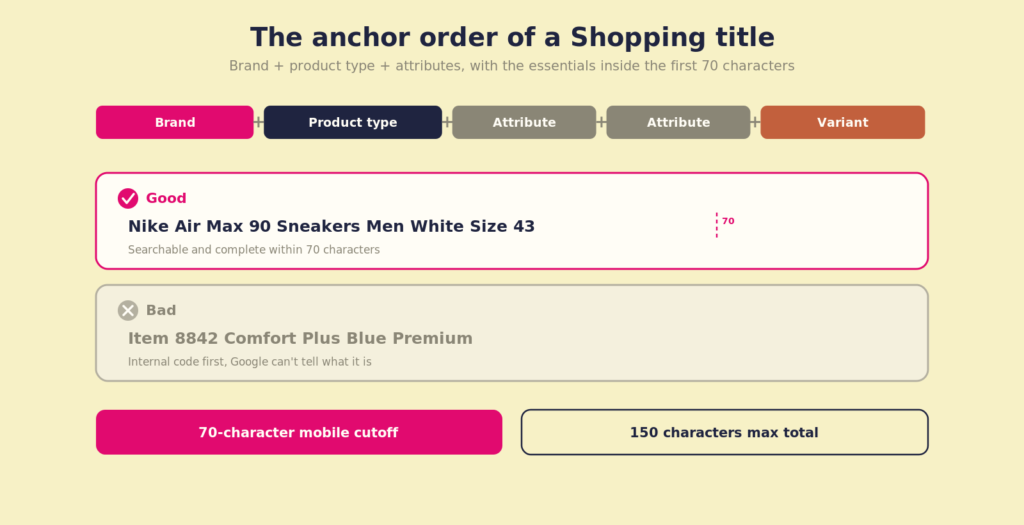
Google reads your title from left to right and gives more weight to the first words. The structure that works best, and the one Google itself recommends for the title attribute, is: brand + product type + key attributes + variant. For clothing that means: brand + product type + gender + colour + size. For electronics: brand + product type + model + key specification.
A good example: "Nike Air Max 90 Trainers Men White Size 43". Brand first, then what it is, then the attributes people filter on. A bad example: "Item 8842, Comfort Plus Blue". Nobody searches for an internal number, and Google doesn't know what the product is.
One nuance that matters: put the brand first when people actually search for that brand. If you sell a private label or an unknown brand nobody searches for, lead with the product type and put the brand behind it. The rule isn't "brand always first", it's "put first what people search for". For known brands that's the brand; for no-name products it's the product type.
The first 70 characters are decisive. On mobile, where most of your Shopping traffic comes from, Google cuts your title off around 70 characters. Anything after that, a buyer on their phone doesn't see. So make sure brand, product type and one or two key attributes sit within those first 70 characters. The hard limit is 150 characters; the space between 70 and 150 is for nice-to-have detail, not for the essentials.
What I never do: stuff keywords or put promotional language in a title. "Buy kettle cheap best kettle" doesn't work, and words like "NEW!", "SALE!" or star symbols even trigger disapproval under Google's promotional language policy. Write for a human, in the order that searches reflect.
GTINs, brand and condition: the attributes that cost you conversions when they're missing
Google has a soft spot for products with a valid GTIN (Global Trade Item Number, in other words the barcode). Products with a GTIN generally perform better in auctions because Google has more confidence in the product match. If you sell branded products and leave the GTIN field empty, you miss that preference.
You get the GTIN from the packaging or the manufacturer's website. For private-label products there's an exception: you set identifier_exists: false in your feed. Do that explicitly rather than just leaving the field blank, because a branded product without a GTIN and without that flag gets disapproved outright in Google Merchant Center.
Beyond that: always fill the brand attribute, even for private labels (use your store name then). And set condition to new if you sell new products. Sounds simple, but I see feeds where that field is empty or inconsistently filled, and Google then ranks those products lower in the auction.
One thing many shops skip: the difference between google_product_category and product_type. The first is the official Google taxonomy, which Google uses to place your product in the right auction. Leave it empty and Google guesses, often wrongly. The second, product_type, is your own category structure (like "Women > Coats > Winter coats"). It's optional, but you'll badly need it later when you want to split your campaign or Performance Max by product type. Fill both: it costs little and gives Google more context.
Handling seasonal trends without rebuilding your feed by hand
A feed is not a static document. What performs well in February (heavy coats, thermal wear) is irrelevant in June. Yet most shops leave their feed unchanged all year.
There are two ways to handle seasonality. The first is via your campaign: give seasonal products a higher priority during the relevant season and lower the bid on the rest. That's the fastest and needs no feed change.
The second, with more impact, is via a supplemental feed: a second feed that overrides specific attributes from your primary feed without touching your webshop. Tools like Channable or DataFeedWatch let you set rules that adjust an attribute automatically when a product falls into a certain category and the date is within a range. So in November you put the word "winter coat" at the front of the title for all winter coats, without touching your primary feed.
For smaller feeds (under 5,000 products), a Google Sheet as a supplemental feed is often the most sensible option. You match on the id field, fill only the columns you want to override, and update it manually per season. It takes an hour, gives you full control, and you don't need to buy an expensive tool if the rest of your setup doesn't justify it.
Custom labels for smarter campaign structure
Custom labels (0 through 4) are perhaps the most underrated part of a Shopping feed. You can't target keywords with them, but you can steer your campaign structure. Important: use them for permanent segmentation, not for one-off promo tags like "Black_Friday_2024", because within a few months you'll have fifty useless labels.
What I use them for: custom label 0 for margin (high, mid, low), custom label 1 for season (summer, winter, year-round), custom label 2 for stock (plenty, nearly sold out). In the campaign you then split on those labels and set a different bid or a different POAS target (Profit On Ad Spend) per segment.
An example: if your winter coats have a 45% margin and your basic trousers 18%, you don't want Google using the same bid for both. With custom labels you create separate product groups per margin segment in your Google Ads campaign and attach differentiated targets to them.
This is also why I always start a feed audit with the question: do you have margin data per product, and does it sit in your feed or your data warehouse? Without that data you optimise on revenue instead of profit, and that costs you money if your bestsellers happen to also be your least profitable products.
Price competitiveness and Omnibus: two things that make or break your feed
Two topics that aren't a title or attribute issue, but do determine whether your feed can win at all.
Price competitiveness is the most important. Google factors your price relative to the market into the auction. If you're 20% or more above the market price on your best-selling products, you simply can't win that auction, no matter how hard you bid. In Merchant Center, under Growth, you'll find the Price Competitiveness report, which shows per product how your price compares to the market average. Check this before you put in more budget or higher bids, because bidding harder on an uncompetitive price is pure waste.
Omnibus is the second. Under the EU Omnibus Directive, when you discount you must show the lowest price of the previous 30 days as a reference. In your feed you handle that with price, sale_price and sale_price_effective_date, and on your product page that reference price must be visible. If this isn't right, you risk disapproval in Merchant Center and a fine from the regulator. Most platforms have a plugin for this, but check that it's actually active.
Feed optimisation without proper tracking is guesswork
This is the point I always end up at, and I understand it sounds frustrating if you came here for feed tips. But I wouldn't feel honest leaving it out.
If your conversion tracking is wrong, you don't know which products actually sell via Google Shopping. Your feed optimisations are then based on impressions and clicks, not real revenue. You're optimising on noise.
The most common problems I run into: double conversion counting (for example a purchase event that fires both via a hardcoded tag and via Google Tag Manager), checkout conversions that go missing because the thank-you page is on a different domain, and purchase events that fire but pass through the wrong order value. In all those cases Google Ads gives you a distorted picture of which products are doing well.
The first step I'd take: check whether the number of purchase events in your analytics matches the number of orders in your backend. A discrepancy of more than 5% is a signal that something is wrong. Only then does it make sense to refine your feed further.
At Coby we run tracking audits where we work out exactly this: where data leaks, which conversions are double-counted, and how to make sure your Shopping campaigns bid on reliable signals. Only once that's in order does it make sense to go deeper into feed optimisation and advanced campaign structures via our performance marketing approach.
Want to know whether your feed and tracking setup are strong enough to scale? Get in touch and we'll look at it together.
Frequently asked questions
How long does it take before feed optimisations show results?
Google usually crawls your feed within 1 to 3 days of an update. Campaign effects normally show after 1 to 2 weeks, because the algorithms need time to process new data. Large changes, like adding GTINs to hundreds of products, are better rolled out in phases so you can measure the effect.
Should I use separate feeds for different countries?
Yes, if you sell in multiple countries. Language, currency, VAT rules and even product titles work differently per market. A Dutch feed you auto-translate into German rarely works well, because search intent in Germany is different too. Create separate feeds per language and country, and optimise them individually.
What's the difference between google_product_category and product_type?
google_product_category uses the official Google taxonomy and determines which auction your product ends up in. product_type is your own categorisation and is optional, but useful for campaign segmentation in Shopping and Performance Max. Fill both fields: it costs little and gives Google more context.
Can I A/B test product titles in Google Shopping?
Not directly via Google Ads the way you do with text ads. What does work: change titles for a selection of products via a supplemental feed, wait two to three weeks, and compare CTR and conversion rate in Merchant Center with the unchanged products. Account for seasonal effects when you compare.
How often should I refresh my feed?
Google requires at least one update every 30 days, but for webshops with changing prices or stock, daily refreshing is the minimum. Price errors, where the feed price differs from the landing page price, lead to immediate disapproval of products. Automatic feeds via your platform (Shopify, WooCommerce) usually handle this, but check the settings.
Does feed optimisation also work for Performance Max campaigns?
Yes, especially. Performance Max uses your feed as the basis for Shopping ads and for dynamic ads on other channels. A strong feed with good titles, correct attributes and filled custom labels gives the algorithm more usable data to steer on. Weak feeds in PMax lead to impressions on irrelevant searches, and because PMax is less transparent than standard Shopping, you notice it later.
Written by Marloes Slotboom, founder of Coby Agency. Last updated: July 2026.