
 Coby Agency
Google quietly added a new set of optional fields to Merchant Center that most feed managers have not touched yet. They are called conversational attributes, and they exist for one reason: AI-powered shopping. When someone asks Google’s AI Mode or Gemini “find me a mattress for hot sleepers under £800”, Google needs more than a title and a price to answer. Conversational attributes are how you hand that context over.
This guide is for e-commerce owners and marketers who manage a Merchant Center feed themselves, or who want to brief whoever does.
After reading, you will be able to:
- Name the six conversational attributes and what each one does
- Decide which ones are worth filling in for your catalogue
- Add them via a supplemental feed without breaking your existing setup
- Judge whether this is a priority for your category right now
What conversational attributes are
Conversational attributes are optional Merchant Center fields, introduced by Google in 2026, that give AI shopping surfaces extra context about your products. Standard attributes like title, GTIN, colour and price tell Google what a product is. Conversational attributes tell it what the product does, how it relates to the rest of your catalogue, and what questions shoppers typically ask about it.
They feed AI-powered shopping experiences such as AI Mode in Google Search and Gemini. They are not required, and leaving them empty does not affect your product approval status or your ad eligibility.
That last point matters for expectations: this is feed quality work for AI surfaces, not a lever that changes your Shopping ad rank or CPC next week.
The six attributes Google defined
Google defined six conversational attributes; the full field reference lives in Google’s Merchant Center documentation. Here is each one, with the format rules that trip people up.
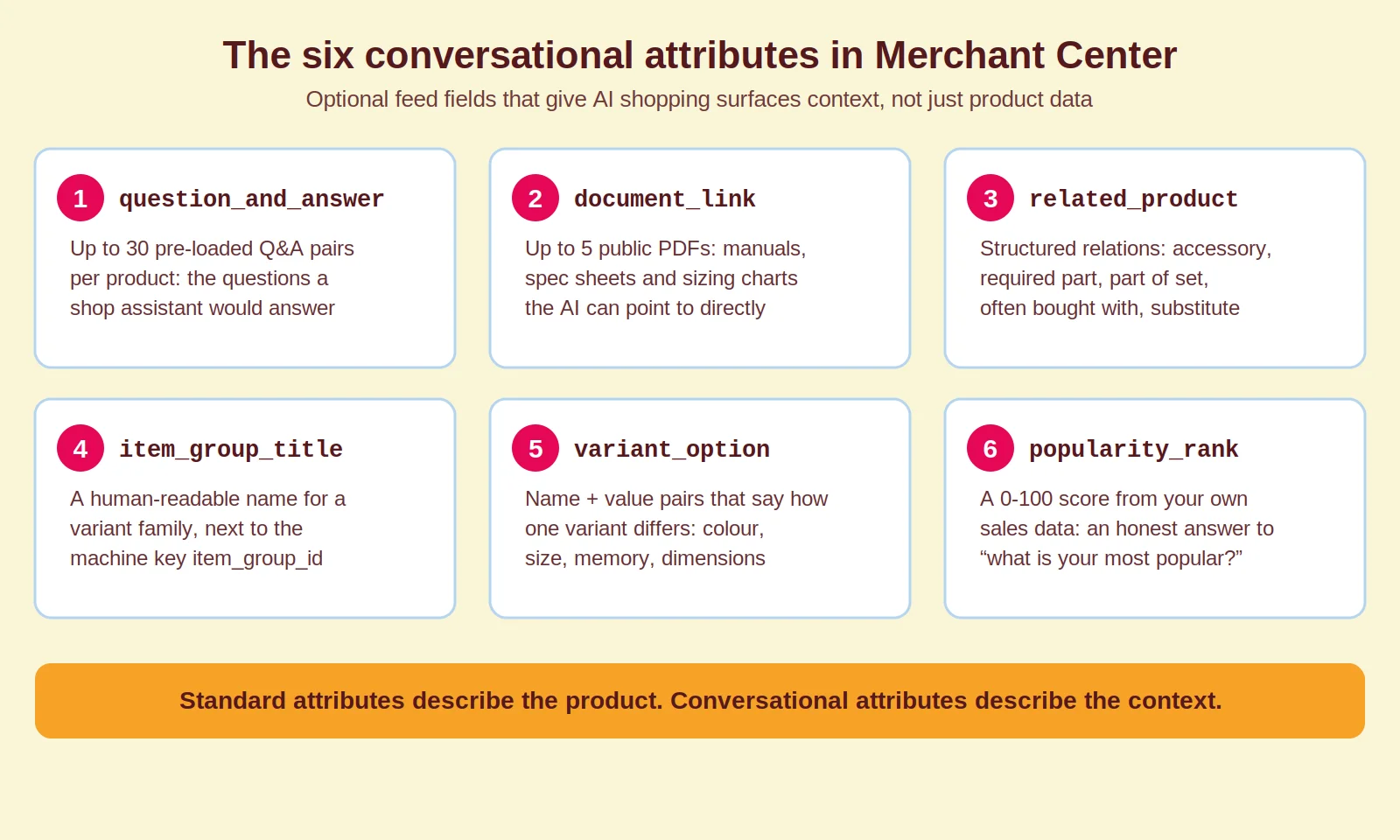
1. question_and_answer
Pre-loaded FAQs for your product, submitted as structured question and answer pairs. You can submit up to 30 pairs per product, with up to 1,000 characters for each question and each answer. Think sizing, compatibility, materials, care instructions: the questions a good shop assistant would answer before a customer commits.
This is the attribute with the most obvious value. When an AI assistant is asked “does this fly curtain keep insects out and is it safe with pets”, a product that carries exactly that Q&A in its feed is far easier to recommend than one that leaves the AI guessing.
2. document_link
Links to publicly accessible PDFs with product-specific information: user manuals, assembly guides, spec sheets, sizing charts. Google accepts up to 5 documents per product. Instead of hoping the AI finds your manual somewhere on your site, you point it straight at the source.
3. related_product
Structured relationships between products in your catalogue. Each entry uses a relationship type, such as accessory, required_part, part_of_set, often_bought_with or substitute, plus the identifier of the related product. This lets an AI answer questions like “what else do I need to use this?” with your own products instead of a competitor’s.
4. item_group_title
A shared, human-readable name for a family of variants, used alongside the existing item_group_id. Where item_group_id is a machine key, item_group_title is the name an AI can actually say out loud: “Organic cotton men’s T-shirt”, covering all its colours and sizes.
5. variant_option
Name and value pairs that describe exactly how one variant differs from its siblings: “colour: transparent black”, “memory: 16 GB”, “size: 90×210 cm”. Combined with item_group_title, this lets an AI navigate your variants instead of treating every size as an unrelated product.
6. popularity_rank
A number from 0 to 100 that signals how well a product sells relative to the rest of your catalogue. It gives AI surfaces an honest answer to “what is your most popular option?”, based on your data rather than its guess.
How this differs from what you already submit
The pattern across all six: standard attributes describe products in isolation, conversational attributes describe them in context. Questions shoppers ask, documents that answer them, products that belong together, variants that belong to one family, and how items rank against each other.
A concrete example. A standard title says “Hybrid Pro Mattress, King, 25 cm”. A question_and_answer pair says “Is this mattress suitable for hot sleepers? Yes, the open-cell foam layer actively dissipates heat.” When someone asks an AI assistant for a mattress for hot sleepers, the second piece of information answers the question. The title never could.
That is the actual gap in most product feeds right now. The data tells Google what something is called and what it costs, but not the problem it solves or the person it is for.
How to add them without breaking your feed
You can submit conversational attributes through your primary feed, through a supplemental feed, or through the Merchant API. One important note if your setup is older: the legacy Content API for Shopping stopped accepting product data in August 2026, so any API-based integration needs to run on the Merchant API.
For most shops, a supplemental feed in Google Sheets is the cleanest starting point. You are not touching existing data, only adding new columns keyed on product ID. The things to get right:
- question_and_answer pairs are structured entries, not one long text dump. Keep each question phrased the way a customer would ask it.
- document_link must point to publicly accessible, product-specific PDFs. A general brand brochure does not qualify.
- related_product needs valid identifiers of products that are actually in your feed, with the correct relationship type.
- variant_option only makes sense together with item_group_id and item_group_title. Fix your variant grouping first if it is messy.
- popularity_rank should reflect real sales data. Feeding every product a 95 defeats the point and helps nobody, including you.
For large catalogues, do not try to fill everything at once. Start with your top revenue categories or the products where shoppers ask the most pre-sale questions. Your customer service inbox and on-site search queries are the best source material for question_and_answer you already own.
And check whether your feed tool supports the fields yet. As of mid-2026 support varies: some feed management platforms handle them, many lighter integrations do not. A supplemental sheet is the workaround while your tool catches up.
Is this worth your time right now
For most shops with a well-maintained feed: yes, as a medium-priority task rather than a fire drill. AI shopping surfaces are still growing, and shops that submit clean conversational data now are building an advantage for when those surfaces carry more buying traffic. Nobody is losing significant revenue today for not having done it.
Move it up your list if you sell in a category where purchase decisions hinge on descriptive questions: apparel, beauty, furniture, supplements, technical or industrial products. “Find me something that does X for Y” queries are where these attributes earn their keep.
One caveat before you invest a single hour: conversational attributes on top of a messy feed will not move the needle. GTINs correct, titles following the brand plus product type plus key attribute format, no disapproved products, prices and availability syncing. That foundation comes first. Our guide to Google Shopping feed optimisation covers it in detail, and our Google Merchant Center guide walks through the wider setup, from approvals to feed rules.
How Coby approaches this
We have already implemented conversational attributes for clients, from a Dutch fly curtain webshop to an industrial concrete mould manufacturer. In both cases the same approach worked: mine the real customer questions first, write answers a shop assistant would give, and submit them through a supplemental feed keyed on the existing product IDs. No rebuild of the primary feed, no risk to live campaigns.
What we add beyond the feed work is measurement. Merchant Center will not give you a clean before-and-after for AI surfaces specifically, so we baseline product-level impressions before submitting and compare again after six to eight weeks. That is the tracking-first habit we apply to everything in our data analytics work: change one thing, measure what it did, keep what works.
If you want your Merchant Center setup audited before you invest in new attributes, that is exactly the kind of Google Ads and Shopping work we do. And if you are weighing this against everything else on your roadmap, our performance marketing team can help you prioritise. Get in touch if you want a second pair of eyes on your feed.
FAQ
Are conversational attributes required in Google Merchant Center?
No. All six are optional. Google will not disapprove products or reduce ad eligibility if you leave them empty. They exist to give AI shopping surfaces more context about your products.
What are the six conversational attributes?
They are question_and_answer, document_link, related_product, item_group_title, variant_option and popularity_rank. Each covers a different type of context: customer questions, supporting documents, product relationships, variant families and relative popularity.
Do conversational attributes improve my Shopping ad performance?
Not directly. They do not change your ad rank, Quality Score or CPC in Shopping or Performance Max campaigns. Their value sits in AI-powered surfaces such as AI Mode and Gemini shopping experiences.
How many question and answer pairs can I submit per product?
Up to 30 pairs per product, with up to 1,000 characters for each question and each answer. Focus on the questions customers genuinely ask before buying rather than trying to fill all 30 slots.
How do I submit conversational attributes?
Through your primary feed, a supplemental feed or the Merchant API. A supplemental Google Sheets feed is the lowest-risk option because it adds columns without touching your existing product data. Note that the legacy Content API no longer accepts product data as of August 2026.
Which shops benefit most from conversational attributes?
Shops in categories where buyers ask descriptive, use-case driven questions: apparel, beauty, furniture, supplements and technical products. If your customer service answers the same pre-sale questions every week, those answers belong in your feed.
Last updated: August 2026
Written by Marloes Slotboom, founder of Coby Agency