
You run an online shop or a lead-gen business, you put real budget into Meta ads, and yet Ads Manager keeps telling a different story than your order overview or CRM. If that sounds familiar, this guide is for you. The Meta Conversions API (CAPI) exists because the Pixel, which runs in the browser, no longer sees every conversion. Ad blockers, Safari’s tracking prevention and Apple’s privacy prompts all take a bite out of your data before it ever reaches Meta.
This matters more than most advertisers realise. Meta’s algorithm spends your budget based on the conversions it can see. Feed it 70 percent of the picture and it optimises towards 70 percent of the truth. The result is a higher cost per purchase or lead, wobbly ROAS reporting, and campaign decisions built on incomplete data.
In this guide you will learn what the Conversions API does differently, how the conversions api vs pixel question actually resolves (spoiler: you need both), which of the four setup routes fits your business, and the four mistakes that quietly ruin most implementations. No developer background required, promise.
Why is the Pixel alone no longer enough?
The Meta Pixel runs in the browser, and the browser is exactly where tracking gets blocked. Ad blockers, Safari’s Intelligent Tracking Prevention, Firefox’s tracking protection and iOS privacy settings all stop or shorten Pixel signals before they reach Meta.
Since iOS 14.5, Apple’s App Tracking Transparency framework asks every app user for permission to be tracked across apps and websites. A large share of users decline. For those people, the browser-side signal from your Meta ads becomes patchy at best.
Browser events also fail for mundane reasons: a slow checkout page, a JavaScript error, a customer who closes the tab before the thank-you page loads. None of this is rare, and none of it means the sale did not happen.
A worked example, purely illustrative: your shop does 200 purchases a month at an average order value of EUR 75. If browser-side blocking hides 15 percent of those, Meta optimises on 170 purchases and treats 30 paying customers as people who clicked and bounced. That is EUR 2,250 in monthly revenue the algorithm learns to avoid. The same signal problem exists on the Google side too, as we covered in why your Google Ads tracking is probably broken.
What does the Meta Conversions API actually do?
The Meta Conversions API sends conversion events from your server straight to Meta, skipping the browser entirely. There is no script to block, no cookie to strip, and no confirmation page that has to load.
Think of the Pixel as a courier who has to walk through your customer’s front garden, past the dog and the locked gate. The Conversions API takes the service road around the back. Same parcel, far fewer ways to lose it.
Your server packages the event (event name, value, currency in EUR, hashed email, hashed phone number, IP address, user agent, source URL) and posts it to Meta over HTTPS. Meta then matches those hashed details to accounts to attribute the conversion to an ad.
How well that matching works shows up in Events Manager as Event Match Quality (EMQ), scored per event on a scale of one to ten. Meta does not publish a magic threshold, so treat it simply: higher is better, and the score climbs as you pass more customer information parameters. Hashed email and phone number do the heavy lifting; browser identifiers (fbp and fbc), external ID, IP address and user agent add to it.
Important: Meta recommends running the Pixel and CAPI together, not swapping one for the other. The Pixel still delivers real-time browser signals; CAPI fills the gaps.
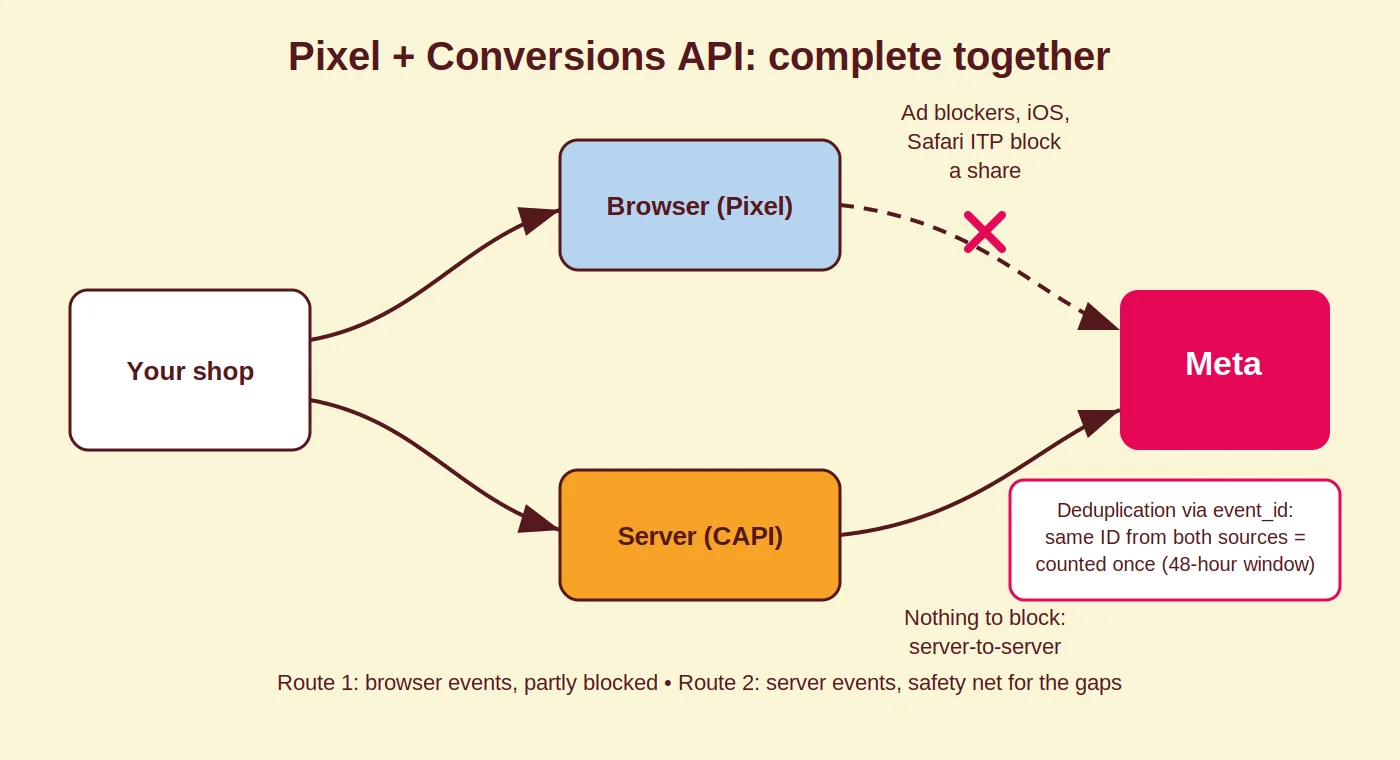
Conversions API vs Pixel: how deduplication really works
Run both and every conversion can reach Meta twice, once from the browser and once from your server. Deduplication through the event_id parameter makes sure each conversion is counted once.
You generate one unique event_id per conversion and send that same ID with the same event name from both sources. According to Meta’s deduplication documentation, when the IDs and event names match, Meta keeps the first event it receives and drops later duplicates within a 48-hour window.
In practice the browser event usually arrives first, so the Pixel event is typically the one kept, and the server event only “wins” when the Pixel was blocked or failed. Which is exactly the point: CAPI is your safety net, not a second scoreboard. Plenty of guides claim the server event always takes priority. It does not, and the distinction matters when you debug.
Check the deduplication view in Events Manager after go-live. If your purchase count suddenly jumps after adding CAPI, your event_id values are not matching and Meta is counting everything twice.
CAPI setup: four routes and when each one fits
There are four realistic ways to set up the Conversions API, from near one-click to fully custom. Meta compares them in its setup options overview; here is the practical version.
- Partner and platform integrations. Shopify, WooCommerce and most major platforms have CAPI built into their Meta integration. You connect your pixel and access token and the platform handles the server events. Lowest effort, least control: you get the events and parameters the platform exposes and nothing more. If you run Shopify and want more grip, start with our guide to the Shopify GTM custom pixel.
- Conversions API Gateway. Meta’s self-serve, low-code option. Through a guided setup in Events Manager you deploy a pre-packaged Conversions API Gateway in your own cloud account (AWS, for example), and it forwards Pixel events server-side without custom code. You pay your cloud provider’s hosting fees rather than a developer. It fits businesses without an engineering team that have outgrown the native integration, and it can serve multiple pixels and domains from one instance.
- Server-side Google Tag Manager. You run a GTM server container (on Google Cloud or a host like Stape or TAGGRS), your website sends events to that container, and the container forwards them to Meta, Google and any other endpoint. Most control for a marketer, easy event enrichment, one setup for all your channels. This is our default route; see our server-side tracking with GTM and TAGGRS guide and our comparison of server-side tracking tools.
- Direct API integration. Your developers send events straight from your back end to Meta. Maximum flexibility, ideal for custom order systems, CRM events and offline conversions, at the cost of build and maintenance time. Worth it for larger operations with engineering capacity.
Coby’s 3-Step CAPI Checklist
Before you call any CAPI setup finished, run it through these three checks. This is the same list we use on client accounts.
- Verify deduplication. In Events Manager, confirm both sources fire for the same conversions and that duplicates are being dropped. Zero deduplication with both sources live means mismatched event_id values. Inflated event counts mean the same thing.
- Check Event Match Quality. Open EMQ per event and look at which customer information parameters arrive. If hashed email or phone number is missing on server events, fix that first; it is the fastest way to improve matching.
- Cross-check against reality. Compare purchase or lead events in Events Manager with your order system or CRM for the same period. A small gap is normal because attribution and timing differ. A structural gap means something still leaks, and it needs finding before you touch budgets.
Common Conversions API mistakes
Most broken CAPI setups fail on one of four points: deduplication, event coverage, match parameters or consent.
No event_id deduplication. The classic. Both sources fire, nothing is matched, and reported ROAS roughly doubles overnight. Every purchase decision made on those numbers is wrong.
Sending only purchases. Meta’s algorithm learns from the whole funnel. If your server setup skips ViewContent, AddToCart, InitiateCheckout or Lead, the algorithm loses the mid-funnel signals it uses to find buyers before they buy.
Poor match parameters. A server event without hashed email, phone or browser identifiers barely matches to anyone. The event arrives, then attributes to nothing. Low EMQ is usually a data problem, not a Meta problem.
No consent signals. CAPI does not exempt you from GDPR. Your server should only send events and personal data in line with the consent your visitor gave, so wire your consent management platform into the setup instead of around it.
How Coby approaches this
We build the tracking first and the campaigns second, because budget optimised on bad data is budget wasted. Best-in-class measurement is the foundation of everything we do at Coby Agency, and server-side setups with correct deduplication and strong match quality are our standard, not an upsell.
That order of operations pays. For De Eenhoorn’s OneMeeting, campaigns built on a clean data foundation reached 1,500 percent ROAS. A lead-gen client went from 2 to 3 leads per month to 4 to 5 per week after we rebuilt their measurement and restructured campaigns on top of it. Marloes, our founder, spent years at Google before starting Coby, which is why the data side gets treated as seriously as the creative side.
If you run Meta alongside Google, the same server container can feed both, and choosing where budget goes gets easier with honest numbers on each. Our Google Ads vs Meta Ads comparison covers that decision, and our data and analytics service covers the plumbing underneath it.
Conclusion: stop paying for invisible conversions
The Pixel is not dead, but on its own it undercounts, and Meta optimises on what it counts. Adding the Conversions API with proper deduplication and strong match parameters gives the algorithm the full picture and gives you reporting you can actually steer on.
Not sure how much your current setup is missing? Book a free 30-minute call with Marloes and we will look at your Events Manager together: plan your call here.
FAQ
What is the Meta Conversions API?
The Meta Conversions API is a server-to-server connection that sends conversion events directly from your server (or a gateway or server container) to Meta, bypassing the browser. Because no script runs on the visitor’s device, ad blockers and browser privacy features cannot stop the event from arriving.
Does the Conversions API replace the Meta Pixel?
No. Meta recommends running both together in a redundant setup. The Pixel supplies real-time browser signals, the Conversions API fills the gaps when the browser signal is blocked, and event_id deduplication prevents double counting between the two.
How does deduplication between the Pixel and CAPI work?
You send the same event_id and event name from both the browser and the server. When Meta sees the matching pair within 48 hours, it keeps the first event received, usually the browser event, and drops the duplicate. Without matching IDs, every conversion counts twice.
What is a good Event Match Quality score?
Meta scores match quality per event on a scale of one to ten and higher is better; Meta does not publish an official pass mark. The practical rule: pass hashed email and phone number plus browser identifiers and IP or user agent, then watch the score climb in Events Manager.
Do I need a developer for a CAPI setup?
Not necessarily. Platform integrations like Shopify’s are self-service, the Conversions API Gateway is a guided low-code deployment in your own cloud account, and server-side GTM suits a technically minded marketer or a specialist agency. Only a direct API integration requires real development work.
Is the Conversions API GDPR-compliant?
The technology is neutral; your implementation decides. You still need a legal basis, usually consent, to send personal data such as hashed emails to Meta. Connect your consent management platform so server events respect each visitor’s choice.
Written by Marloes Slotboom, founder of Coby Agency.
Last updated: August 2026