
Most guides on AI ad creation list every tool under the sun and call it a day. This one does not.
AI has changed how ads get made. Copy, visuals, video, landing pages. The tools available in 2026 can handle all of it faster and cheaper than traditional production. But faster and cheaper only matter if the output actually converts.
This guide covers what is working right now for the kind of businesses Coby Agency works with: SMEs running Google Ads and Meta Ads with real budgets and real performance targets. Not enterprise brands with dedicated creative teams, and not solopreneurs testing 50 euros a day.
What AI ad creation actually means in 2026
AI ad creation in 2026 means two layers working together: the ad platforms themselves, which now generate and optimise creative natively, and a smaller set of third-party tools that fill the gaps.
The platform layer has moved fastest. Meta has built generative tools directly into Ads Manager: background generation, image expansion for different placements, text variations and video adaptations. The full list is in Meta’s generative AI features documentation. On the campaign side, Meta’s Advantage+ campaigns handle targeting, placements and budget allocation around whatever creative you feed them.
Google has done the same with Performance Max and AI Max for Search. Inside Google Ads, Asset Studio generates and edits image assets with Google AI, and Veo, Google’s video model, generates video assets for YouTube placements without any external tool.
The third-party layer handles what the platforms do not: producing assets from scratch at volume, keeping them on brand, and organising what you learn from testing.
So the question is no longer whether to use AI in ad creation. It is which parts of the process to delegate to AI and which parts to keep under human control.
Coby’s AI Ad Creation Framework
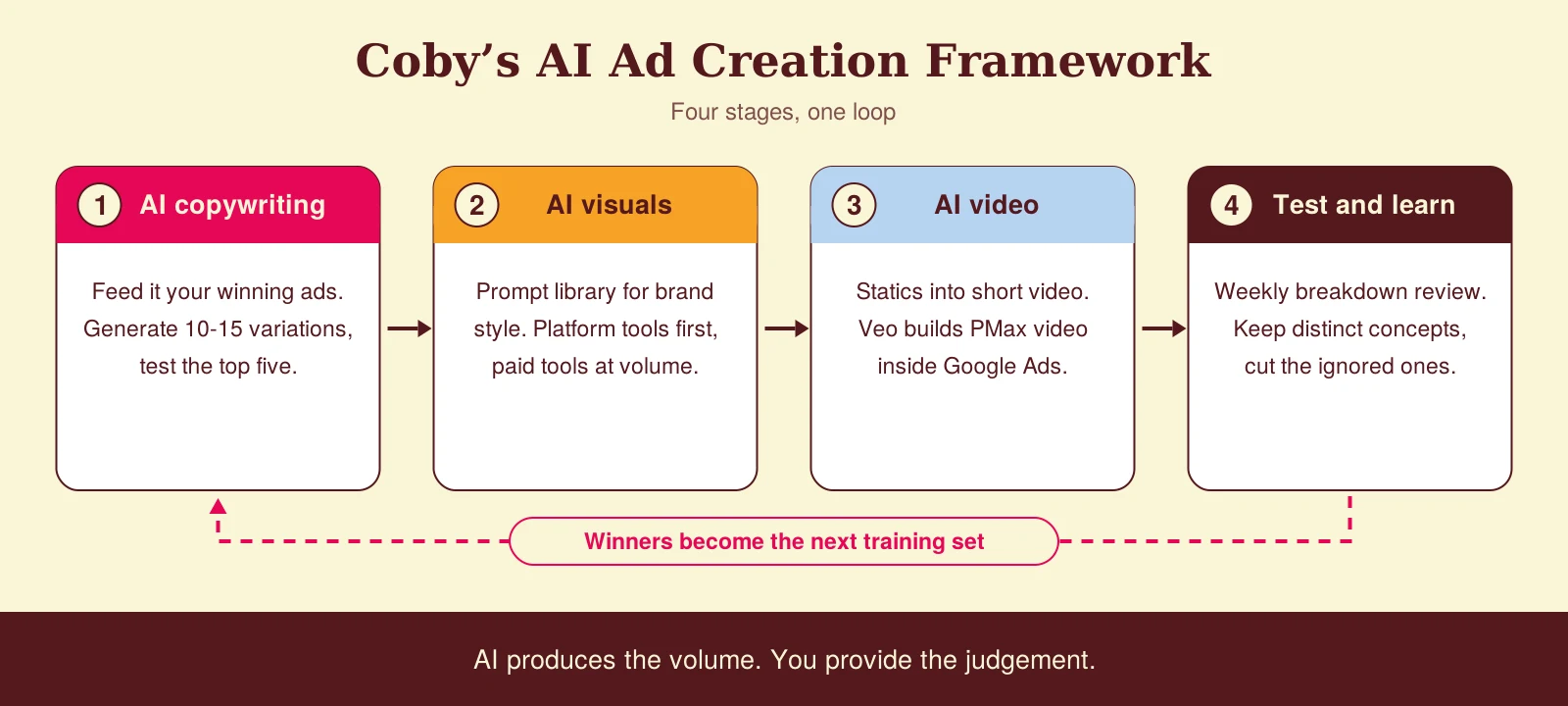
At Coby, we break AI ad creation into four stages. Each stage has a clear job, and each has tools that do that job well.
Stage 1: AI copywriting
This is where most advertisers start, and where most waste time by using it wrong.
Every AI model produces competent but generic copy out of the box. The operators getting results follow a specific process: feed the model your highest-converting existing ads and landing pages before generating anything new. That becomes the training set that shapes everything the tool produces.
In practice, this means pasting your three best-performing ads into ChatGPT or Claude before asking for new variations. Define your audience explicitly. Not “SME owners” but “a marketing manager at a Dutch B2B company who runs Google Ads in-house and cannot tell which campaigns are producing pipeline”. Ask for 10 to 15 variations. Test the top five.
For Google Ads specifically, this approach takes about half an hour and consistently produces better headlines than starting from scratch, because the AI is working from proven patterns rather than generic assumptions.
Stage 2: AI image and visual creation
Static ad visuals are the biggest creative bottleneck for most SMEs. Without a designer or a budget for photography, you end up reusing the same three images until performance drops.
AI image generation has largely solved this. Tools like Midjourney, Adobe Firefly and Canva’s AI features can produce on-brand visuals in minutes. The thing that separates coherent output from random output is a prompt library that captures your brand style, colour palette and visual tone.
For e-commerce brands with large product catalogues, dedicated platforms such as AdCreative.ai (part of Appier since its acquisition in February 2025) generate static ad designs at volume. For lead generation businesses, a simpler route works just as well: generate background images with AI and combine them with clear, benefit-focused headlines in a consistent template.
And before paying for anything, test what the platforms give you for free. Google’s image editor in Asset Studio generates and edits images inside your account, and Meta’s background and expansion tools cover a lot of the variation work that used to eat design hours.
Stage 3: AI video creation
Video is no longer optional for Meta Ads, and increasingly not for Google either.
For businesses without video production resources, tools like Creatify and InVideo convert static images and product descriptions into short video ads with voiceover, subtitles and motion. The output is not broadcast quality, but for Meta feed and Stories placements, it performs.
The more significant development sits inside Google Ads itself. Veo video generation in Asset Studio now creates video assets for YouTube placements within Performance Max. If you run PMax, you can generate compliant video assets directly inside the platform, which removes the old excuse of letting Google auto-generate a slideshow from your images because video was too expensive.
Stage 4: AI-assisted testing and optimisation
Generating creative is only half the job. The other half is knowing what to keep and what to cut.
Start with what is native. Meta’s Advantage+ creative options test visual and copy combinations across audience segments automatically. Review the breakdown data weekly: which concept is winning, which is being ignored, and where frequency is creeping up. We covered the real creative fatigue signals, and why Meta’s Andromeda system rewards concept diversity over near-duplicates, in our paid social trends analysis.
Feed those signals back into your next AI generation cycle. That loop, not any individual tool, is what compounds. Winners become the training set for stage 1, and the cycle repeats.
The part AI cannot replace
Generic inputs produce generic outputs, regardless of how sophisticated the tool.
What AI cannot do is understand your customer. It does not know that your best clients always mention the word “clarity” when describing what they got from working with you. It does not know which imagery outperformed in your last campaign, because that answer lives in your ad account, not in a model’s training data. It does not know that your Dutch audience responds differently to urgency-based copy than your German audience.
That customer knowledge has to come from you. The role of AI is to execute against that knowledge faster and at lower cost than traditional production. The strategy still has to be human.
At Coby, we use AI to produce the first 20 variations. Then we apply what we know about the client’s customer to select the five worth testing. That combination consistently outperforms either approach alone.
Common mistakes we see
Prompting from nothing. Asking a model for “10 Facebook ads for my webshop” without feeding it your winning ads, your audience definition or your offer produces filler. The input work is the work.
Publishing without review. AI copy happily invents claims your product cannot support. Both Google and Meta judge the final ad, not the production method, so a human check before launch is not optional.
Flooding the account with near-duplicates. Twenty variations of the same concept is not diversity. Meta’s ranking systems reward distinct concepts, so generate variations within three or four different angles instead of thirty versions of one.
Testing on broken measurement. If your conversion tracking is double-counting or missing conversions, every creative test you run is reading noise. Fix the data layer before you scale the creative layer.
How Coby approaches this
We are a tracking-first agency, and that applies to creative work too. AI can produce fifty assets a week, but if the account cannot measure which ones drive revenue, volume just produces noise faster.
So the order is always the same. First we make sure the conversion data is clean. Then we set up the creative loop: AI produces the volume, the account data picks the winners, and the winners train the next round. For one B2B client, that foundation took them from 2 to 3 leads per month to 4 to 5 per week. For e-commerce client De Eenhoorn, the same clean-data-first approach supported a 1,500% ROAS, with creative iteration compounding on top of measurement we could trust.
If you want to know whether your account is ready for an AI creative workflow, or whether the measurement underneath it would hold up, our data and analytics team looks at exactly that in a free audit.
A practical starting point
If you have not used AI in your ad creation process yet, start with copywriting. It has the lowest barrier to entry, the fastest feedback loop and the clearest return.
Take your best-performing ad from the last 90 days. Paste it into Claude or ChatGPT. Ask for 10 headline variations that keep the same core message but change the angle: one focused on the problem, one on the outcome, one on the proof, one on the timeframe. Add those to your next Google Ads rotation and measure click-through rate over two weeks.
That single test will tell you more about where AI adds value in your specific account than any tool comparison article, including this one. And if you would rather have someone build the whole loop with you, from measurement to creative testing, that is what our performance marketing service does. Get in touch and we will have a look at your account together.
Frequently asked questions
Does using AI for ad creation reduce ad performance?
Not when used correctly. Output quality depends on input quality: AI prompted with your best-performing copy and a sharp audience definition consistently beats generic ads. The risk is treating AI as a replacement for strategy rather than an accelerator.
Which AI tool is best for Google Ads copy in 2026?
Claude and ChatGPT remain the most cost-effective options for Search ad copy, provided you prompt them with your existing winning ads. For Performance Max assets, Google’s own Asset Studio now handles image and video generation inside the platform.
Should I use the platforms’ built-in AI tools or a third-party creative tool?
Start with what is built in: Meta’s generative features in Ads Manager and Google’s Asset Studio cost nothing extra and give you immediate performance data. Move to a third-party tool once you have enough volume to know which creative variables matter for your audience.
Can Google Ads generate video for me now?
Yes. Veo video generation in Asset Studio creates video assets for YouTube placements in Performance Max, directly inside Google Ads. For most SMEs this replaces the auto-generated slideshows that used to fill the video slot.
Is AI-generated ad creative compliant with Google and Meta policies?
Yes, provided you review the output before publishing. Both platforms evaluate the final ad, not the production method. The main risk areas are unsubstantiated claims and automated copy that makes guarantees your product cannot support.
How long does it take to set up an AI ad creation workflow?
The copywriting stage takes a couple of hours: gather your winning ads, landing pages and audience descriptions, then run a first generation cycle and select variations. The image and video stages take longer because they need brand guidelines and a prompt library, typically an afternoon of upfront work.
Written by Marloes Slotboom, founder of Coby Agency. Last updated: October 2026.