
LinkedIn ads are expensive. Not mildly expensive, but eye-wateringly expensive if the account is set up wrong. If you are a B2B founder or marketing manager staring at the cost per click in Campaign Manager and wondering whether LinkedIn ads for B2B can ever pay for themselves, this post is for you.
Here is the short version. LinkedIn is the only platform where you can target by job title, seniority, company size, industry and company name at the same time. That precision is why it costs what it costs. The waste rarely comes from the platform. It comes from accounts that send cold audiences straight to demo pages, judge everything on last-click conversions, and ask one campaign to do three different jobs.
We have seen companies burn through €5,000 in a month with nothing to show for it, and we have seen modest test budgets produce real pipeline. The difference is structure and measurement, not luck or budget size.
After reading this guide you will know where LinkedIn advertising cost actually goes, how to split your budget across the funnel with a clear logic, and how to connect ad spend to closed deals in your CRM instead of guessing.
Why LinkedIn ads for B2B cost so much (and when they are worth it)
LinkedIn charges a premium because its B2B targeting data is better than anyone else’s. You are paying to reach exactly the people who can sign off on your product, and that option does not exist at this scale on Meta or Google Search.
In our experience across B2B accounts, CPCs somewhere between €5 and €15 are normal, and click-through rates of 0.4 to 0.6 percent on Sponsored Content are unremarkable. Treat those as rough, experience-based ranges rather than official benchmarks. LinkedIn does not publish standard figures, and your vertical, audience size and creative will push you above or below them.
Think of LinkedIn as the trade fair of online advertising. The ticket price is steep, but everyone in the room is someone you might genuinely want to talk to. On Google Ads and Meta the reach is cheaper, but the room is mostly full of strangers.
The maths only works when your deal size can carry the click price. Selling €50,000 software contracts to operations directors? LinkedIn deserves a place in your plan. Selling €800 one-off services to sole traders? Spend that budget elsewhere first.
Coby’s LinkedIn Funnel Split: one budget, three jobs
The fastest way to stop budget leaking is to split one LinkedIn budget into three campaigns, each with its own job, objective and creative. We call this Coby’s LinkedIn Funnel Split, and it is the structure behind almost every B2B account we run.
- Awareness, roughly 40 percent of budget. A cold audience campaign built on your ideal customer profile: job titles, seniority, company size, or an uploaded target account list. The job is to introduce a problem your buyer recognises, using Thought Leader Ads or Document Ads. Nobody is asked to book anything yet.
- Consideration, roughly 35 percent. A campaign for people who engaged with the awareness layer or visited your site. The offer steps up: a guide, a webinar, a teardown, a free audit. This is where Lead Gen Forms and Website Conversions campaigns earn their keep.
- Conversion, roughly 25 percent. Retargeting only: people who hit your pricing or contact page, opened a Lead Gen Form, or match late-stage CRM segments. Direct response creative with a demo or call CTA is fine here, because the audience already knows you.
- Exclusions everywhere. Exclude existing customers, converted leads and open deals from the top two layers. Without exclusions you pay to advertise to people your sales team is already emailing.
- Review the split monthly. The percentages are a starting point, not a law. If retargeting pools are small, feed awareness more. If pipeline is thin, check the middle layer before blaming the top.
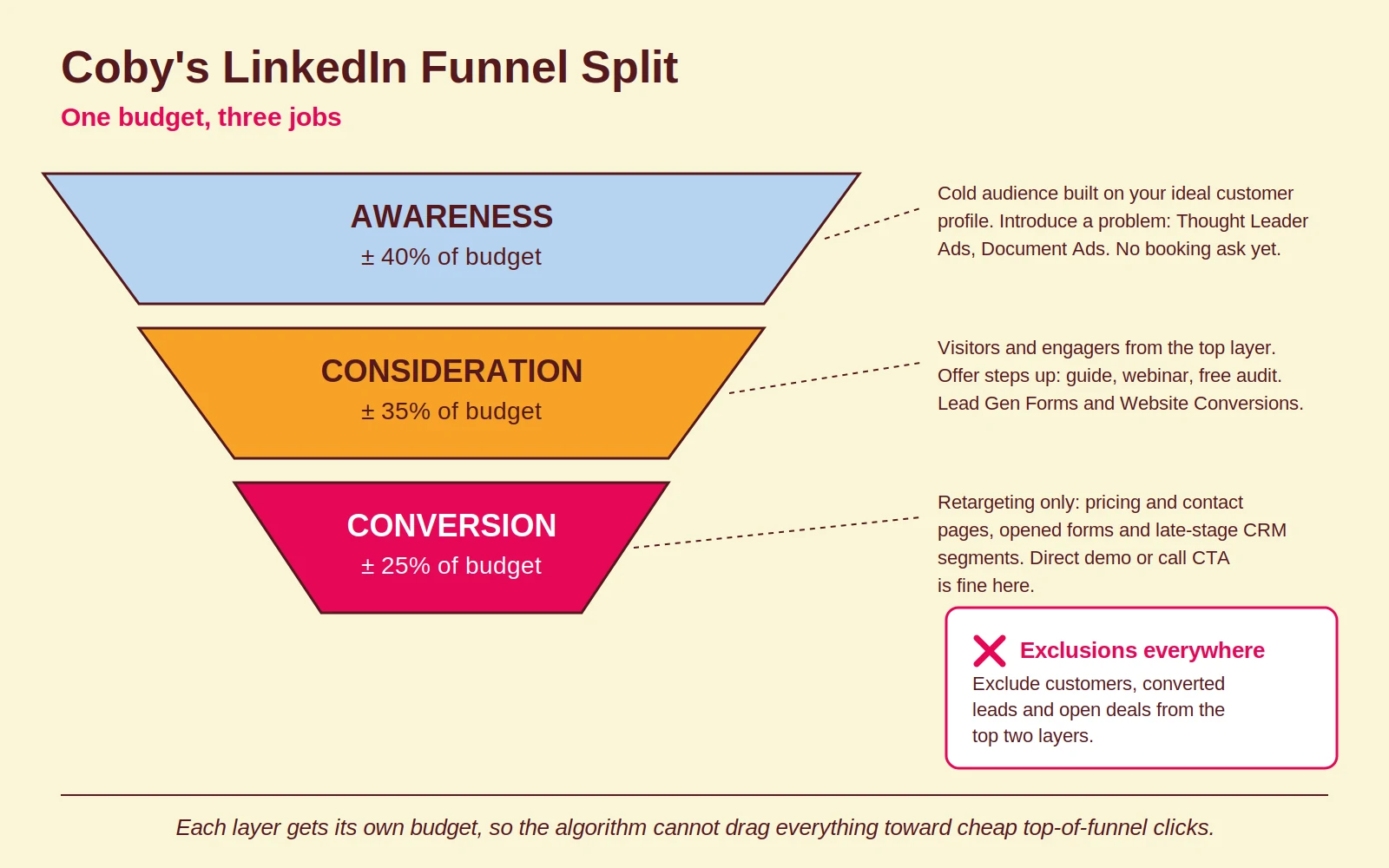
Each layer gets its own budget so the algorithm cannot quietly drag everything toward cheap top-of-funnel clicks. That budget logic, more than any single creative decision, is what separates accounts that scale from accounts that stall.
Objectives and formats that actually move revenue
Pick your campaign objective for the action you want, not the metric that looks best in a report. Objective selection breaks more LinkedIn accounts than weak creative ever does.
Website Visits optimises for people who click, which is not the same as people who convert. Website Conversions gives the algorithm a real signal, but it needs volume: as a rule of thumb from practice, a few dozen conversion events per month before the data stabilises. Below that, expect noisy results and slow learning.
On formats, three are worth testing in most B2B accounts:
- Document Ads. Multi-page PDF carousels read inside the feed. In accounts we have run and audited, they tend to outperform single image ads for lead generation, because scrolling through pages signals real interest.
- Thought Leader Ads. Sponsored posts from a named person rather than the company page. People trust people, and a founder’s post usually feels less like an ad than a logo does.
- Lead Gen Forms. Pre-filled with LinkedIn profile data, so friction is minimal. The trade-off is intent: cheaper leads, but softer ones. Run them against a landing page variant and judge on pipeline, not cost per lead.
The CRM feedback loop: where LinkedIn budgets are really won
If you connect your CRM back to Campaign Manager, LinkedIn stops being a black box. This is the fix with the biggest payoff for most B2B accounts, and it is the piece almost everyone skips.
The problem it solves is familiar. A director sees your ad, visits the site, closes the tab. Three weeks later she books a demo after a follow-up email, and the deal closes at €30,000. Campaign Manager records nothing, the campaign looks dead, and someone pauses it. In long B2B sales cycles this happens constantly, and it is the same class of problem we describe in our post on Google Ads tracking problems.
The fix has three parts, in order:
- Insight Tag on every page, with conversion events for the actions that matter: demo booked, form sent, call made. Not just a thank-you page view.
- UTM parameters captured in your CRM at contact level, so every lead carries its first-touch LinkedIn source through to closed-won.
- Offline conversion import. Push CRM outcomes like “qualified lead” and “closed-won” back into LinkedIn through its Conversions API, so the algorithm optimises toward revenue instead of form fills. Tools like n8n make the sync between CRM and ad platforms maintainable; our automation service exists largely for plumbing like this.
If your measurement already leans on server-side tracking, the LinkedIn feedback loop slots into the same setup. The goal is one version of the truth: what Campaign Manager reports and what your CRM records should tell the same story.
Four common mistakes that drain LinkedIn budgets
Most wasted LinkedIn spend traces back to four errors, and none of them are about creative talent.
- Sending cold audiences to demo pages. A stranger does not book a sales call from the first ad they see. Cold traffic needs a problem-first message and a low-friction next step, then a retargeting layer to do the asking.
- Judging on platform conversions only. Last-click numbers in Campaign Manager systematically undercount LinkedIn in long sales cycles. Look at CRM-attributed pipeline, branded search lift and assisted conversions before declaring a campaign a failure.
- Targeting too narrow. Stacking five filters until your audience is 8,000 people feels precise, but it drives CPMs up and starves the algorithm of data. Loosen one filter at a time and let exclusions do the fine work.
- Ignoring frequency. Small B2B audiences see the same ad again and again, CTR sags and CPCs climb. LinkedIn manages default delivery frequency itself these days, and Campaign Manager offers a configurable frequency cap for supported setups. Watch frequency in your reporting and rotate creative every three to four weeks: new hook, new format, not just a new image.
How Coby approaches this
We treat LinkedIn as a measurement problem first and a media problem second. Before scaling spend, we make sure the Insight Tag, conversion events, UTM capture and CRM feedback loop are in place, because optimising on incomplete data is just guessing with a dashboard. That tracking-first setup is the core of our data and analytics service.
It also helps that we see LinkedIn from more than one angle. Coby runs campaigns across SaaS, healthcare, manufacturing and hospitality, and patterns from one vertical keep paying off in another. For OneMeeting Group (De Eenhoorn) that combination of clean tracking and funnel structure supported a 1,500 percent ROAS, and for another B2B client we took lead flow from two to three leads per month to four to five per week.
Marloes, our founder, spent years at Google as an Agency Account Strategist for Benelux and the Nordics before starting Coby. That background shapes how we plan channels together rather than in silos, including where LinkedIn fits in a Q4 B2B plan.
Conclusion: structure first, budget second
LinkedIn ads work for B2B when three things line up: a deal size that can carry the click price, a funnel split that gives every euro one clear job, and a CRM feedback loop that shows what the platform cannot. Get those right and the high CPCs stop being scary and start being a filter.
If your account has run for three months and you still cannot say what a pipeline-qualified lead costs per audience segment, start with the measurement, not the media. Book a free 30-minute call with Marloes and we will tell you honestly whether your tracking or your structure is the problem.
Frequently asked questions
How much do LinkedIn ads cost for B2B?
LinkedIn’s own minimum is $10 per day (roughly €9) per campaign, per its minimum budget requirements. In practice, meaningful B2B testing needs more: in our experience €50 to €100 per day, or €3,000 to €5,000 per month, gives you enough data to compare two or three audiences properly.
Is LinkedIn advertising worth it for B2B?
Yes, when your average deal size is large enough to absorb CPCs that often land between €5 and €15 in our experience. For high-value B2B sales to specific job titles or target accounts, no other platform targets as precisely. For low-ticket offers, Google Ads or Meta usually earns the first euro better.
What is a good CTR for LinkedIn ads?
In our experience, 0.4 to 0.6 percent is a normal range for B2B Sponsored Content, though LinkedIn publishes no official benchmark. If you sit well below that, the first line of your ad copy is the usual suspect: name the problem immediately instead of setting context.
Should I use Lead Gen Forms or send traffic to my website?
Test both with the same creative and judge on downstream pipeline quality, not cost per lead. Lead Gen Forms cut friction and cost per lead, while website conversions usually produce fewer but warmer leads. Your CRM data, not Campaign Manager, should settle the argument.
How do I measure LinkedIn ads beyond the last click?
Capture UTM parameters in your CRM at first touch, carry them through to closed-won, and import those offline outcomes back into LinkedIn via its Conversions API. That loop shows LinkedIn’s real contribution to pipeline, which last-click reporting structurally undercounts in long sales cycles.
Written by Marloes Slotboom, founder of Coby Agency. Last updated: August 2026