
An installation company in Apeldoorn spent €1,200 a month on Google Ads. After three months: zero leads from its own region. The campaign ran on broad search terms and pulled clicks from Amsterdam, Rotterdam and even Belgium. The budget was gone, the calendar stayed empty.
That is not an unusual story. Local advertising with Google Ads sounds simple, but Google's default settings work against local businesses more often than they work for them. Below is what I see going wrong, how to set it up properly, and how to measure whether it works afterwards.
In this article you'll learn:
- Why Google's default location setting costs you money
- Which campaign type suits local goals best
- How to target specific neighbourhoods, towns or radii
- Which conversions to measure to see real ROI
- How to use performance data to steer your strategy
The location setting that's on by default and almost nobody changes
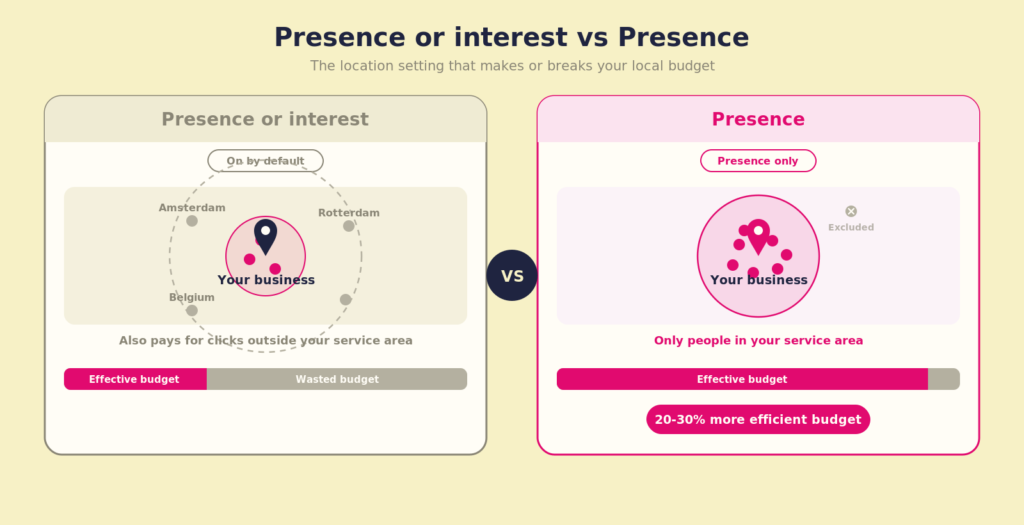
When you create a new Google Ads campaign and choose "Apeldoorn" as your location, Google shows your ad by default to people who are interested in Apeldoorn but don't live or work there. That sounds reasonable until you realise that someone in Groningen reading a blog about Apeldoorn also falls within your targeting.
The setting is called "Presence or interest" and it's on by default. You want "Presence" (presence only). That choice sits a few clicks deep in the campaign settings, under the advanced location options. Every campaign. Every time.
Changing that one setting can easily make your click budget 20 to 30% more efficient, purely because you stop paying for people who will never geographically walk through your door. For service businesses with a small service area, this is often the first quick win I apply.
Search ads versus Performance Max and Demand Gen for local campaigns
Google pushes everyone towards Performance Max. Understandable from Google's point of view, because it gives them a lot of control over where your ad appears. For local businesses, that's exactly the problem.
Performance Max combines Search, Display, YouTube, Gmail and Maps in one campaign. For a national webshop that can work. For a plumber in Nijmegen who only wants to advertise within 25 kilometres, it's a black box. You can't see where your money goes, you can't steer at search-query level, and the campaign needs weeks to learn, which with limited local volume means you wait a long time for data that may never reach enough volume.
My starting point for most local businesses: the Search Network, manual CPC or maximise clicks, with a tight location setting and a negative keyword list that's filled before day one. Once you hit 30 to 50 conversions a month, you can look at whether smart bidding or a Performance Max campaign alongside the Search campaign makes sense. But not before.
There's also a newer campaign type called Demand Gen. Demand Gen originally runs on YouTube, Shorts, Discover and Gmail: visual channels where you create demand rather than capture existing demand. For a long time that was hard to justify for a local business, because you paid for reach in places where local intent was nowhere to be found. That has changed. Google added Google Maps as a separate, controllable channel inside Demand Gen. And Maps is exactly where local intent lives: people searching for directions, comparing a nearby business or deciding where to drive.
You choose the channel at ad group level. You can include Maps alongside YouTube and Discover, or build a Maps-only ad group so your budget goes only to that local, high-intent surface. For a plumber or a physical shop, the second option is often the sensible one: no reach wasted on national video inventory, but visible the moment someone nearby is navigating.
Then the people. Demand Gen gives you two levers that work well here.
Custom segments are your sharpest steering tool. You build a segment based on what people actively search for or which sites and apps they use, for example search terms around your service or competitors in your region. That keeps your reach close to real, current intent.
Lookalike segments start from your own first-party data: you upload a customer or lead list (minimum 1,000 matches) as a seed, and Google finds similar people. Note one important change: since March 2026, a lookalike in Demand Gen is no longer a hard targeting boundary but a signal. Google uses your seed and chosen reach (narrow, balanced or broad) to steer the AI towards conversions, not to fence in your audience. So you steer the bidding, you don't put a wall around your audience. Good first-party data matters more than ever: the quality of your seed determines the quality of the signal.
Practically for local: set up a Maps-only ad group, feed it a custom segment around local search intent, and let a lookalike of your best customers push the whole thing towards your most valuable people. Always put lookalikes in a separate ad group so you can see what they actually add.
One nuance that fits the rest of this piece: Demand Gen is an addition, not a replacement for your Search foundation. It leans on conversion volume and clean event data to learn, which is exactly where a local account is often thin. Build your Search foundation with reliable tracking first, and put Demand Gen alongside it once you have enough conversion signal to feed the machine. Otherwise a shiny new channel still optimises on noise.
Google Ads for local businesses works best when you match your campaign structure to your service area and audience, not to Google's default recommendations.
Radius, postcodes and neighbourhoods: how specific you can target
Google Ads offers three ways to target geographically: by place (municipality, province, country), by a radius around an address, or by postcode. You can combine them, and it pays off.
A practical example: a dental practice in central Utrecht wants to reach patients living within 8 kilometres, but wants to exclude Overvecht and Kanaleneiland because two other practices in the network already serve those areas. You set an 8-kilometre radius, then manually exclude the specific postcodes of those neighbourhoods. That's a targeted approach you can't reach with just a place name.
Location bid adjustments are worth it too. If you know that customers from certain postcodes convert more often or have higher order values, you can set a higher bid for those locations. In Google Ads you do this via Campaign settings, Locations, the geographic report tab. You then see exactly which postcodes or places your clicks and conversions come from, and you adjust the bids accordingly.
For the most advanced local targeting, where you also look at behavioural data and conversion patterns per location, you do need a properly set-up tracking system. Otherwise you're optimising on noise.
The conversions you set determine what Google optimises
This is where local campaigns most often go wrong, and it's also the least glamorous part, so it gets skipped.
Say you only measure form submissions as a conversion. You get 10 forms a month. Google has too little data to bid intelligently. The campaign runs on gut feeling instead of signals. Meanwhile your phone rings 40 times a month after an ad click, but you never see that data.
For local businesses, these are the conversions you want to measure at a minimum:
- Phone contacts via Google's call tracking (or via a dynamic phone number on the landing page)
- Form submissions
- Directions requests from Google Maps (if you have a location)
- Direct appointment bookings if you use a booking tool
Once you combine those four sources, you get a far more realistic picture of what your campaign delivers. At a car garage in Deventer I worked with, 60% of conversions turned out to come in by phone. That data was nowhere in the account. The campaign optimised purely on the 8 forms a month and therefore missed the bulk of the real signal.
Setting up tracking correctly is technical work, but it's the foundation. At Coby we start every engagement with a tracking audit, precisely because a campaign without proper measurement is built on sand.
How to use performance data to steer local campaigns
Once tracking is in place, you can actually optimise. But you don't do that by fiddling with the controls every week. You do it by looking, structurally, at a few specific reports.
Search terms report: check this at least once a week in the first month. Local campaigns attract a surprising amount of irrelevant queries, even with exact match. Search terms like "mechanic vacancy" or competitor names in other cities can simply show up. Add negative keywords based on what you see, not on what you think you'll see.
Geographic report: this report (under Insights and reports, Geographic report) shows where your clicks and conversions come from. If you see that 30% of your clicks come from a municipality outside your service area, add that municipality as an excluded location.
Time of day and day of week: for many local businesses, ads at the weekend or after closing time are wasted money if there's nobody to answer the phone or follow up quickly. You can set an ad schedule so your campaign only runs when you're actually reachable.
If you want to know how to turn performance data structurally into better campaign decisions, that's exactly what performance marketing is about.
What a local Google Ads campaign realistically costs and returns
Setting honest expectations is part of good advice. Local Google Ads campaigns work with relatively small volumes. If your service area has 50,000 residents and you focus on one service, there might be 200 to 400 relevant searches a month. You won't see thousands of clicks a month, and you don't need to.
A realistic budget for a local Search campaign sits between €500 and €2,000 a month, depending on competition on the search terms and the click price in your sector. WordStream publishes annual benchmarks by industry that give a good indication of average click prices per sector, though local markets can differ significantly from these.
What you want to measure is cost per lead or cost per appointment, not cost per click. A €3 click that results in an €800 job is cheap. A €0.80 click that never converts is expensive. You can only do that calculation if your conversions are set up correctly.
Want to know where your Google Ads account stands right now? At Coby we run tracking audits that show where conversions leak and how to make your campaigns run on real data. Get in touch and we'll look at what's going on together.
Frequently asked questions
What's the difference between 'presence' and 'presence or interest' as a location setting in Google Ads?
'Presence' shows your ad only to people who are physically in your selected area or regularly there. 'Presence or interest' also adds people who've shown interest in that area, for example via a search, even if they live far away. For local businesses that want to reach customers in a specific region, 'presence' is almost always the better choice.
Should a local business use Performance Max or regular search ads?
Regular Search campaigns give you more control over search terms, location and bids, which usually works better for local businesses on a limited budget. Performance Max is a black box that functions well at higher volumes and for broad goals. Once you record 30 to 50 conversions a month, you can look at whether Performance Max is a useful addition, but not as a starting point.
How do I measure whether my local Google Ads campaign is profitable?
Set conversion goals for all contact moments: phone calls, forms, appointments and directions requests. Then calculate cost per lead and compare it with the average value of a new customer. If a new customer is worth €600 on average and you pay €80 per lead with a 40% close rate, a new customer costs you €200. That's your starting point for judging whether the budget can go up or down.
Can I target specific neighbourhoods or postcodes in Google Ads?
Yes. You can add or exclude postcodes as a location, and you can set a radius around a specific address. You can combine both methods. For neighbourhoods Google doesn't recognise as a separate location, you work with postcodes or a custom radius. This works best when you know which areas are most valuable to you.
How often should I check my local Google Ads campaign?
In the first month, at least weekly: the search terms report for new negatives, the geographic report for locations to exclude, and the conversion data to check that everything is measurable. After the first month, once the basics are in place, every two weeks or monthly is enough, unless the budget rises or falls significantly.
Written by Marloes Slotboom, founder of Coby Agency and a former Google Agency Account Strategist (Benelux and Nordics). Last updated: July 2026.