
On 17 August 2026, Google changes how target-based bidding works for budget-limited campaigns. If your Target CPA or Target ROAS sits far from what your campaigns actually deliver, that gap is about to cost you money. This post explains what changes, who it hits, and gives you a free Google Ads script that finds every campaign at risk in your account.
What changes on 17 August 2026
Today, a campaign that is limited by budget often beats its target quietly. You set a €10 Target CPA, and because the budget runs out before the day does, Google brings conversions in at €5. You get more, cheaper conversions than the target asked for.
From 17 August, Google makes those budget-limited campaigns deliver toward the target you actually set. That €10 target that was running at €5 will drift up toward €10. Same budget, up to twice the cost per conversion, and fewer conversions for your money. Google's own help page on the change confirms the mechanics.
Target ROAS works the same way in reverse. A campaign set to a 300% target while actually delivering 600% will drift down toward 300%.
The target stops being a soft ceiling that Google beats when it can, and becomes the number it delivers to.
Who this actually hits
Two things have to be true for a campaign to be affected:
- It uses a target-based strategy: Target CPA or Target ROAS (including Maximise conversions or Maximise conversion value with a target set).
- It is "Limited by budget".
If a campaign is not budget-limited, this change does not move it. So the first job is to find the campaigns that are both target-based and budget-limited, and then check how far their target has drifted from their actual performance.
You can see "Limited by budget" on the campaign status in the Google Ads UI. At scale, across a whole account or an MCC, checking every campaign by hand is slow. That is what the script below is for.
Why a loose target suddenly costs money
Take a Search campaign, budget-limited, on a €10 Target CPA, actually converting at €5.
Before 17 August: it spends its budget picking up conversions at around €5. If the budget is €500 a day, that is roughly 100 conversions.
After 17 August: it is allowed to deliver toward €10. The same €500 a day now buys conversions at up to €10, so you get closer to 50 for the same spend.
Nothing about your product, your funnel or your competition changed. Only the target you left sitting too high.
The fix: bring your target to your actual, before the 17th
The fix is simple to say: move each target in line with your recent actual performance so there is no slack left for Google to spend.
The care is in how you move it.
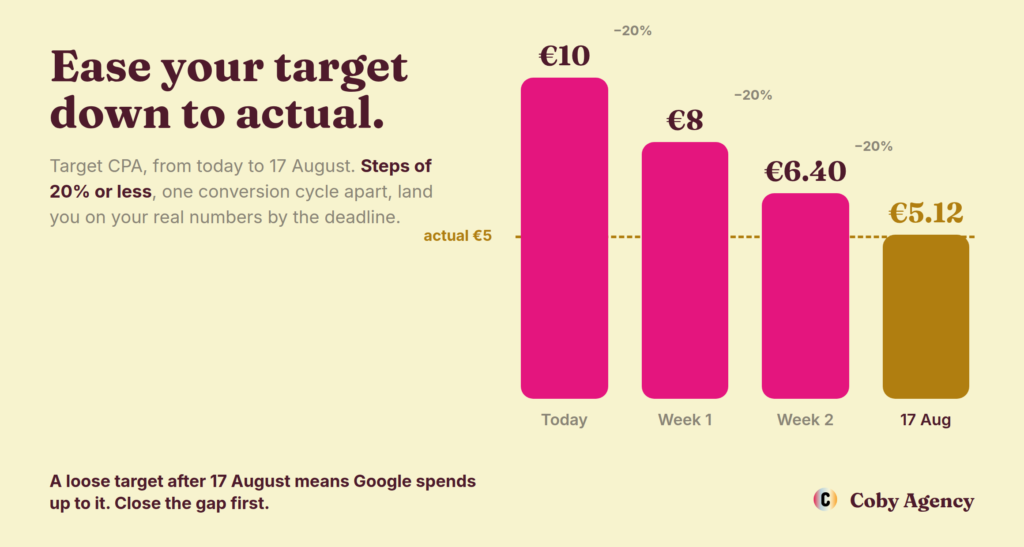
Every target change restarts Smart Bidding's learning. Change a target by a large amount in one go and you can disrupt performance while it re-learns. Change it every couple of days and it never settles, because each change resets the window again.
So:
- If the gap is small, roughly 15 to 20% or less, make one change to your recent actual and hold it.
- If the gap is large, close it in steps of no more than 20% at a time, and give each step a full conversion cycle to settle before the next. For most accounts that is about a week. For low-volume accounts it is longer, wait until the numbers are stable, not just until seven days have passed.
Starting about three weeks out from 17 August gives you room for two or three clean steps, which is enough to close most gaps without shocking anything.
One more note. Since 6 July Google also has a Bid Target Adjustment Tool in the interface that suggests target changes per campaign. It is useful. The script below is the at-scale version: it audits every campaign at once and tells you which gaps are worth acting on first.
The free script: find every drifted target in your account
This script scans an account, compares each target-based campaign's target to its last 30 days of actual CPA or ROAS, and flags the budget-limited campaigns where the target has drifted loose. It changes nothing. It only reports, to your logs and, if you want, to a Google Sheet or an email.
How to run it:
- In Google Ads, go to Tools, then Bulk actions, then Scripts, then the plus button for a new script.
- Paste the script in.
- Optional: paste a Google Sheet URL and an email address in the CONFIG block at the top.
- Authorise, then Preview, and read the Logs.
/**
 * Coby Agency - Target CPA / Target ROAS drift audit
 * -------------------------------------------------------------
 * From 17 August 2026 Google steers budget-limited campaigns that use a
 * target-based strategy (Target CPA / Target ROAS) toward the target you
 * actually set, instead of quietly beating it. A target that sits looser
 * than your real performance will cost you: CPA drifts up toward the target,
 * ROAS drifts down toward it, for the same budget.
 *
 * This script scans an account, compares each target to the last 30 days of
 * actual performance, and flags the campaigns to tighten before the 17th.
 * It changes nothing in the account. It only reports.
 *
 * How to use:
 *   1. Google Ads > Tools > Bulk actions > Scripts > + New script.
 *   2. Paste this in, Authorise, Preview. Read the Logs.
 *   3. Optional: paste a Google Sheet URL and / or an email below to get the
 *      report out of the logs.
 *
 * MCC: run it per account, or wrap main() in an AdsManagerApp account
 * iterator if you manage several.
 * -------------------------------------------------------------
 */

var CONFIG = {
  DATE_RANGE: 'LAST_30_DAYS',       // window for "actual" CPA / ROAS
  MIN_CONVERSIONS: 15,              // skip thin-data campaigns (unreliable actuals)
  BUDGET_LOST_IS_THRESHOLD: 0.10,   // > 10% search budget lost IS = budget-limited
  DRIFT_FLAG_PCT: 0.15,             // flag when the target is > 15% looser than actual
  MAX_STEP_PCT: 0.20,               // never suggest moving more than 20% per step
  SPREADSHEET_URL: '',             // optional: a Google Sheet URL to write results to
  EMAIL: ''                        // optional: address to email the summary to
};

function main() {
  var query =
    'SELECT campaign.id, campaign.name, campaign.advertising_channel_type, ' +
    'campaign.bidding_strategy_type, ' +
    'campaign.target_cpa.target_cpa_micros, ' +
    'campaign.maximize_conversions.target_cpa_micros, ' +
    'campaign.target_roas.target_roas, ' +
    'campaign.maximize_conversion_value.target_roas, ' +
    'metrics.cost_micros, metrics.conversions, metrics.conversions_value, ' +
    'metrics.search_budget_lost_impression_share ' +
    'FROM campaign ' +
    "WHERE campaign.status = 'ENABLED' " +
    'AND segments.date DURING ' + CONFIG.DATE_RANGE;

  var rows = AdsApp.search(query);
  var results = [];

  while (rows.hasNext()) {
    var r = rows.next();
    var c = r.campaign || {};
    var m = r.metrics || {};

    // Find the target (campaign-level strategies only; see note on portfolio below)
    var type = null, target = null;
    if (c.targetCpa && c.targetCpa.targetCpaMicros) {
      type = 'CPA'; target = micros(c.targetCpa.targetCpaMicros);
    } else if (c.maximizeConversions && c.maximizeConversions.targetCpaMicros) {
      type = 'CPA'; target = micros(c.maximizeConversions.targetCpaMicros);
    } else if (c.targetRoas && c.targetRoas.targetRoas) {
      type = 'ROAS'; target = Number(c.targetRoas.targetRoas);
    } else if (c.maximizeConversionValue && c.maximizeConversionValue.targetRoas) {
      type = 'ROAS'; target = Number(c.maximizeConversionValue.targetRoas);
    }
    if (!type || !target) continue;   // not a target-based campaign, or no target set

    var conv = Number(m.conversions || 0);
    if (conv < CONFIG.MIN_CONVERSIONS) continue;

    var cost = micros(m.costMicros);
    var value = Number(m.conversionsValue || 0);
    var budgetLostIS = Number(m.searchBudgetLostImpressionShare || 0);
    var channel = c.advertisingChannelType || '';

    var actual, driftPct, looser, suggestion;
    if (type === 'CPA') {
      actual = cost / conv;
      looser = target > actual;                       // Google may pay up to the target
      driftPct = actual > 0 ? (target - actual) / actual : 0;
      suggestion = Math.max(actual, target * (1 - CONFIG.MAX_STEP_PCT));
    } else {
      actual = cost > 0 ? value / cost : 0;
      looser = target < actual;                       // Google may accept down to the target
      driftPct = target > 0 ? (actual - target) / target : 0;
      suggestion = Math.min(actual, target * (1 + CONFIG.MAX_STEP_PCT));
    }

    // Budget-limited detection is reliable for Search/Shopping only
    var budgetLimited;
    if (budgetLostIS > CONFIG.BUDGET_LOST_IS_THRESHOLD) budgetLimited = 'Yes';
    else if (channel === 'SEARCH' || channel === 'SHOPPING') budgetLimited = 'No';
    else budgetLimited = 'Unknown';

    var flagged = looser && Math.abs(driftPct) >= CONFIG.DRIFT_FLAG_PCT;
    var action;
    if (!flagged) action = 'OK, target close to actual';
    else if (budgetLimited === 'Yes') action = 'TIGHTEN before 17 Aug';
    else if (budgetLimited === 'Unknown') action = 'Check if budget-limited, then tighten';
    else action = 'Watch (not budget-limited today)';

    results.push({
      name: c.name, channel: channel, type: type, target: target, actual: actual,
      driftPct: driftPct, budgetLimited: budgetLimited, budgetLostIS: budgetLostIS,
      suggestion: suggestion, conv: conv, flagged: flagged, action: action
    });
  }

  // Most urgent first: budget-limited + flagged, then by drift size
  var rank = { 'TIGHTEN before 17 Aug': 3, 'Check if budget-limited, then tighten': 2, 'Watch (not budget-limited today)': 1, 'OK, target close to actual': 0 };
  results.sort(function (a, b) {
    return (rank[b.action] - rank[a.action]) || (Math.abs(b.driftPct) - Math.abs(a.driftPct));
  });

  report(results);
  if (CONFIG.SPREADSHEET_URL) writeSheet(results);
  if (CONFIG.EMAIL) emailSummary(results);
}

function micros(v) { return Number(v || 0) / 1000000; }
function pct(x) { return (x >= 0 ? '+' : '') + Math.round(x * 100) + '%'; }
function money(x) { return x.toFixed(2); }
function roas(x) { return x.toFixed(2) + 'x'; }

function report(results) {
  var tighten = results.filter(function (r) { return r.action.indexOf('TIGHTEN') === 0; });
  Logger.log('Target drift audit, ' + CONFIG.DATE_RANGE + ', ' + results.length +
    ' target-based campaigns with enough data.');
  Logger.log(tighten.length + ' are budget-limited with a loose target. Fix these before 17 August.\n');
  Logger.log(['CAMPAIGN', 'CHANNEL', 'TYPE', 'TARGET', 'ACTUAL', 'DRIFT', 'BUDGET-LTD', 'NEXT STEP (<=20%)', 'ACTION'].join(' | '));
  results.forEach(function (r) {
    var t = r.type === 'CPA' ? money(r.target) : roas(r.target);
    var a = r.type === 'CPA' ? money(r.actual) : roas(r.actual);
    var s = r.type === 'CPA' ? money(r.suggestion) : roas(r.suggestion);
    Logger.log([trim(r.name, 34), r.channel, r.type, t, a, pct(r.driftPct), r.budgetLimited, s, r.action].join(' | '));
  });
  Logger.log('\nNote: portfolio (shared) target strategies are not covered here, their target lives on the strategy, not the campaign. Check those in Tools > Shared library > Bid strategies.');
}

function trim(s, n) { s = String(s || ''); return s.length > n ? s.substring(0, n - 1) + '.' : s; }

function writeSheet(results) {
  var ss = SpreadsheetApp.openByUrl(CONFIG.SPREADSHEET_URL);
  var sh = ss.getActiveSheet();
  sh.clear();
  sh.appendRow(['Campaign', 'Channel', 'Type', 'Target', 'Actual', 'Drift', 'Budget-limited', 'Search budget lost IS', 'Next step (<=20%)', 'Conversions', 'Action']);
  results.forEach(function (r) {
    sh.appendRow([r.name, r.channel, r.type,
      r.type === 'CPA' ? r.target : r.target,
      r.type === 'CPA' ? r.actual : r.actual,
      Math.round(r.driftPct * 100) / 100,
      r.budgetLimited, Math.round(r.budgetLostIS * 100) / 100,
      r.suggestion, r.conv, r.action]);
  });
  Logger.log('Written to sheet: ' + CONFIG.SPREADSHEET_URL);
}

function emailSummary(results) {
  var tighten = results.filter(function (r) { return r.action.indexOf('TIGHTEN') === 0; });
  var body = 'Target drift audit (' + CONFIG.DATE_RANGE + ')\n' +
    tighten.length + ' budget-limited campaigns with a loose target to fix before 17 August:\n\n';
  tighten.forEach(function (r) {
    var t = r.type === 'CPA' ? money(r.target) : roas(r.target);
    var a = r.type === 'CPA' ? money(r.actual) : roas(r.actual);
    body += '- ' + r.name + ' (' + r.type + '): target ' + t + ', actual ' + a + ', drift ' + pct(r.driftPct) + '\n';
  });
  MailApp.sendEmail(CONFIG.EMAIL, 'Google Ads target drift audit', body);
  Logger.log('Emailed summary to ' + CONFIG.EMAIL);
}
Reading the output
The report lists every target-based campaign with enough data, most urgent first. The columns that matter:
Drift is how far your target sits from your actual. A Target CPA of €10 against a €5 actual shows +100%.
Budget-limited is Yes, No or Unknown. The change only bites budget-limited campaigns, so the Yes rows are your priority. Unknown appears for Performance Max and Demand Gen, where budget-limited status is not exposed to scripts, so confirm those in the interface.
Action tells you what to do. "TIGHTEN before 17 Aug" means budget-limited with a loose target: fix these first. "Next step" suggests a target no more than 20% closer to your actual, as a safe first move.
Two limits to know. The script reads campaign-level targets, so portfolio (shared) bid strategies need a separate check under Shared library. And it skips campaigns under 15 conversions in the window, because their actuals are too noisy to trust.
Before the 17th, in short
Find your target-based campaigns that are Limited by budget. Measure the gap to your last 30 days of actual. Where the target is loose, bring it toward your real numbers, in steps of 20% or less, a conversion cycle apart. Then hold, and watch the last week of August.
Do that, and 17 August is a non-event for your account instead of a quiet price rise.
Want a second pair of eyes?
If you would rather someone run this across your account and tell you exactly which targets to move and by how much, book a free audit and we will take a look. More on how we run paid accounts is on the SEA service page.
Written by Marloes Slotboom, founder of Coby Agency. Last updated: July 2026.