
 Coby Agency
Performance Max promised simplicity. Hand Google your budget, your assets and your goals, and let the machine figure out the rest.
For a while, that was enough. But as PMax has matured, the gap between advertisers who treat it as a black box and those who actively steer it has become impossible to ignore.
The good news: Google has shipped more transparency and control features since late 2025 than in the two years before. The bad news: most advertisers have not activated them yet.
This guide covers the advanced Performance Max strategies that are making the biggest difference for Coby Agency clients right now, updated for the features that are live in September 2026. It is written for advertisers who already run PMax and want more control, whether you manage it in-house or want to check what your agency should be doing.
What has changed in Performance Max since late 2025
Before getting into the strategies, it helps to know what you are now actually working with.
Google rolled out channel-level reporting for Performance Max, showing how each channel (Search, YouTube, Display, Discover, Gmail and Maps) contributes to campaign performance. In 2026 a timeline chart was added, so instead of a single blended ROAS number you can see which channels drive results over time and which consume budget without converting.
Search terms reporting now has the same granularity as regular Search campaigns, and campaign-level negative keywords (up to 10,000 per campaign) and brand exclusions are available to act on what you find.
First-party audience exclusions are also live. The “Your data exclusions” setting lets you exclude specific customer lists from your Performance Max campaigns, so you can stop serving acquisition ads to people who converted last week.
And PMax Experiments let you test a Performance Max campaign against another campaign type, or measure the uplift of adding PMax alongside what you already run, so decisions rest on evidence instead of opinion.
These features change how PMax should be managed. Here is how to use them.
Coby’s 7-Step Performance Max Control Framework
One part of this you can automate today: our free MCC placement excluder script flags and removes junk placements on a schedule.
1. Use the channel report before touching anything else
The channel performance report is the starting point for every PMax audit. Before adjusting bids, budgets or assets, pull the report for the last 30 days and look at where your conversions actually come from.
If you run product feeds through Performance Max, the report shows how your product ads perform across each channel. Shopping historically dominated PMax spend, but you could not tell how much YouTube or Display was eating into it. Now you can. Clean feed data makes this picture sharper, which is why we always pair PMax work with Shopping feed optimisation and a healthy Merchant Center setup.
For B2B lead generation, correlate channel performance with lead quality data from your CRM. If Search drives qualified leads while Display generates form fills that never convert, the report gives you the data to act on that.
2. Enforce campaign-level negative keyword lists
This was the most requested feature in PMax history. You can now add up to 10,000 negative keywords per campaign, alongside brand exclusions, URL controls, device and demographic controls, and placement exclusions.
Use negative keyword lists to block brand terms (if you run a separate brand campaign), competitor names and irrelevant intent. A SaaS company should not appear for searches like “Performance Max tutorial” unless that is genuinely its audience. Build your exclusion list from the search terms report, which now shows the same detail as Search campaigns, and apply it from day one.
3. Activate first-party audience exclusions strategically
The “Your data exclusions” option in campaign settings lets you exclude customer match and remarketing audiences from Performance Max.
The most effective use case: exclude recent converters (the last 30 to 90 days, depending on your sales cycle) so Google stops serving acquisition-focused ads to people who are already customers. This sharpens your new customer acquisition goal and stops budget leaking into audiences already in your pipeline.
One note of caution: the need to exclude audiences varies by advertiser. What works for one may not apply to another. Test with a shorter window before committing to longer exclusion periods.
4. Run a PMax Experiment before making major changes
Most advertisers change Performance Max campaigns based on instinct. PMax Experiments let you test instead.
You can test a Performance Max campaign against an existing Shopping or Search campaign via a traffic split, or measure the uplift of adding PMax alongside other campaign types. The uplift experiment is particularly useful: it shows the incremental gain of running PMax next to your existing Search campaigns, rather than assuming they cannibalise each other.
Before restructuring your account around PMax, run an uplift experiment for three to four weeks. The data will tell you whether PMax adds reach or mostly duplicates conversions you would have captured anyway.
5. Set text guidelines to control AI-generated copy
Google’s text guidelines (still in beta) let you define up to 25 term exclusions and 40 messaging restrictions per campaign, for Performance Max and for Search campaigns with AI Max. Text customisation needs to be switched on first, and Google Ads Editor supports the feature since version 2.12 (March 2026).
This matters because final URL expansion and automated asset generation can produce copy that is off-brand, off-strategy or legally problematic. Use term exclusions to block phrases your legal or brand team has flagged. Use messaging restrictions to define what your ads can and cannot say about pricing, guarantees or product claims.
6. Expand your video assets, the limits have gone up
Google’s documentation for PMax video assets now allows up to 15 videos per orientation (horizontal, square and vertical) per asset group. Most advertisers still run one or two videos because that used to be the ceiling. Google’s systems need variety to find what resonates on YouTube Shorts, YouTube in-stream and Display.
Even without a video production budget you have options. Veo-powered video generation in Asset Studio can turn static assets into short videos, and if you upload nothing, Google may auto-generate videos from your asset group. We would rather have you create a few deliberate six to fifteen second videos than leave that entirely to automation, because auto-generated video is exactly the kind of output text guidelines cannot fully police.
7. Build a weekly review rhythm around the new reporting
More data is only useful if you actually look at it. The channel report, placement reports and asset performance data are available, but they need a structured review to turn into action.
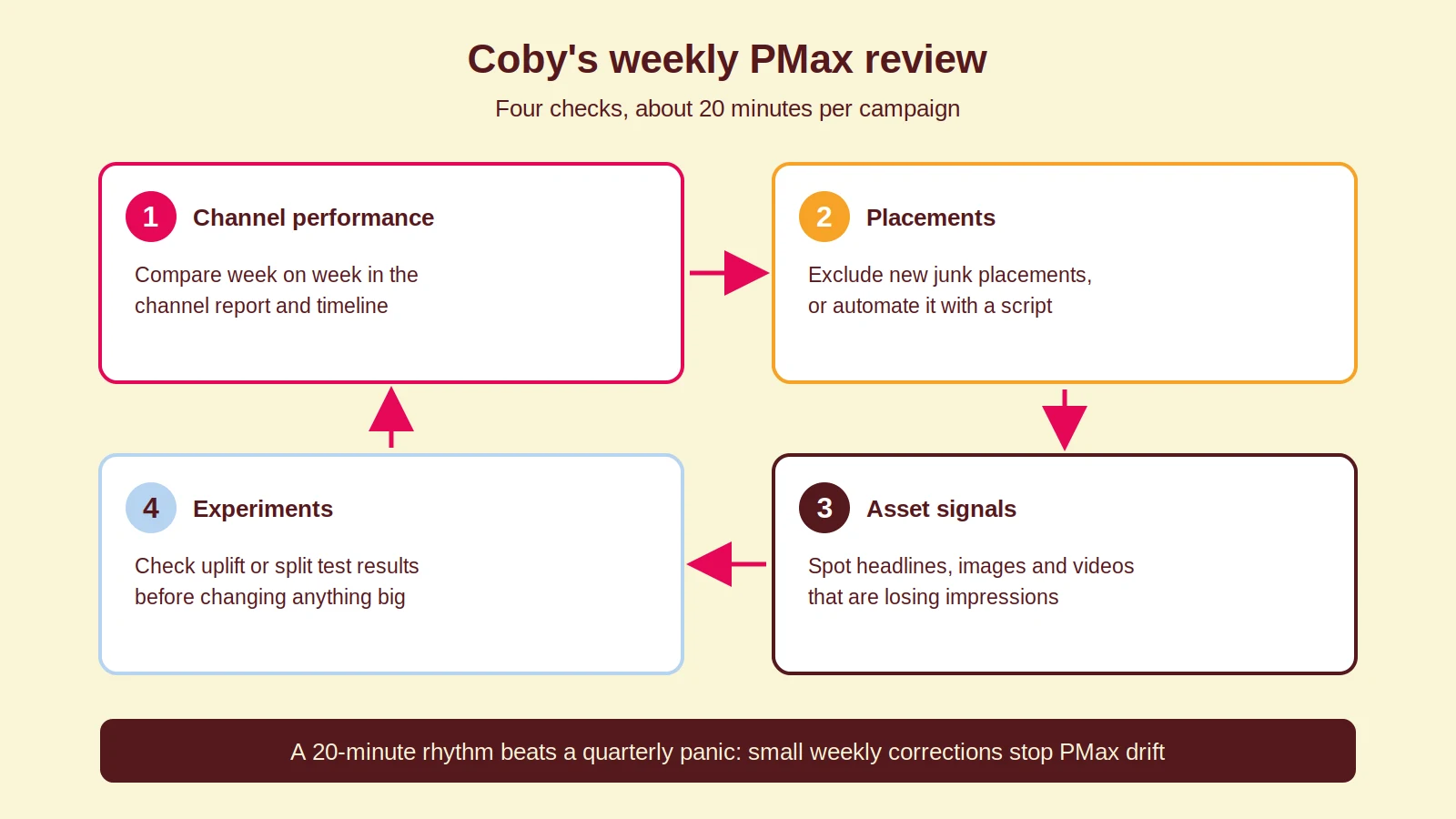
Coby’s weekly PMax review covers four things: channel performance changes week over week, new placements to exclude, asset rotation signals (which headlines and images are losing impressions), and experiment results if one is running. It takes about 20 minutes per campaign and prevents the drift that makes PMax performance plateau after the initial learning period.
The bigger picture: PMax in 2026
PMax is also converging with AI Max for Search, and running them side by side is becoming the default setup we recommend in Google Ads management.
The biggest mistake is thinking that new AI-powered features can compensate for weak fundamentals. Automation works best when tracking, pages, structure, creative and business feedback loops are already strong.
Performance Max is not a replacement for strategy. It is a distribution layer that amplifies whatever inputs you give it. Strong conversion tracking, clear audience signals and well-structured landing pages will always beat a PMax campaign left to run without direction.
How Coby approaches this
At Coby Agency, every PMax engagement starts with the measurement layer, not the campaign settings. Smart Bidding optimises towards whatever your conversion data says, so if that data is incomplete or double-counted, every clever strategy above just automates the wrong thing. Our Google Ads conversion tracking guide covers the basics, and our tracking-first approach explains why we always fix this before scaling spend.
With clean data, the controls in this guide compound. For De Eenhoorn, a Dutch ecommerce client, accurate value tracking combined with tightly steered campaigns produced a 1,500% ROAS. That is not a promise, it is an illustration of what happens when automation gets fed the right signals.
Want to know which of these levers would matter most in your account? Our data and analytics team audits PMax setups regularly, or get in touch for a direct look.
Frequently Asked Questions
Should I use Performance Max or standard Search and Shopping campaigns in 2026?
Use both in complementary roles. Standard Search and Shopping give you precise control and full keyword transparency. Performance Max adds reach across YouTube, Display and Discover. The combination consistently outperforms either approach alone, provided your tracking is clean enough to measure the difference.
How many asset groups should a Performance Max campaign have?
Start with one asset group per distinct audience or product category. If you sell to both SMEs and enterprise clients, separate asset groups let you tailor creative and landing pages to each. More than four or five asset groups in a single campaign usually means you should be running separate campaigns instead.
What is the fastest way to reduce wasted spend in Performance Max?
Apply campaign-level negative keyword lists and exclude recent converters via the “Your data exclusions” setting. These two changes address the most common sources of waste: irrelevant search intent and budget spent re-engaging people already in your pipeline.
How long does Performance Max take to exit the learning period?
Expect a few weeks, depending on conversion volume. For target ROAS, Google recommends at least 15 conversions in the past 30 days before the strategy has enough data. Below that, run Maximise Conversions or Maximise Conversion Value without a target until volume is established.
Does Performance Max cannibalise existing Search campaigns?
Sometimes, but not always. Run a PMax uplift experiment to measure the actual incremental impact in your account before assuming cannibalisation. In most accounts with strong Search campaigns, PMax adds reach rather than stealing credit, and the experiment data will confirm this for your specific setup.
Can I see search terms and add negative keywords in Performance Max?
Yes. Since 2025, Performance Max shows search terms at the same level of detail as Search campaigns, and you can add up to 10,000 campaign-level negative keywords plus brand exclusions. Review the search terms report monthly and feed what you find into your negative lists.
Written by Marloes Slotboom, founder of Coby Agency. Last updated: September 2026.